
Basic how to guide to Install Ansible quickly on Ubuntu. The full guide for Ubuntu is here.
Installation
sudo apt-add-repository ppa:ansible/ansible
sudo apt update
sudo apt install ansible
Create the Inventory to Test
This file is named router_switch_inv.ini in my lab.
[lab_core]
172.16.1.104

[lab_access]
172.16.1.102
172.16.1.103
172.16.1.124
Test Topology
With three lines and a small file it is very simple to start interacting with network devices.
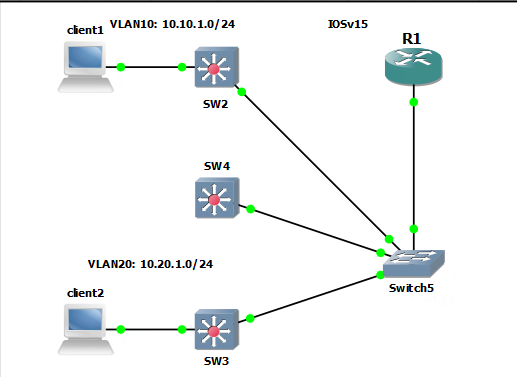
R1: 172.16.1.104
S2: 172.16.1.102
S3: 172.16.1.103
S4: 172.16.1.124
$ ansible -i ./router_switch_inv.ini --list-hosts all
hosts (4):
172.16.1.104
172.16.1.102
172.16.1.103
172.16.1.124
$ ansible 172.16.1.104 -i ./router_switch_inv.ini -m raw -a "show ip int br" -u admin -k
SSH password:
172.16.1.104 | CHANGED | rc=0 >>

Interface              IP-Address      OK? Method Status                Protocol
FastEthernet0/0        172.16.1.104    YES NVRAM  up                    up
Ethernet1/0            unassigned      YES unset  up                    up
Ethernet1/0.10         10.10.1.1       YES manual up                    up
Ethernet1/0.20         10.20.1.1       YES manual up                    up
Ethernet1/1            unassigned      YES unset  administratively down down
Ethernet1/2            unassigned      YES unset  administratively down down
Ethernet1/3            unassigned      YES unset  administratively down down    Shared connection to 172.16.1.104 closed.
Inventory File in Depth
The ansible inventory file can be specified or a default location can be configured in the /etc/ansible/ansible.cfg file by adding the following lines.
[defaults]
inventory	= /home/stef/Ansible/inventory/router_switch_inv.ini
Another change that can be made is to include group variables for things like usernames/passwords, device types and the ansible vault.
The inventory file looks like this, with a new group called “all_devcies”. This group holds all of my devcices and I can now apply variables to them. I could have created two files based off the group names.
$ cat inventory/router_switch_inv.ini
[all_devices]
172.16.1.104
172.16.1.102
172.16.1.103
172.16.1.124

[lab_core]
172.16.1.104

[lab_access]
172.16.1.102
172.16.1.103
172.16.1.124
The group_vars file is a yaml file and needs to be named the same as the group. Mine will need to be called all_devices.yml
The diagram will explain how it must look.
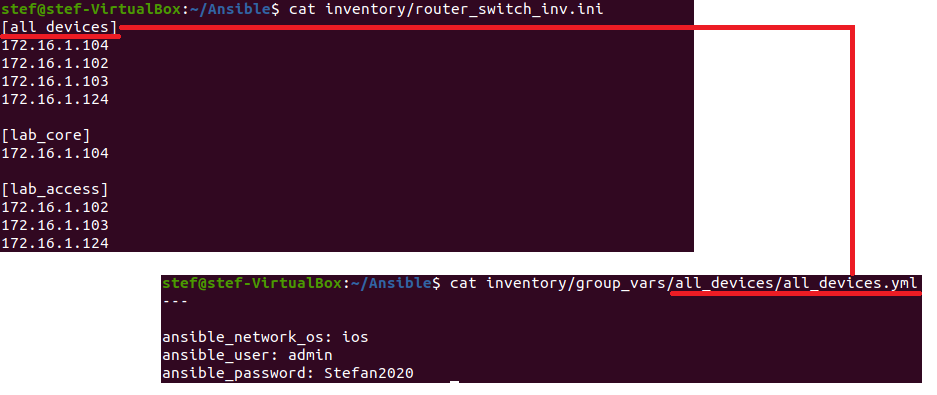
Below is a good example showing how I have the files structured.
$ tree
.
├── default ansible hosts
├── inventory
│             ├── group_vars
│             │             └── all_devices
│             │                 └── all_devices.yml
│             ├── router_switch_inv.ini
│             └── usernames.txt
├── output
│             ├── 172.16.1.102_iosfacts2.json
│             ├── 172.16.1.103_iosfacts2.json
│             ├── 172.16.1.104_iosfacts2.json
│             └── 172.16.1.124_iosfacts2.json
└── playbooks
    ├── pb1_basic.yml
    ├── pb2_ioscommand.yml
    ├── pb3_magicvars.yml
    ├── pb4_iosfacts.yml
    ├── pb5_iosfacts2.yml
    ├── pb6_iosconfig.yml
    ├── pb7_multitasks.yml
    └── pb8_multiplays.yml

5 directories, 16 files
Now when running commands there isn’t a need to specify the inventory file or the credentials. The device type being ios is used for the ios module.