
This is a mini project I created for myself in one of my previous roles. The problem, that it is designed to solve is given an IP address, where is that IP physically located?
This is necessary in older network environments that aren’t using tools such as Solarwinds, or newer products like; Cisco ISE, DNA Centre or ACI. Each of these tools/products has the ability store a database of IP/port/switch info atleast. An IP can be easily looked up in a web interface.
However if these tools/products are not yet in use or not correctly utilised then it can be time consuming to search for a IP and then MAC address on each switch.
This is where my Ansible tool comes in handy. It runs the commands that you would manually, but in automatically. All the user needs to do is to enter the IP address they are looking for.
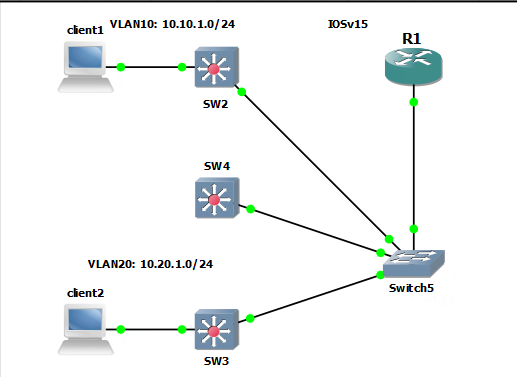
The topology is not exactly like it would be setup in a modern environment. In my GNS3 lab I am using a “router on a stick” or 802.1q tagging on the router. This is because the IOS layer 3 switch images I have do not work correctly. So my switches will be all layer 2 and the router is the gateway. The topology is not the important factor here.
There are two DHCP pools configured on the router to make testing easy and show how moving the clients (which are IOS router images) moves the MAC address and therefore changes Ansible output.
R1#sh ip dhcp pool

Pool vlan10 :
 Utilization mark (high/low)    : 100 / 0
 Subnet size (first/next)       : 0 / 0
 Total addresses                : 254
 Leased addresses               : 0
 Excluded addresses             : 1
 Pending event                  : none
 1 subnet is currently in the pool :
 Current index        IP address range                    Leased/Excluded/Total
 10.10.1.1            10.10.1.1        - 10.10.1.254       0     / 1     / 254

Pool vlan20 :
 Utilization mark (high/low)    : 100 / 0
 Subnet size (first/next)       : 0 / 0
 Total addresses                : 254
 Leased addresses               : 2
 Excluded addresses             : 1
 Pending event                  : none
 1 subnet is currently in the pool :
 Current index        IP address range                    Leased/Excluded/Total
 10.20.1.4            10.20.1.1        - 10.20.1.254       2     / 1     / 254
Manual Process
In this scenario I want to locate the physical port that client 1 is on. I know that R1 will be the gateway and so I can get the ARP which shows me the MAC address.
With the MAC address I can check both switches to see the physical port.
R1#sh ip arp
Protocol  Address          Age (min)  Hardware Addr   Type   Interface
Internet  10.10.1.1               -   ca01.6cbe.001c  ARPA   Ethernet1/0.10
Internet  10.10.1.3               0   0cec.3110.1000  ARPA   Ethernet1/0.10
Internet  10.20.1.1               -   ca01.6cbe.001c  ARPA   Ethernet1/0.20
Internet  10.20.1.3               0   0cec.3120.2000  ARPA   Ethernet1/0.20
Internet  172.16.1.1             22   0cec.3167.8301  ARPA   FastEthernet0/0
Internet  172.16.1.104            -   ca01.6cbe.0000  ARPA   FastEthernet0/0
SW2#sh mac address-table address 0cec.3110.1000
          Mac Address Table
-------------------------------------------

Vlan    Mac Address       Type        Ports
----    -----------       --------    -----
  10    0cec.3110.1000    DYNAMIC     Et0/1
Total Mac Addresses for this criterion: 1
SW3#sh mac address-table address 0cec.3110.1000
          Mac Address Table
-------------------------------------------

Vlan    Mac Address       Type        Ports
----    -----------       --------    -----
  10    0cec.3110.1000    DYNAMIC     Et3/3
Total Mac Addresses for this criterion: 1
Ansible
The Ansible output I have is not pretty and you need to have an idea what to look for. However it is there without going through the manual process.
The playbook and all files can be found on my Github.
The IP to be checked is 10.20.1.3. This IP resides on SW3, 172.16.1.103. The output we are looking for is a MAC address found on all switches on the uplink ports and the MAC address found on a user port.
Now there will be problems if all the switches in use use random ports as their uplink ports. However this should not be the case and in the lab eth3/3 is the uplink port.
stef@stef-VirtualBox:~/Ansible_projects$ ansible-playbook -c paramiko playbooks/pb2_ip_finder.yml --ask-vault-pass
Vault password:
Enter IP: 10.20.1.3

PLAY [Cisco ios Find IP] *********************************************************************************************************************

TASK [PRINT USER IP] *************************************************************************************************************************
[WARNING]: ansible-pylibssh not installed, falling back to paramiko
ok: [172.16.1.104] => {
    "msg": "You input 10.20.1.3"
}

TASK [SHOW ARP] ******************************************************************************************************************************
ok: [172.16.1.104]

TASK [debug] *********************************************************************************************************************************
ok: [172.16.1.104] => {
    "sh_mac_res.stdout": [
        "Internet  10.20.1.3               0   aabb.cc00.0600  ARPA   Ethernet1/0.20"
    ]
}

TASK [set_fact] ******************************************************************************************************************************
ok: [172.16.1.104]

TASK [PRINT MAC] *****************************************************************************************************************************
ok: [172.16.1.104] => {
    "mac_addr": "aabb.cc00.0600"
}

PLAY [Cisco ios Find MAC] ********************************************************************************************************************

TASK [set_fact] ******************************************************************************************************************************
[WARNING]: ansible-pylibssh not installed, falling back to paramiko
ok: [172.16.1.102]
[WARNING]: ansible-pylibssh not installed, falling back to paramiko
[WARNING]: ansible-pylibssh not installed, falling back to paramiko
ok: [172.16.1.103]
ok: [172.16.1.124]

TASK [PRINT MAC] *****************************************************************************************************************************
ok: [172.16.1.102] => {
    "mac_addr": "aabb.cc00.0600"
}
ok: [172.16.1.124] => {
    "mac_addr": "aabb.cc00.0600"
}
ok: [172.16.1.103] => {
    "mac_addr": "aabb.cc00.0600"
}

TASK [SHOW MAC ADDRESS IN TABLE] *************************************************************************************************************
ok: [172.16.1.102]
ok: [172.16.1.103]
ok: [172.16.1.124]

TASK [print output] **************************************************************************************************************************
ok: [172.16.1.102] => {
    "output.stdout_lines": [
        [
            "Mac Address Table",
            "-------------------------------------------",
            "",
            "Vlan    Mac Address       Type        Ports",
            "----    -----------       --------    -----",
            "  20    aabb.cc00.0600    DYNAMIC     Et3/3",
            "Total Mac Addresses for this criterion: 1"
        ]
    ]
}
ok: [172.16.1.124] => {
    "output.stdout_lines": [
        [
            "Mac Address Table",
            "-------------------------------------------",
            "",
            "Vlan    Mac Address       Type        Ports",
            "----    -----------       --------    -----",
            "  20    aabb.cc00.0600    DYNAMIC     Et3/3",
            "Total Mac Addresses for this criterion: 1"
        ]
    ]
}
ok: [172.16.1.103] => {
    "output.stdout_lines": [
        [
            "Mac Address Table",
            "-------------------------------------------",
            "",
            "Vlan    Mac Address       Type        Ports",
            "----    -----------       --------    -----",
            "  20    aabb.cc00.0600    DYNAMIC     Et0/1",
            "Total Mac Addresses for this criterion: 1"
        ]
    ]
}

PLAY RECAP ***********************************************************************************************************************************
172.16.1.102               : ok=4    changed=0    unreachable=0    failed=0    skipped=0    rescued=0    ignored=0
172.16.1.103               : ok=4    changed=0    unreachable=0    failed=0    skipped=0    rescued=0    ignored=0
172.16.1.104               : ok=5    changed=0    unreachable=0    failed=0    skipped=0    rescued=0    ignored=0
172.16.1.124               : ok=4    changed=0    unreachable=0    failed=0    skipped=0    rescued=0    ignored=0
Fixing the Output
In the output above every switch returns the location of the MAC address.. I have updated the playbook to only show the MAC address when the port is not on the known uplink port of Eth3/3. Below is a excerpt of th eplaybook containing on the the lines for the debug output.
    - name: gather output
      when:
        - 'output.stdout_lines[0] | length>5' # When the output list is has less than 6 elements in
        - '"3/3" not in output.stdout_lines[0][5]' # When 3/3 is missing from the 6th list element
      debug:
        var: output.stdout_lines
stef@stef-VirtualBox:~/Ansible_projects$ ansible-playbook -c paramiko playbooks/pb2_ip_finder2.yml --ask-vault-pass
Vault password:
Enter IP: 10.20.1.2

PLAY [Cisco ios Find IP] **************************************************************************************************

TASK [PRINT USER IP] ******************************************************************************************************
[WARNING]: ansible-pylibssh not installed, falling back to paramiko
ok: [172.16.1.104] => {
    "msg": "You input 10.20.1.2"
}

TASK [SHOW ARP] ***********************************************************************************************************
ok: [172.16.1.104]

TASK [set_fact] ***********************************************************************************************************
ok: [172.16.1.104]

TASK [PRINT MAC] **********************************************************************************************************
ok: [172.16.1.104] => {
    "mac_addr": "aabb.cc00.0600"
}

PLAY [Cisco ios Find MAC] *************************************************************************************************

TASK [set_fact] ***********************************************************************************************************
[WARNING]: ansible-pylibssh not installed, falling back to paramiko
ok: [172.16.1.103]
[WARNING]: ansible-pylibssh not installed, falling back to paramiko
[WARNING]: ansible-pylibssh not installed, falling back to paramiko
ok: [172.16.1.124]
ok: [172.16.1.102]

TASK [PRINT MAC] **********************************************************************************************************
ok: [172.16.1.103] => {
    "mac_addr": "aabb.cc00.0600"
}
ok: [172.16.1.102] => {
    "mac_addr": "aabb.cc00.0600"
}
ok: [172.16.1.124] => {
    "mac_addr": "aabb.cc00.0600"
}

TASK [SHOW MAC ADDRESS IN TABLE] ******************************************************************************************
ok: [172.16.1.102]
ok: [172.16.1.103]
ok: [172.16.1.124]

TASK [gather output] ******************************************************************************************************
skipping: [172.16.1.102]
skipping: [172.16.1.124]
ok: [172.16.1.103] => {
    "output.stdout_lines": [
        [
            "Mac Address Table",
            "-------------------------------------------",
            "",
            "Vlan    Mac Address       Type        Ports",
            "----    -----------       --------    -----",
            "  20    aabb.cc00.0600    DYNAMIC     Et0/1",
            "Total Mac Addresses for this criterion: 1"
        ]
    ]
}

PLAY RECAP ****************************************************************************************************************
172.16.1.102               : ok=3    changed=0    unreachable=0    failed=0    skipped=1    rescued=0    ignored=0
172.16.1.103               : ok=4    changed=0    unreachable=0    failed=0    skipped=0    rescued=0    ignored=0
172.16.1.104               : ok=4    changed=0    unreachable=0    failed=0    skipped=0    rescued=0    ignored=0
172.16.1.124               : ok=3    changed=0    unreachable=0    failed=0    skipped=1    rescued=0    ignored=0