
As I have been going through my list of configuration items for the security audit, I have only used Ansible to send commands. I haven’t used the ios_config module for any of its other abilities like interface configuration, gathering facts or ACL configuration.
This post will cover 2/3 of those. Gathering facts, specifically ACL facts and ACL configuration.
A great resource I used for this post can be found on the Ansible website blog. It covers more of the ACL configuration differences that can be performed. I did run into a couple of issues, so I’ll note them down.
The playbooks I will use here can be found on my GitHub.
Gathering ACL Configuration and Creating ACL Host Vars
The gathering of the current ACLs and saving them as host_vars is important. The ios_acls module creates the ACLs in a specific format that would be time-consuming and frustrating to manually create.
Current ACL. Very basic standard ACL.
ip access-list standard 99
 10 permit host 10.1.1.1
 20 permit 172.18.0.12 0.0.0.0
 30 permit 10.0.0.0 0.255.255.255
 40 permit 172.16.1.0 0.0.0.255
 200 deny 192.168.0.0 0.0.255.255
 210 deny any
Ansible will need a variable that looks like the below. This is readable, if you compare to the Cisco config above. It’s very long and not easily readable. Nobody wants to manually create this.
acls:
-   acls:
    -   aces:
        -   grant: permit
            sequence: 10
            source:
                host: 10.1.1.1
        -   grant: permit
            sequence: 20
            source:
                host: 172.18.0.12
        -   grant: permit
            sequence: 30
            source:
                address: 10.0.0.0
                wildcard_bits: 0.255.255.255
        -   grant: permit
            sequence: 40
            source:
                address: 172.16.1.0
                wildcard_bits: 0.0.0.255
        -   grant: deny
            sequence: 200
            source:
                address: 192.168.0.0
                wildcard_bits: 0.0.255.255
        -   grant: deny
            sequence: 210
            source:
                address: any # modified from host as it casues an error
        acl_type: standard
        name: '99'
    afi: ipv4
To avoid manually creating the ios_acl module can do it and save it in the correct location for host_vars. Although I am going to use this as a group_var, so I will just manually copy the yaml over.
---

- name: convert configured ACLs to structured data
  hosts: lab_core
  gather_facts: false
  connection: network_cli


  tasks:
    - name: Use the ACLs resource module to gather the current config
      cisco.ios.ios_acls:
        state: gathered
      register: acls


    - name: Create inventory directory
      file:
        path: "{{ inventory_dir }}/host_vars/{{ inventory_hostname }}"
        state: directory

    - name: Write the ACL configuration to a file
      copy:
        content: "{{ {'acls': acls['gathered']} | to_nice_yaml }}"
        dest: "{{ inventory_dir }}/host_vars/{{ inventory_hostname }}/acls.yaml"
I did have an issue with the resulting host_var files. The last line of my ACL is a deny any.
ip access-list standard 99
 10 permit host 10.1.1.1
 ...
 210 deny any
The deny any line on 210 is similar to the host line on 10. The ios_acl has interpreted the “any” as a hostname. This causes an error when the ACL is run as the command “210 deny host any” is sent to the device, resulting in an error.
stef@stef-VirtualBox:~/Ansible_projects$ ansible-playbook -c paramiko playbooks/pb4_securityaudit9.yml --ask-vault-pass
Vault password:

PLAY [VTY ACL - Replaced state play] *********************************************************************************************************************************************

TASK [Replace ACLs config with device existing ACLs config] **********************************************************************************************************************
[WARNING]: ansible-pylibssh not installed, falling back to paramiko
[WARNING]: ansible-pylibssh not installed, falling back to paramiko
fatal: [172.16.1.104]: FAILED! => {
    "changed": false
}

MSG:

MODULE FAILURE
See stdout/stderr for the exact error


MODULE_STDERR:

210 deny host any
Translating "any"

Translating "host"

210 deny host any
              ^
% Invalid input detected at '^' marker.

R1(config-std-nacl)#
ok: [172.16.1.125]

PLAY RECAP ***********************************************************************************************************************************************************************
172.16.1.104               : ok=0    changed=0    unreachable=0    failed=1    skipped=0    rescued=0    ignored=0
172.16.1.125               : ok=1    changed=0    unreachable=0    failed=0    skipped=0    rescued=0    ignored=0
To fix this I simply opened the yaml file where the ACL variable is and changed the key of “host” for “address”. This worked, and the ACL can be applied successfully.
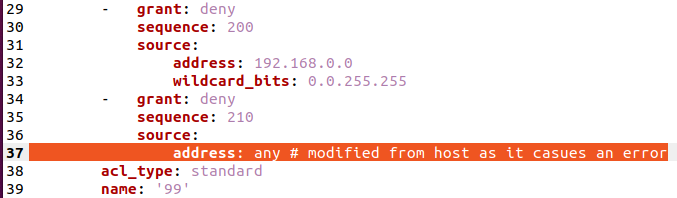
This does cause problems with the ability for Ansible to compare the ACL that is gathered from the device and to what the group_var has. They will always be different due to ios_acl incorrectly assuming that “any” is a host.
The only solution to this is to remove the explicit deny statement from the ACL.
Configuring Devices With ACLs
Now that the ACL in yaml format has been added to the group_vars file (below). The next step is to create a playbook that can use this to make changes.
---

ansible_network_os: ios
ansible_user: "{{ vault_ansible_username }}"
ansible_password: "{{ vault_ansible_password }}"
ansible_become_password: "{{ vault_ansible_become_password }}"

acls:
-   acls:
    -   aces:
        -   grant: permit
            sequence: 10
            source:
                host: 10.1.1.1
        -   grant: permit
            sequence: 20
            source:
                host: 172.18.0.12
        -   grant: permit
            sequence: 30
            source:
                address: 10.0.0.0
                wildcard_bits: 0.255.255.255
        -   grant: permit
            sequence: 40
            source:
                address: 172.16.1.0
                wildcard_bits: 0.0.0.255
        -   grant: deny
            sequence: 200
            source:
                address: 192.168.0.0
                wildcard_bits: 0.0.255.255
        -   grant: deny
            sequence: 210
            source:
                address: any # modified from host as it casues an error
        acl_type: standard
        name: '99'
    afi: ipv4
The ACL configuration playbook will utilise the ios_acl module, and therefore it’s very easy to configure as the complex checking is handled by the module.
For this configuration, I have chosen to use the “replaced” state for the ACL configuration.
This means that the ios_acl will remove the ACLs referenced in the group_vars file before applying the correct ACLs.
In my example case, there is only a single ACL in the group_vars, ACL 99. So if there were another ACL, say ACL 10 on the device, this one would not be touched, it will remain as last configured.
The below playbook will simply remove entries in ACL 99 and then apply the entries from the group_vars file. This task will always show as changing the configuration. There is no comparison taking place to check if it is required.
---

- name: VTY ACL - Replaced state play
  hosts: lab_core
  gather_facts: false
  connection: network_cli


  tasks:
    - name: Replace ACLs config with device existing ACLs config
      ios_acls:
        state: replaced
        config: "{{ acls }}"
The output of this playbook.
stef@stef-VirtualBox:~/Ansible_projects$ ansible-playbook -c paramiko playbooks/pb4_securityaudit9.yml --ask-vault-pass
Vault password:

PLAY [VTY ACL - Replaced state play] *********************************************************************************************************************************************

TASK [Use the ACLs resource module to gather the current config] *****************************************************************************************************************
[WARNING]: ansible-pylibssh not installed, falling back to paramiko
[WARNING]: ansible-pylibssh not installed, falling back to paramiko
ok: [172.16.1.104]
ok: [172.16.1.125]

TASK [Replace ACLs config with device existing ACLs config] **********************************************************************************************************************
changed: [172.16.1.104]
changed: [172.16.1.125]

PLAY RECAP ***********************************************************************************************************************************************************************
172.16.1.104               : ok=2    changed=1    unreachable=0    failed=0    skipped=0    rescued=0    ignored=0
172.16.1.125               : ok=2    changed=1    unreachable=0    failed=0    skipped=0    rescued=0    ignored=0
The ACL 10 is still present after the change. As this is not in the group_vars file, it is not modified by Ansible.
R1(config-std-nacl)#do sh ip access-lists
Standard IP access list 10
    10 permit 10.1.1.1
    20 permit 172.18.0.12
Standard IP access list 99
    10 permit 10.1.1.1
    20 permit 172.18.0.12
    30 permit 10.0.0.0, wildcard bits 0.255.255.255
    40 permit 172.16.1.0, wildcard bits 0.0.0.255
    200 deny   192.168.0.0, wildcard bits 0.0.255.255
    210 deny   any
Configuring ACL 99 on VTY Lines
I have left the configuration of the VTY lines to the very last step. I had hoped to perform a comparison of the ACL 99 applied on the device with what is in the group_var. However, they do not match, due to my workaround and also because they are named differently. A comparison using “show run” commands is probably easier.
---

- name: VTY ACL PLAY
  hosts: lab_core
  gather_facts: false
  connection: network_cli


  tasks:
    - name: Configure VTY
      ios_config:
        lines:
          - access-class 99 in
        parents: line vty 0 4