
This project will get the Flask fiance and savings calculator up and running on AWS from scratch.
There are a few prerequisites required before hand, such as AWS CLI access to your account. The containers repo used is also private and therefore there is an access token that needs to be created in the repo.
I could have made this a public repo, but I wanted to test with a private repo how the EC2 instance can clone the repo.
There are many parts to this project. I’ll start at the bottom and work my way to the application layer.

AWS Infrastructure
There are two CloudFormation templates. The first will create a VPC base. This is lifted from previous projects and is there for Security Groups a new VPC, Internet access and a VPC Endpoint that isn’t used as the EC2 instance created is in a public subnet.
The first CloudFormation template requires an IP address that is used to only allow access from that source. The IP is automatically found and added to the template parameters.
The second CloudFormation template is there to create the EC2 instance that will host the Flask app in Docker. The CloudFormation template and deploy_docker.sh script will install Git, Docker and docker-compose. It will then clone the containers repo and build the containers with docker-compose.
GitLab
GitLab is currently only used for storing the project code. There is no CI/CD pipeline as of yet. The repo is private, which means that there needs to be an access token to allow the EC2 instance to clone the project.
EC2 & Docker
Docker and docker-compose are both installed by the CloudFormation template. The deploy_docker.sh script will create secrets in the AWS Secrets Manager for the EC2 instance to access securely.
The EC2 instance can then use these tokens to clone the repo, build the containers with docker-compose and setup the communication between Flask and the Postgres DB.
echo "Creating secrets and setting environment variables on the EC2 instane $EC2ID"
# Load the variables from .env file
set -a  # automatically export all variables
source .env
set +a

# Function to check if secret exists and create if it doesn't
create_secret_if_not_exists() {
    local secret_name=$1
    local secret_value=$2

    # Check if secret exists
    if aws secretsmanager describe-secret --secret-id "$secret_name" 2>/dev/null; then
        echo "Secret '$secret_name' already exists"
    else
        echo "Creating secret '$secret_name'"
        aws secretsmanager create-secret --name "$secret_name" --secret-string "$secret_value"
    fi
}

# Create secrets if they don't exist
create_secret_if_not_exists "gitlab-user2" "$GITLAB_DEPLOY_USER"
create_secret_if_not_exists "gitlab-token2" "$GITLAB_DEPLOY_TOKEN"
create_secret_if_not_exists "postgres_user" "$POSTGRES_USER"
create_secret_if_not_exists "postgres_password" "$POSTGRES_PASSWORD"
create_secret_if_not_exists "postgres_db" "$POSTGRES_DB"
Flask App & Postgres DB
Once the containers have been built and are running access will be granted from the source IP address that was provided in the script. This keeps everything private for testing purposes.
Deployment
The deployment of the Flask app is all taken care of by a bash script. The entire deployment has been created from several small problems. I’ll detail some of the more interesting ones below.
#!/bin/bash

# Function to check stack status
check_stack_status() {
    aws cloudformation describe-stacks --stack-name $1 --query 'Stacks[0].StackStatus' --output text
}

ip=$(curl -s icanhazip.com)
if [ -z "$ip" ]; then
  echo "Failed to retrieve IP address"
  exit 1
fi
echo "Retrieved IP: $ip"


# Deploy CloudFormation Infra stack VPC, Subnets and endpoint
echo "Creating VPC Base to be ready..."
aws cloudformation create-stack \
  --stack-name vpcBase \
  --template-body file://environment/base_single_az_gw.yaml \
  --capabilities CAPABILITY_NAMED_IAM \
  --parameters \
    ParameterKey=AllowedIPRange,ParameterValue="$ip/32" \
  --region us-east-1

echo "Stack creation initiated with AllowedIPRange: ${ip}/32"


echo "Waiting for VPC stack to complete..."
while true; do
    status=$(check_stack_status "vpcBase")
    echo "Current status: $status"
    if [ "$status" = "CREATE_COMPLETE" ]; then
        echo "Stack creation completed successfully."
        break
    elif [ "$status" = "CREATE_FAILED" ] || [ "$status" = "ROLLBACK_COMPLETE" ]; then
        echo "Stack creation failed."
        exit 1
    fi
    sleep 30
done


# Deploy CloudFormation Infra stack VPC, Subnets and endpoint
echo "Creating VPC Base to be ready..."
aws cloudformation create-stack \
  --stack-name DockerEC2 \
  --template-body file://environment/docker-ec2.yaml \
  --capabilities CAPABILITY_NAMED_IAM \
  --parameters \
      ParameterKey=Terraform,ParameterValue=false \
      ParameterKey=ContentTimestamp,ParameterValue=$(date +%Y-%m-%d-%H%M%S) \
  --capabilities CAPABILITY_NAMED_IAM \
  --region us-east-1

echo "Waiting for DockerEC2 stack to complete..."
while true; do
    status=$(check_stack_status "DockerEC2")
    echo "Current status: $status"
    if [ "$status" = "CREATE_COMPLETE" ]; then
        echo "Stack creation completed successfully."
        break
    elif [ "$status" = "CREATE_FAILED" ] || [ "$status" = "ROLLBACK_COMPLETE" ]; then
        echo "Stack creation failed."
        exit 1
    fi
    sleep 30
done


# Get EC2 ID from CloudFormation output
EC2ID=$(aws cloudformation describe-stacks \
    --stack-name DockerEC2 \
    --query 'Stacks[0].Outputs[?OutputKey==`InstanceId`].OutputValue' \
    --output text)

if [ -z "$EC2ID" ]; then
    echo "Failed to retrieve EC2 instance ID"
    exit 1
fi


# Get EC2 Public IP from CloudFormation output
EC2PubPC=$(aws cloudformation describe-stacks \
    --stack-name DockerEC2 \
    --query 'Stacks[0].Outputs[?OutputKey==`InstancePublicIP`].OutputValue' \
    --output text)

if [ -z "$EC2PubPC" ]; then
    echo "Failed to retrieve publc IP of instance ID"
    exit 1
fi

echo "Stack creation completed, getting key pair"
# Connect to Private Instance
# echo "Connect to Private EC2 Instance: aws ec2-instance-connect ssh --instance-id $EC2ID --region us-east-1"

# Connect to public Instance
keyPairName="EC2Temp"

keyPairID=$(aws ec2 describe-key-pairs \
  --filters Name=key-name,Values=$keyPairName \
  --query KeyPairs[*].KeyPairId \
  --output text)

echo "keyPairID = $keyPairID"

fileName="EC2Temp_private_key"

# Delete existing key
# rm -f $fileName.pem
if [ -n "$fileName" ] && [ -f "$fileName.pem" ]; then
    rm -f "$fileName.pem"
    echo "Removed $fileName.pem"
else
    echo "File $fileName.pem does not exist or fileName is not set"
fi

aws ssm get-parameter \
  --name /ec2/keypair/$keyPairID \
  --with-decryption \
  --query Parameter.Value \
  --output text > $fileName.pem

chmod 400 $fileName.pem

echo "Creating secrets and setting environment variables on the EC2 instane $EC2ID"
# Load the variables from .env file
set -a  # automatically export all variables
source .env
set +a

# Function to check if secret exists and create if it doesn't
create_secret_if_not_exists() {
    local secret_name=$1
    local secret_value=$2

    # Check if secret exists
    if aws secretsmanager describe-secret --secret-id "$secret_name" 2>/dev/null; then
        echo "Secret '$secret_name' already exists"
    else
        echo "Creating secret '$secret_name'"
        aws secretsmanager create-secret --name "$secret_name" --secret-string "$secret_value"
    fi
}

# Create secrets if they don't exist
create_secret_if_not_exists "gitlab-user2" "$GITLAB_DEPLOY_USER"
create_secret_if_not_exists "gitlab-token2" "$GITLAB_DEPLOY_TOKEN"
create_secret_if_not_exists "postgres_user" "$POSTGRES_USER"
create_secret_if_not_exists "postgres_password" "$POSTGRES_PASSWORD"
create_secret_if_not_exists "postgres_db" "$POSTGRES_DB"


echo "Connecting to instance and cloning repo"
ssh -i $fileName.pem ec2-user@$EC2PubPC \
"export GITLAB_DEPLOY_USER=\$(aws secretsmanager get-secret-value --secret-id gitlab-user2 --query SecretString --output text) && \
export GITLAB_DEPLOY_TOKEN=\$(aws secretsmanager get-secret-value --secret-id gitlab-token2 --query SecretString --output text) && \
export POSTGRES_USER=\$(aws secretsmanager get-secret-value --secret-id postgres_user --query SecretString --output text) && \
export POSTGRES_PASSWORD=\$(aws secretsmanager get-secret-value --secret-id postgres_password --query SecretString --output text) && \
export POSTGRES_DB=\$(aws secretsmanager get-secret-value --secret-id postgres_db --query SecretString --output text) && \
git clone https://gitlab+deploy-token-\$GITLAB_DEPLOY_USER:\$GITLAB_DEPLOY_TOKEN@gitlab.com/ntwklab1/containers.git && \
echo \"POSTGRES_USER=\$POSTGRES_USER\" >> containers/.env && \
echo \"POSTGRES_PASSWORD=\$POSTGRES_PASSWORD\" >> containers/.env && \
echo \"POSTGRES_DB=\$POSTGRES_DB\" >> containers/.env
cd containers
docker-compose up --build -d
"

echo "Connect to Public IP of Public EC2 Instance: ssh -i $fileName.pem ec2-user@$EC2PubPC"
echo "Connect to the website at the IP address: $EC2PubPC"
Getting AWS Private Key from CloudFormation
When creating a key pair in the AWS console you are prompted to download the .pem private key. However, when creating the key pair using CloudFormation this cannot be done, and the private key cannot be downloaded from the console after creation.
The below are the AWS CLI commands to get the .pem file
keyPairName="EC2Temp"

keyPairID=$(aws ec2 describe-key-pairs \
  --filters Name=key-name,Values=$keyPairName \
  --query KeyPairs[*].KeyPairId \
  --output text)

echo "keyPairID = $keyPairID"

fileName="EC2Temp_private_key"

# Delete existing key if present
rm -f $fileName.pem

aws ssm get-parameter \
  --name /ec2/keypair/$keyPairID \
  --with-decryption \
  --query Parameter.Value \
  --output text > $fileName.pem

chmod 400 $fileName.pem
Creating a GitLab Deploy Token
As the repo is private, I have used a deploy token instead of an SSH key to access the project repo only. To create a deploy token navigate to the project repo, settings and Repository. The Deploy token can be created there. The scope of this key is to just access this repo as read only.
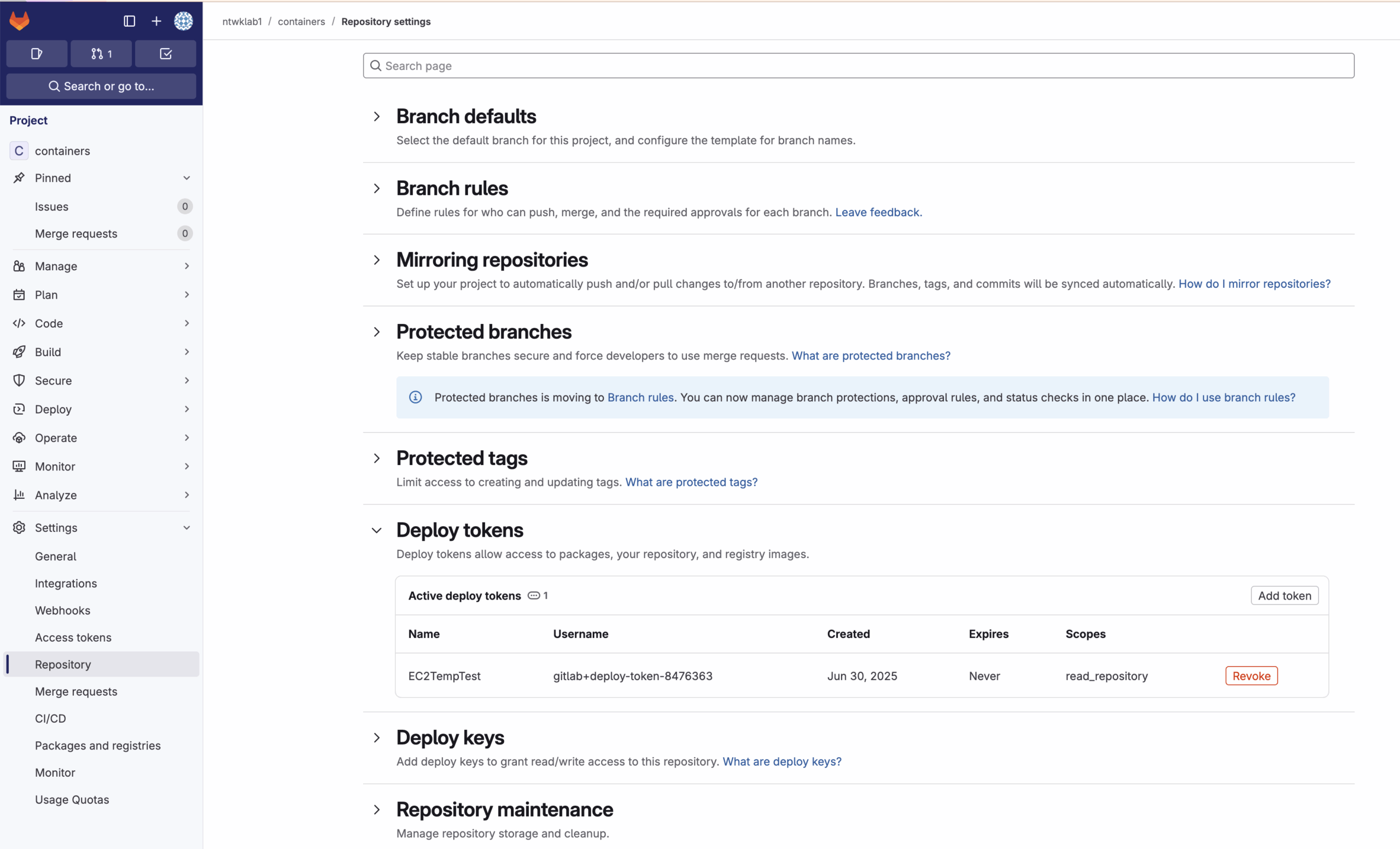
Once the token has been created, there will be a user and a token that will need to be added to the EC2 instance that is running the Flask container. The deploy.sh script has the AWS CLI commands to get the token into the AWS Secrets Manager.
I have included a .env file in the repo that contains all of the secrets in. This file is not included in the repo, but is stored locally and the deploy.sh script uses this to create the secrets.
aws secretsmanager create-secret --name gitlab-user --secret-string "$GITLAB_DEPLOY_USER"
aws secretsmanager create-secret --name gitlab-token --secret-string "$GITLAB_DEPLOY_TOKEN"

ssh -i $fileName.pem ec2-user@$EC2PubPC "export GITLAB_DEPLOY_TOKEN=\$(aws secretsmanager get-secret-value --secret-id gitlab-token --query SecretString --output text) && git clone https://gitlab+deploy-token-GITLAB_DEPLOY_USER:\$GITLAB_DEPLOY_TOKEN@gitlab.com/ntwklab1/containers.git"
Creating Secrets in AWS Secrets Manager
In the deploy.sh script, there is a section that will load in the .env and then with a function to check if there is already a secret present in the Secrets Manager. If the secret is not present, then the secret will be created.
echo "Creating secrets and setting environment variables on the EC2 instane $EC2ID"
# Load the variables from .env file
set -a  # automatically export all variables
source .env
set +a

# Function to check if secret exists and create if it doesn't
create_secret_if_not_exists() {
    local secret_name=$1
    local secret_value=$2

    # Check if secret exists
    if aws secretsmanager describe-secret --secret-id "$secret_name" 2>/dev/null; then
        echo "Secret '$secret_name' already exists"
    else
        echo "Creating secret '$secret_name'"
        aws secretsmanager create-secret --name "$secret_name" --secret-string "$secret_value"
    fi
}

# Create secrets if they don't exist
create_secret_if_not_exists "gitlab-user2" "$GITLAB_DEPLOY_USER"
create_secret_if_not_exists "gitlab-token2" "$GITLAB_DEPLOY_TOKEN"
create_secret_if_not_exists "postgres_user" "$POSTGRES_USER"
create_secret_if_not_exists "postgres_password" "$POSTGRES_PASSWORD"
create_secret_if_not_exists "postgres_db" "$POSTGRES_DB"