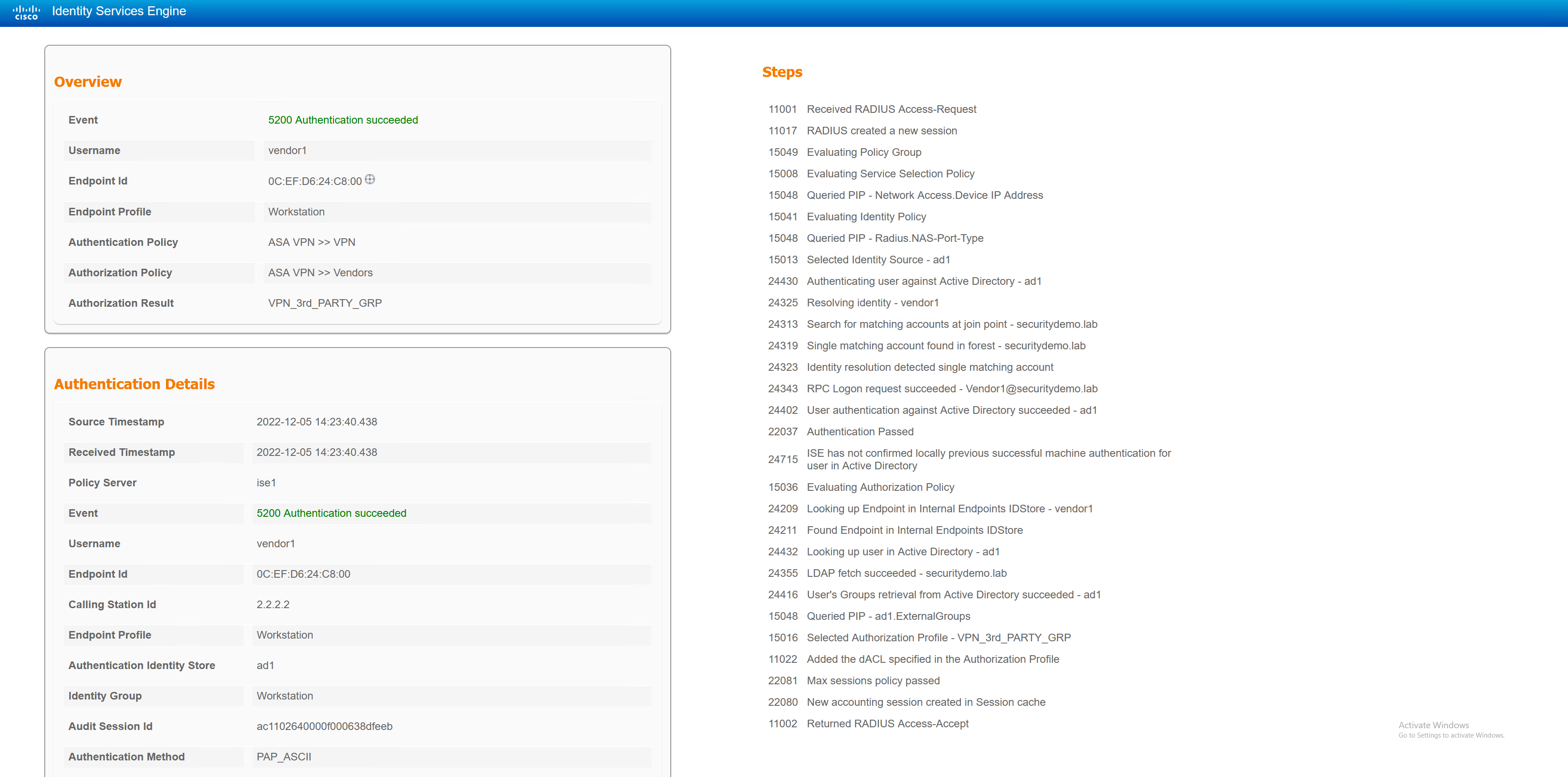
This lab is demonstrating the use of Cisco AnyConnect and ISE. AnyConnect can be used in conjunction with ISE in a similar way it can on a wired LAN.
Based off a username, ISE can determine which group-policy to apply to an AnyConnect user, and apply a downloadable ACL (dACL) to that user. In addition to this, ISE can also run a posture scan on the user’s machine to determine if it is running correct software or is actually a corporate machine or not.
The lab will have three types of users; standard corporate user, Admin corporate user and a third party user. Each user will receive their own VPN IP pool and ACL.
ASA RADIUS Config
aaa-server RADIUS_ISE protocol radius
 authorize-only
 interim-accounting-update periodic 1
 dynamic-authorization
aaa-server RADIUS_ISE (INSIDE) host 172.17.5.101
 timeout 60
 key Stefan2020
Add ASA to ISE
The ASA is configured to send RADIUS to ISE, however, ISE needs to be aware that it will receive RADIUS messages from the ASA. Each device must be configured in ISE with the same RADIUS key as input to the device config.
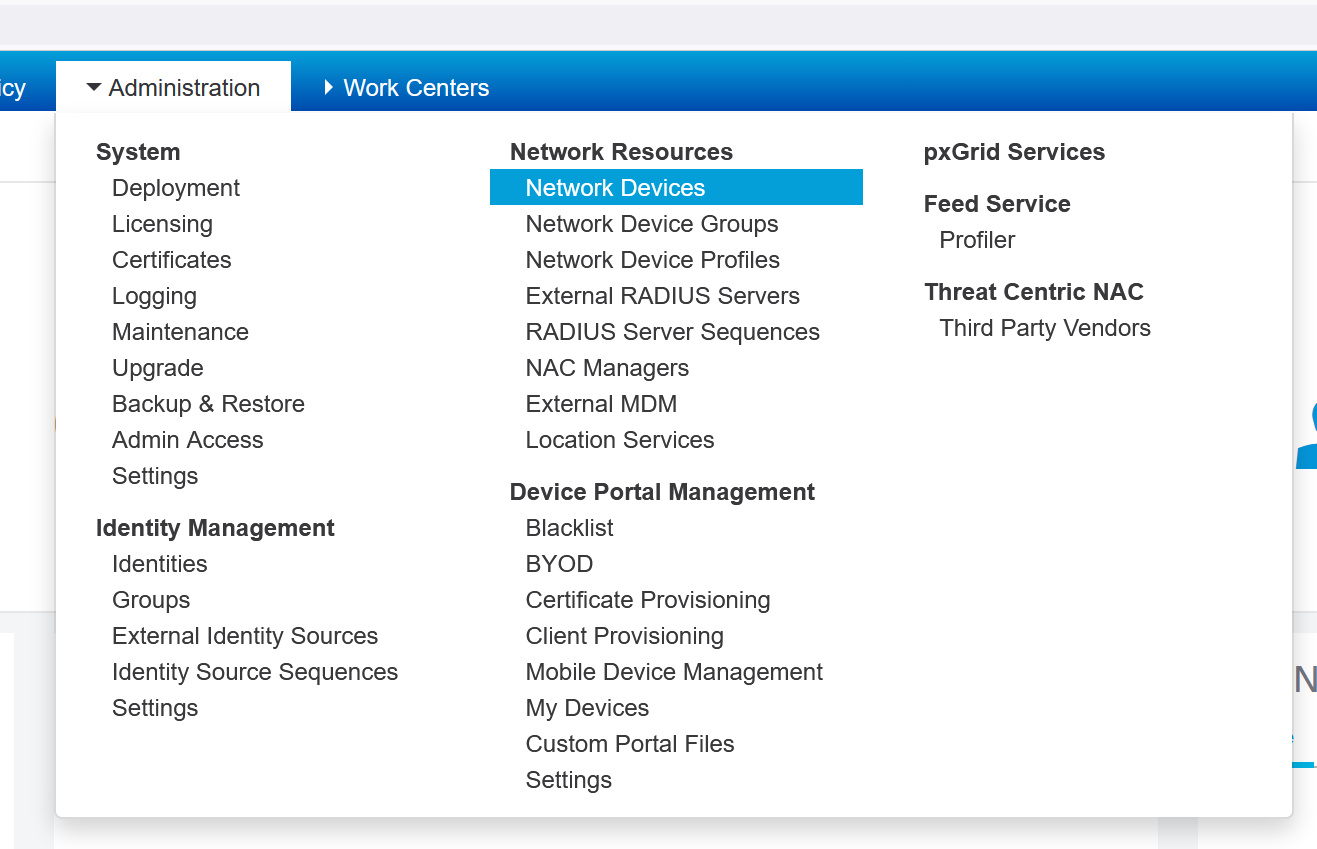
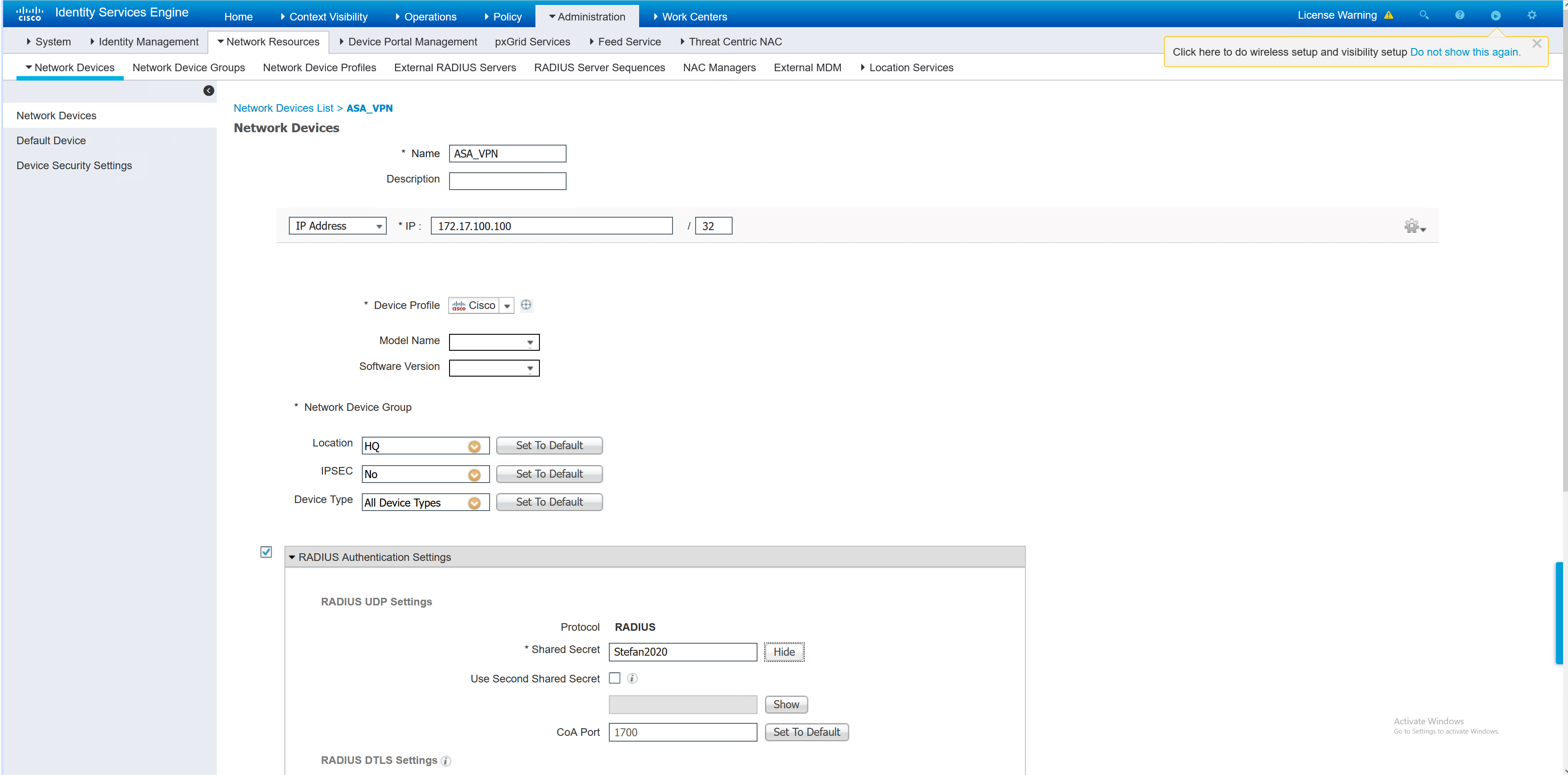
Once the ASA has been added, a test may be performed from the ASA to confirm. The test can also be seen in the ISE RADIUS live logs.
ASA1# test aaa-server authentication RADIUS_ISE host 172.17.5.101 username Employee1 password Stefan2020
INFO: Attempting Authentication test to IP address (172.17.5.101) (timeout: 62 seconds)
INFO: Authentication Successful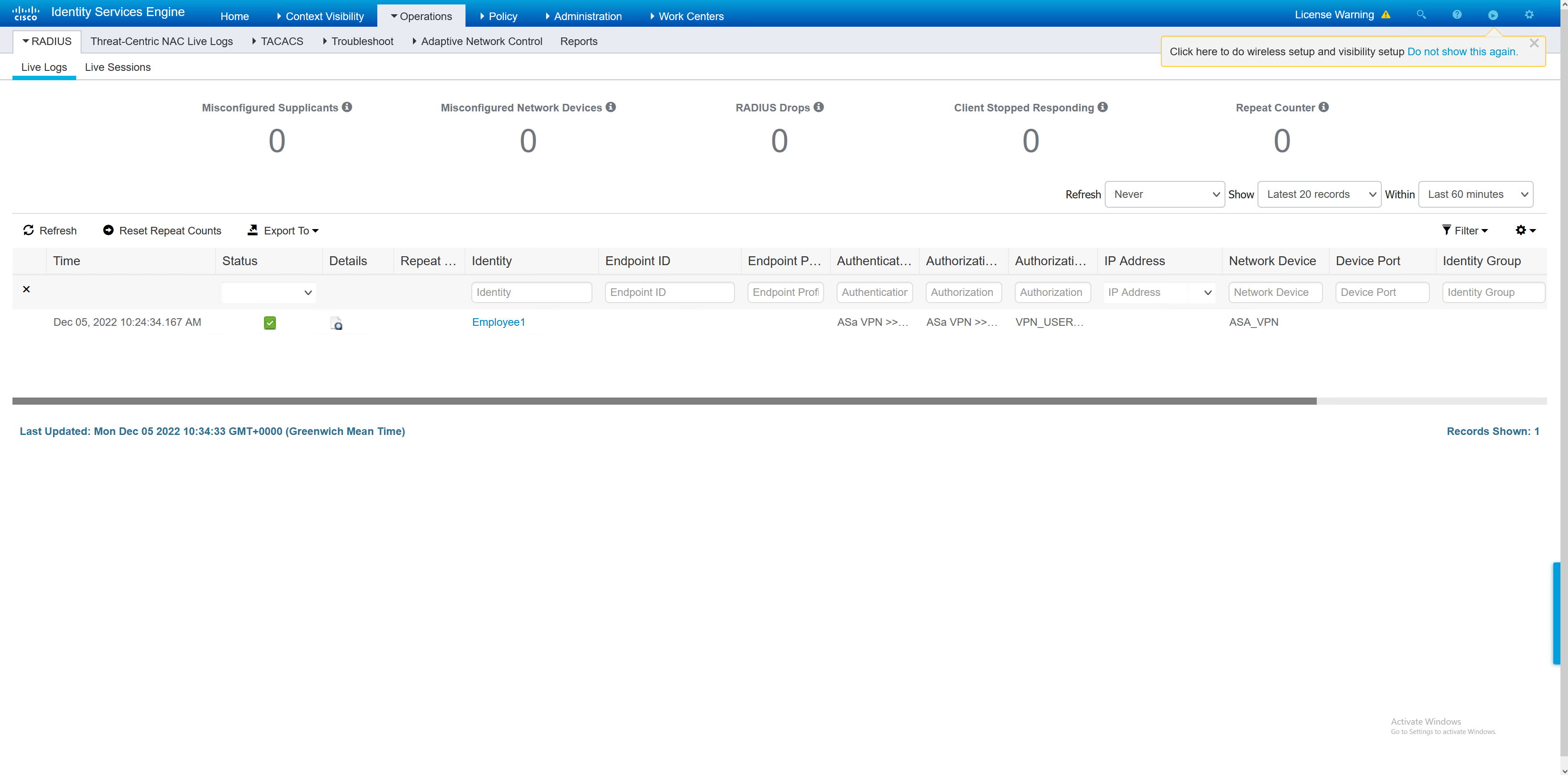
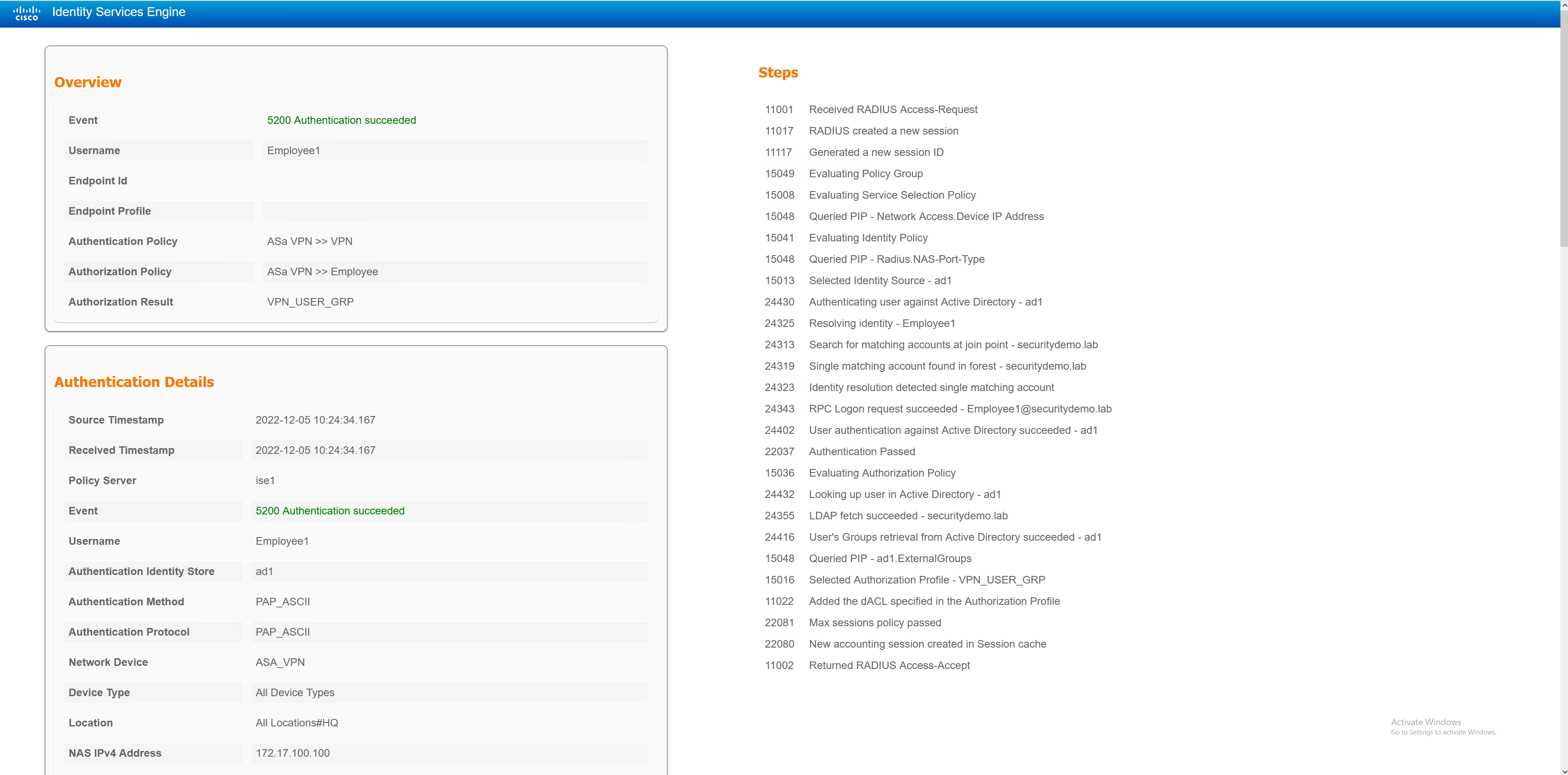
ASA VPN Config
There are three user types, each with their own VPN config. Only the default tunnel-group is shared. If the user does not match on any of the user types (standard corp user, admin corp user or third party user) then they will be given a no access group-policy. This will disconnect them from the VPN as no user sessions are permitted.
ip local pool NETWORK_ADMIN_POOL 172.20.171.1-172.20.171.254 mask 255.255.255.0
ip local pool NETWORK_USER_POOL 172.20.170.1-172.20.170.254 mask 255.255.255.0
ip local pool VPN_3rd_PARTY_POOL 172.20.169.1-172.20.169.254 mask 255.255.255.0


object-group network NETWORK_ADMIN_POOL
 network-object 172.20.171.0 255.255.255.0
object-group network NETWORK_ADMIN_ACCESS
 network-object 172.17.5.0 255.255.255.0
 network-object 172.17.4.0 255.255.255.0
 network-object 172.17.3.0 255.255.255.0
 network-object 172.17.2.0 255.255.255.0
 network-object host 2.2.1.101
object-group network NETWORK_USER_POOL
 network-object 172.20.170.0 255.255.255.0
object-group network NETWORK_USER_ACCESS
 network-object 172.17.3.0 255.255.255.0
 network-object host 2.2.1.101
object-group network VPN_3rd_PARTY_POOL
 network-object 172.20.169.0 255.255.255.0
object-group network VPN_3rd_PARTY_ACCESS
 network-object host 2.2.1.101
 network-object host 172.17.4.10


access-list VPN_ADMIN_SPLIT_TUNNEL extended permit ip object-group NETWORK_ADMIN_ACCESS object-group NETWORK_ADMIN_POOL
access-list VPN_USER_FILTER extended deny ip 172.20.170.0 255.255.255.0 172.20.169.0 255.255.255.0
access-list VPN_USER_FILTER extended deny ip 172.20.170.0 255.255.255.0 172.20.170.0 255.255.255.0
access-list VPN_USER_FILTER extended deny ip 172.20.170.0 255.255.255.0 172.20.171.0 255.255.255.0
access-list VPN_USER_FILTER extended deny ip 172.20.170.0 255.255.255.0 172.17.2.0 255.255.255.0
access-list VPN_USER_FILTER extended permit ip any any
access-list VPN_USER_SPLIT_TUNNEL extended permit ip object-group NETWORK_USER_ACCESS object-group NETWORK_USER_POOL
access-list POSTURE-REDIRECT extended deny udp any any eq domain
access-list POSTURE-REDIRECT extended deny tcp any any eq domain
access-list POSTURE-REDIRECT extended deny tcp any host 172.17.5.101 eq 8443
access-list POSTURE-REDIRECT extended deny tcp any host 172.17.5.101 eq 8905
access-list POSTURE-REDIRECT extended deny udp any host 172.17.5.101 eq 8905
access-list POSTURE-REDIRECT extended deny tcp any host 2.2.1.101 eq 8443
access-list POSTURE-REDIRECT extended deny tcp any host 2.2.1.101 eq 8905
access-list POSTURE-REDIRECT extended deny udp any host 2.2.1.101 eq 8905
access-list POSTURE-REDIRECT extended permit tcp any any eq www
access-list POSTURE-REDIRECT extended permit tcp any any eq https
access-list POSTURE-REDIRECT extended deny ip any any
access-list VPN_3rd_PARTY_FILTER extended deny ip 172.20.169.0 255.255.255.0 172.20.169.0 255.255.255.0
access-list VPN_3rd_PARTY_FILTER extended deny ip 172.20.169.0 255.255.255.0 172.20.170.0 255.255.255.0
access-list VPN_3rd_PARTY_FILTER extended deny ip 172.20.169.0 255.255.255.0 172.20.171.0 255.255.255.0
access-list VPN_3rd_PARTY_FILTER extended deny ip 172.20.169.0 255.255.255.0 172.17.2.0 255.255.255.0
access-list VPN_3rd_PARTY_FILTER extended permit ip any any
access-list VPN_3rd_PARTY_SPLIT_TUNNEL extended permit ip object-group VPN_3rd_PARTY_ACCESS object-group VPN_3rd_PARTY_POOL


nat (any,OUTSIDE) source static NETWORK_ADMIN_ACCESS NETWORK_ADMIN_ACCESS destination static NETWORK_ADMIN_POOL NETWORK_ADMIN_POOL
nat (any,OUTSIDE) source static NETWORK_USER_ACCESS NETWORK_USER_ACCESS destination static NETWORK_USER_POOL NETWORK_USER_POOL
nat (any,OUTSIDE) source static VPN_3rd_PARTY_ACCESS VPN_3rd_PARTY_ACCESS destination static VPN_3rd_PARTY_POOL VPN_3rd_PARTY_POOL


webvpn
 enable OUTSIDE
 anyconnect image disk0:/anyconnect-win-4.7.01076-webdeploy-k9.pkg 1
 anyconnect profiles ANYCONNECT-PROFILE disk0:/AnyConnectProfile.xml
 anyconnect enable
 cache
  disable
 error-recovery disable


group-policy NOACCESS internal
group-policy NOACCESS attributes
 wins-server none
 vpn-simultaneous-logins 0
 vpn-tunnel-protocol ikev1 ssl-client ssl-clientless
 default-domain none

group-policy VPN_USER_GRP internal
group-policy VPN_USER_GRP attributes
 dns-server value 172.17.4.10
 vpn-simultaneous-logins 200
 vpn-filter value VPN_USER_FILTER
 vpn-tunnel-protocol ssl-client ssl-clientless
 split-tunnel-policy tunnelspecified
 split-tunnel-network-list value VPN_USER_SPLIT_TUNNEL
 default-domain value securitydemo.lab
 address-pools value NETWORK_USER_POOL
 webvpn
  anyconnect ssl dtls enable
  anyconnect modules value dart,iseposture
  anyconnect ask enable

group-policy VPN_3rd_PARTY_GRP internal
group-policy VPN_3rd_PARTY_GRP attributes
 dns-server value 172.17.4.10
 vpn-simultaneous-logins 200
 vpn-filter value VPN_3rd_PARTY_FILTER
 vpn-tunnel-protocol ssl-client ssl-clientless
 split-tunnel-policy tunnelspecified
 split-tunnel-network-list value VPN_3rd_PARTY_SPLIT_TUNNEL
 default-domain value securitydemo.lab
 address-pools value VPN_3rd_PARTY_POOL
 webvpn
  anyconnect ssl dtls enable
  anyconnect modules value dart,iseposture
  anyconnect ask enable

group-policy NETWORK_ADMIN internal
group-policy NETWORK_ADMIN attributes
 dns-server value 172.17.4.10
 vpn-simultaneous-logins 200
 vpn-tunnel-protocol ssl-client ssl-clientless
 split-tunnel-policy tunnelspecified
 split-tunnel-network-list value VPN_ADMIN_SPLIT_TUNNEL
 default-domain value securitydemo.lab
 address-pools value NETWORK_ADMIN_POOL
 webvpn
  anyconnect ssl dtls enable
  anyconnect keep-installer installed
  anyconnect modules value dart,iseposture
  anyconnect ask enable
dynamic-access-policy-record DfltAccessPolicy

tunnel-group DefaultWEBVPNGroup general-attributes
 authentication-server-group RADIUS_ISE
tunnel-group 2FA type remote-access
tunnel-group 2FA general-attributes
 authentication-server-group RADIUS_ISE
 accounting-server-group RADIUS_ISE
 default-group-policy NOACCESS
tunnel-group 2FA webvpn-attributes
 group-alias Duo enable
ISE Policy Sets
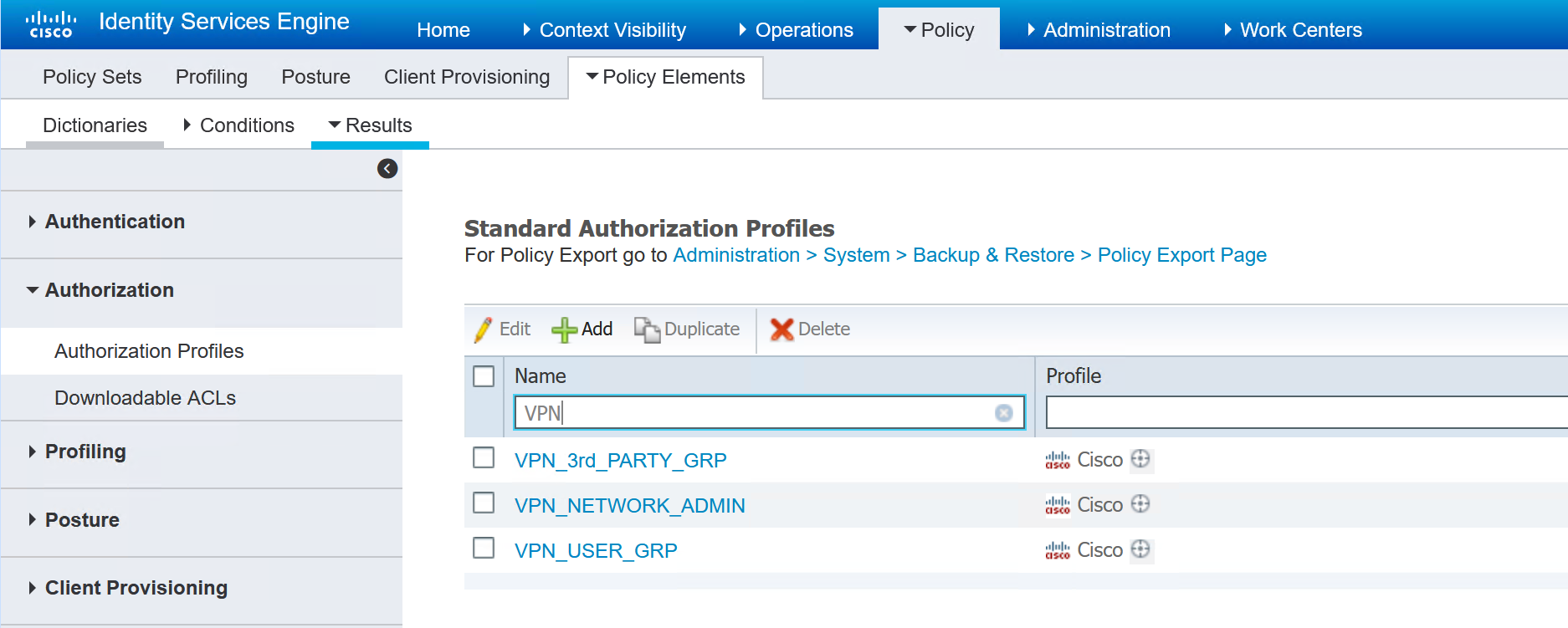
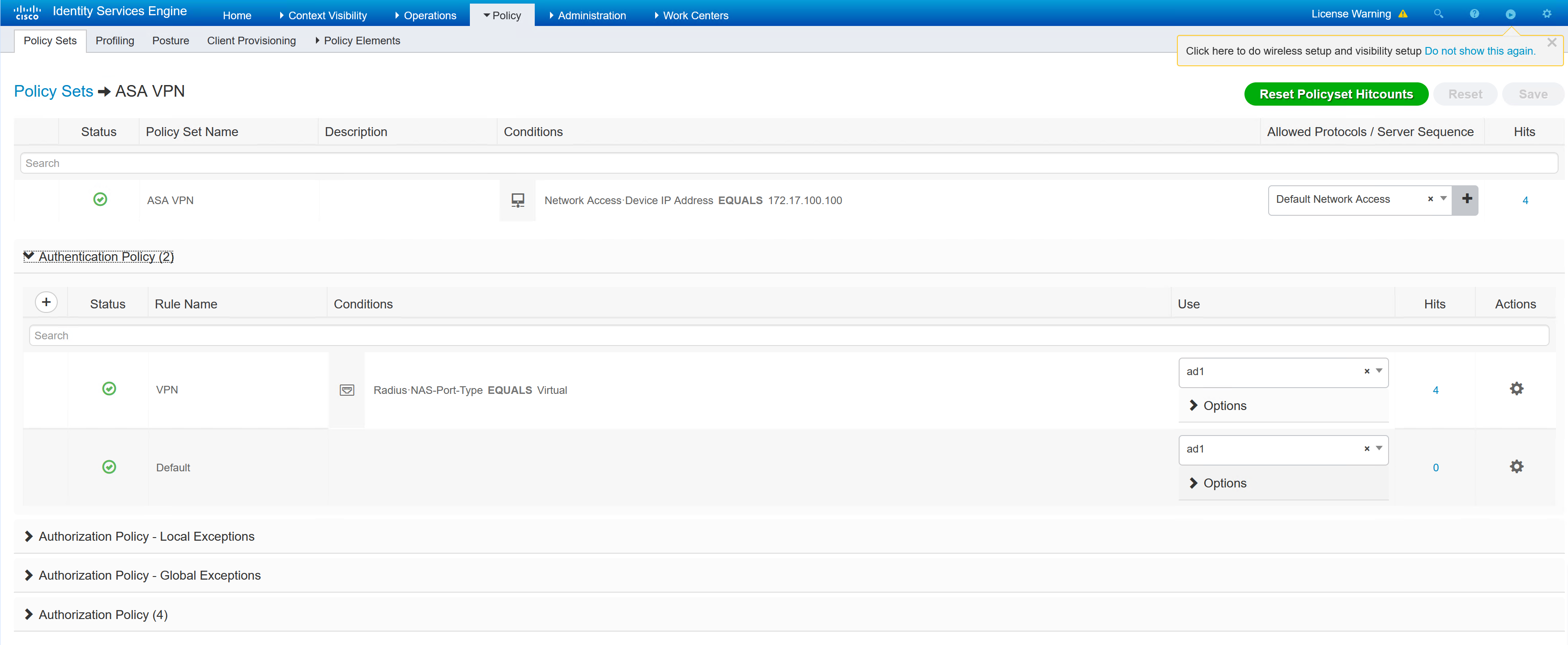
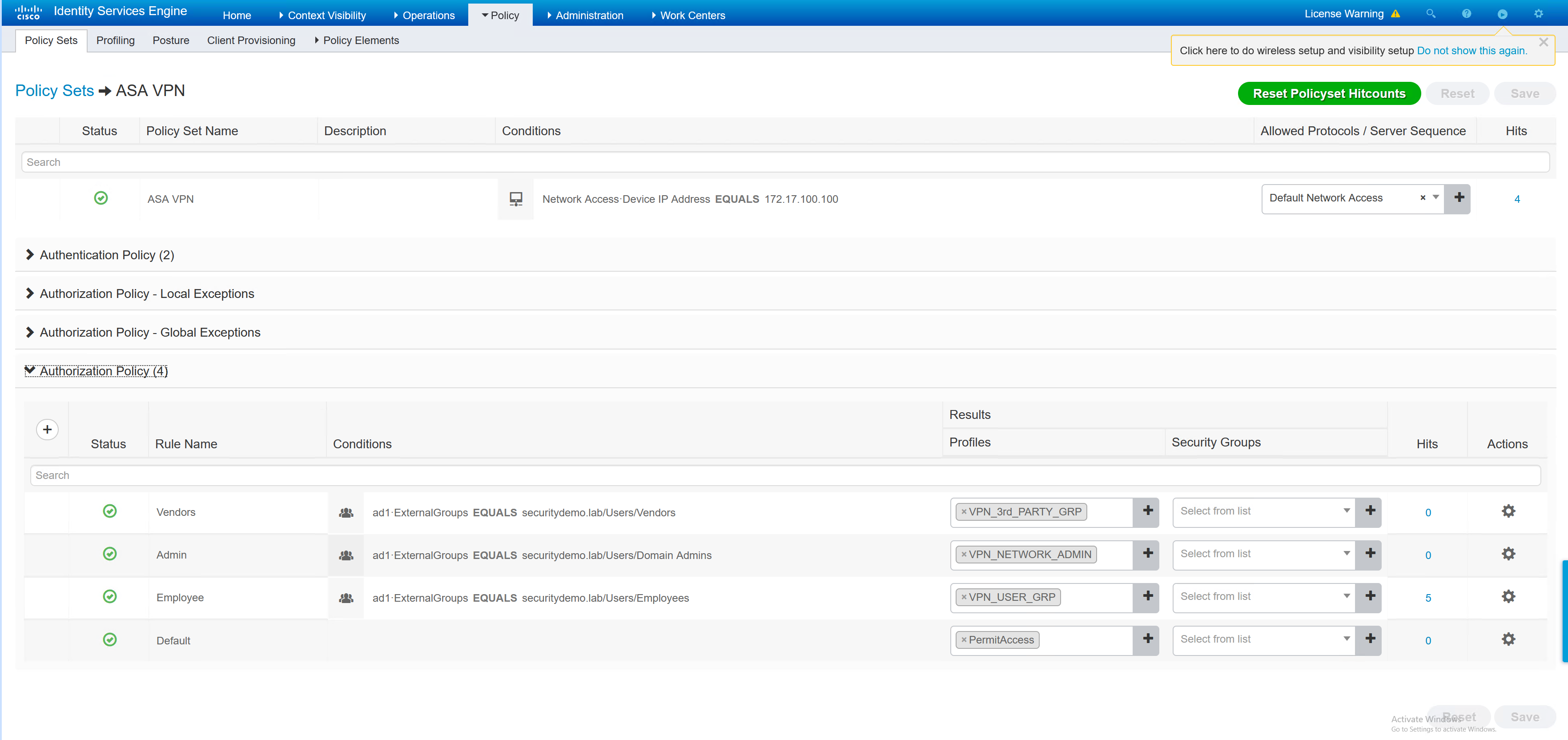
To create an ISE policy set for the VPN users, the first step is to create the authorisation policy for each VPN user type.
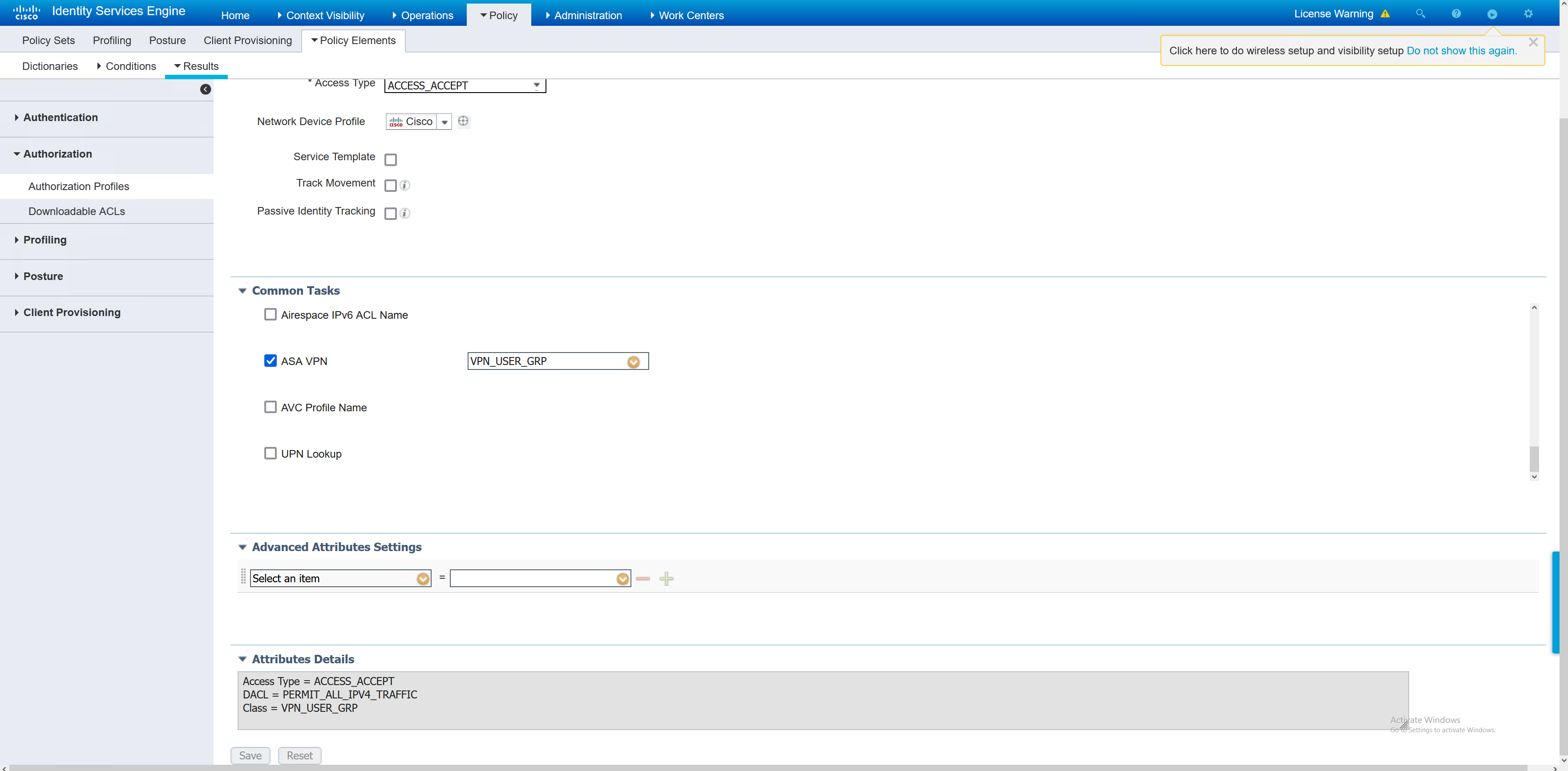
Inside each of the authorisation profiles, the group-policy is referenced. In the ASA there are three group policies, the names in ISE must match in order for the user to be given the correct group policy.
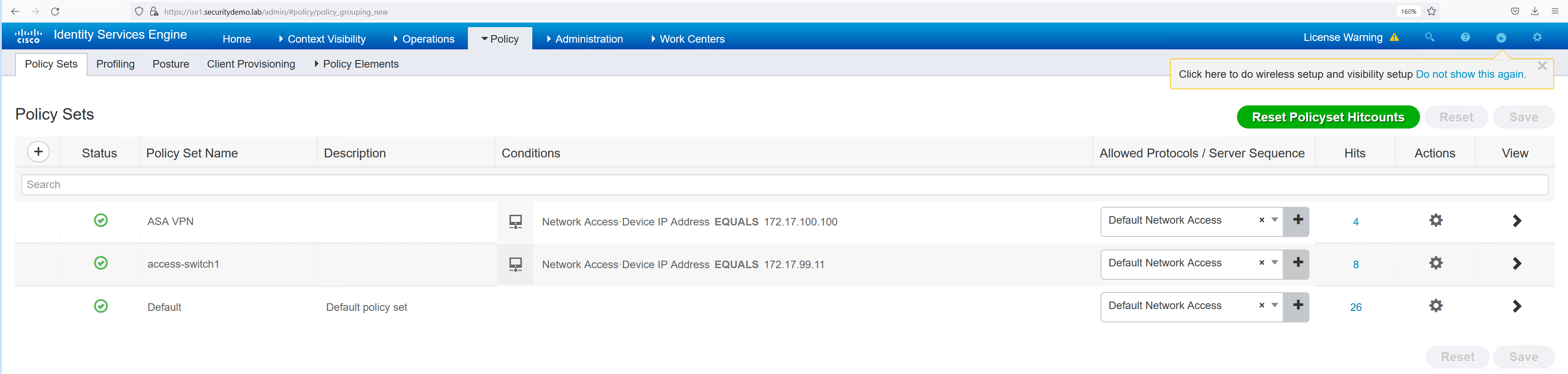
Now the individual authentication profiles have been created, the overall policy set can be created. The policy set is going to tie together the authorisation profiles and the authenticating device (ASA).
Testing
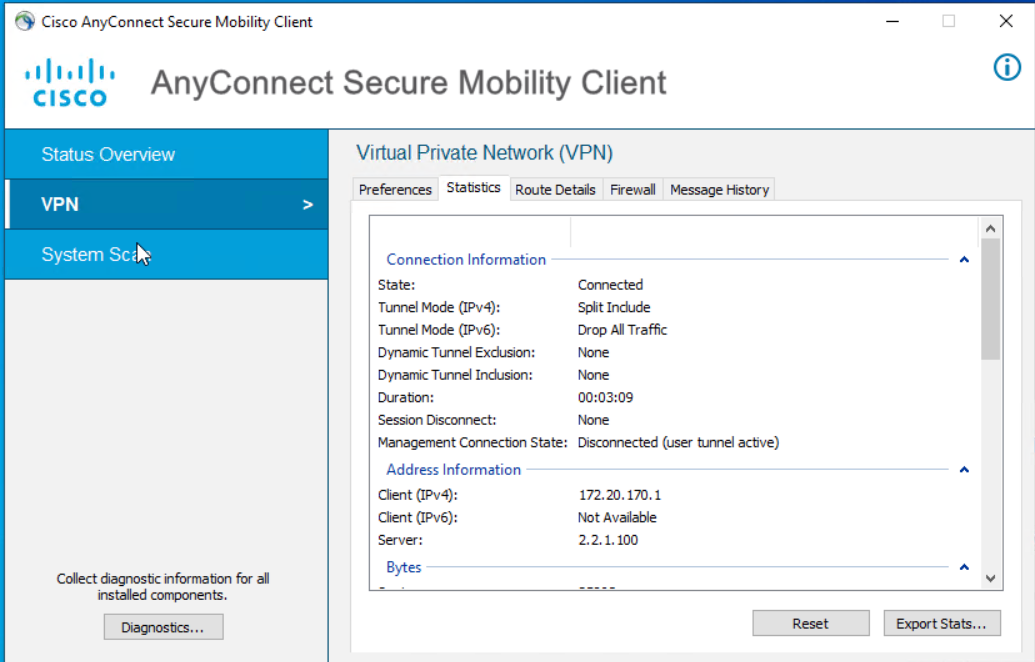
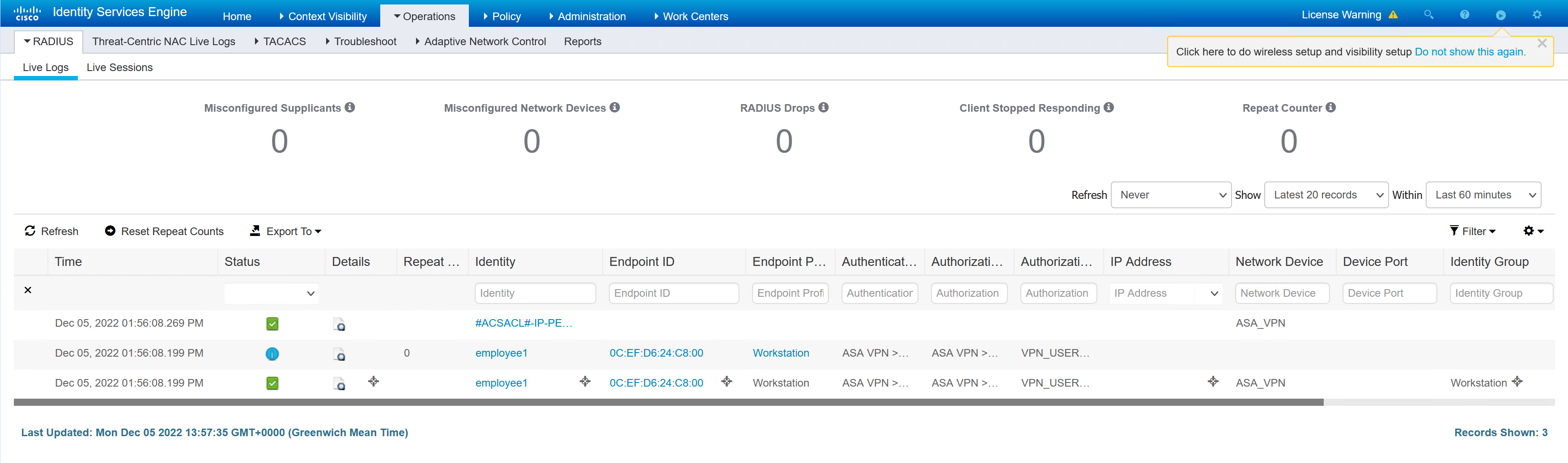
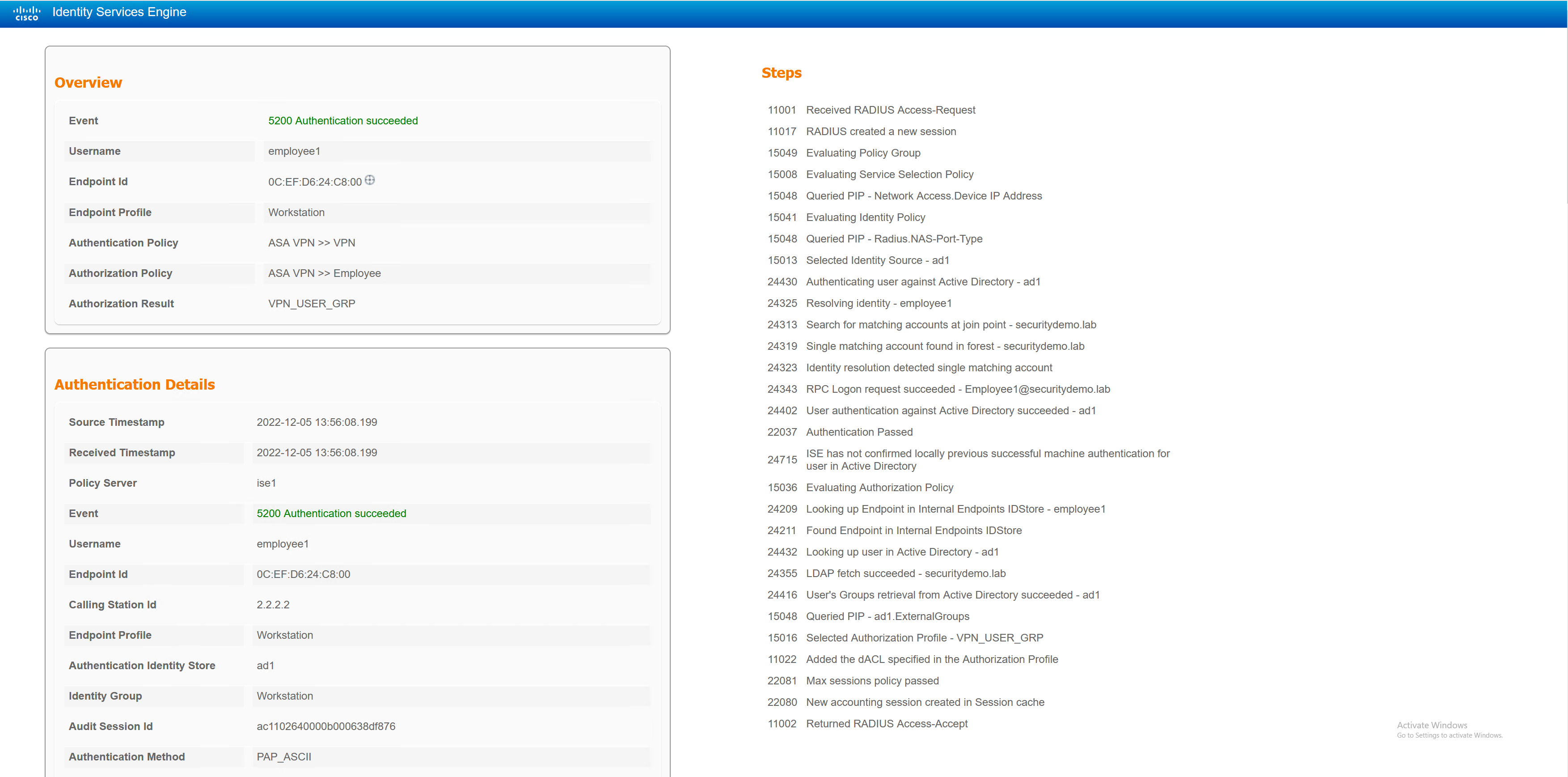
Employee1 – Standard Corp User
The employee1 user will be given the VPN_USER_GRP
ASA1# sh vpn-sessiondb detail anyconnect filter name employee1

Session Type: AnyConnect Detailed

Username     : employee1              Index        : 11
Assigned IP  : 172.20.170.1           Public IP    : 2.2.2.2
Protocol     : AnyConnect-Parent SSL-Tunnel DTLS-Tunnel
License      : AnyConnect Premium
Encryption   : AnyConnect-Parent: (1)none  SSL-Tunnel: (1)AES-GCM-256  DTLS-Tunnel: (1)AES256
Hashing      : AnyConnect-Parent: (1)none  SSL-Tunnel: (1)SHA384  DTLS-Tunnel: (1)SHA1
Bytes Tx     : 34188                  Bytes Rx     : 19212
Pkts Tx      : 161                    Pkts Rx      : 162
Pkts Tx Drop : 0                      Pkts Rx Drop : 0
Group Policy : VPN_USER_GRP           Tunnel Group : DefaultWEBVPNGroup
Login Time   : 13:56:06 UTC Mon Dec 5 2022
Duration     : 0h:01m:18s
Inactivity   : 0h:00m:00s
VLAN Mapping : N/A                    VLAN         : none
Audt Sess ID : ac1102640000b000638df876
Security Grp : none

AnyConnect-Parent Tunnels: 1
SSL-Tunnel Tunnels: 1
DTLS-Tunnel Tunnels: 1

AnyConnect-Parent:
  Tunnel ID    : 11.1
  Public IP    : 2.2.2.2
  Encryption   : none                   Hashing      : none
  TCP Src Port : 12754                  TCP Dst Port : 443
  Auth Mode    : userPassword
  Idle Time Out: 30 Minutes             Idle TO Left : 28 Minutes
  Client OS    : win
  Client OS Ver: 10.0.19045
  Client Type  : AnyConnect
  Client Ver   : Cisco AnyConnect VPN Agent for Windows 4.7.01076
  Bytes Tx     : 7850                   Bytes Rx     : 0
  Pkts Tx      : 6                      Pkts Rx      : 0
  Pkts Tx Drop : 0                      Pkts Rx Drop : 0

SSL-Tunnel:
  Tunnel ID    : 11.2
  Assigned IP  : 172.20.170.1           Public IP    : 2.2.2.2
  Encryption   : AES-GCM-256            Hashing      : SHA384
  Ciphersuite  : ECDHE-ECDSA-AES256-GCM-SHA384
  Encapsulation: TLSv1.2                TCP Src Port : 37524
  TCP Dst Port : 443                    Auth Mode    : userPassword
  Idle Time Out: 30 Minutes             Idle TO Left : 28 Minutes
  Client OS    : Windows
  Client Type  : SSL VPN Client
  Client Ver   : Cisco AnyConnect VPN Agent for Windows 4.7.01076
  Bytes Tx     : 7928                   Bytes Rx     : 134
  Pkts Tx      : 7                      Pkts Rx      : 2
  Pkts Tx Drop : 0                      Pkts Rx Drop : 0
  Filter Name  : #ACSACL#-IP-PERMIT_ALL_IPV4_TRAFFIC-57f6b0d3

DTLS-Tunnel:
  Tunnel ID    : 11.3
  Assigned IP  : 172.20.170.1           Public IP    : 2.2.2.2
  Encryption   : AES256                 Hashing      : SHA1
  Ciphersuite  : DHE-RSA-AES256-SHA
  Encapsulation: DTLSv1.0               UDP Src Port : 10007
  UDP Dst Port : 443                    Auth Mode    : userPassword
  Idle Time Out: 30 Minutes             Idle TO Left : 29 Minutes
  Client OS    : Windows
  Client Type  : DTLS VPN Client
  Client Ver   : Cisco AnyConnect VPN Agent for Windows 4.7.01076
  Bytes Tx     : 18724                  Bytes Rx     : 19191
  Pkts Tx      : 149                    Pkts Rx      : 162
  Pkts Tx Drop : 0                      Pkts Rx Drop : 0
  Filter Name  : #ACSACL#-IP-PERMIT_ALL_IPV4_TRAFFIC-57f6b0d3
Employee2.admin – Admin Corp User
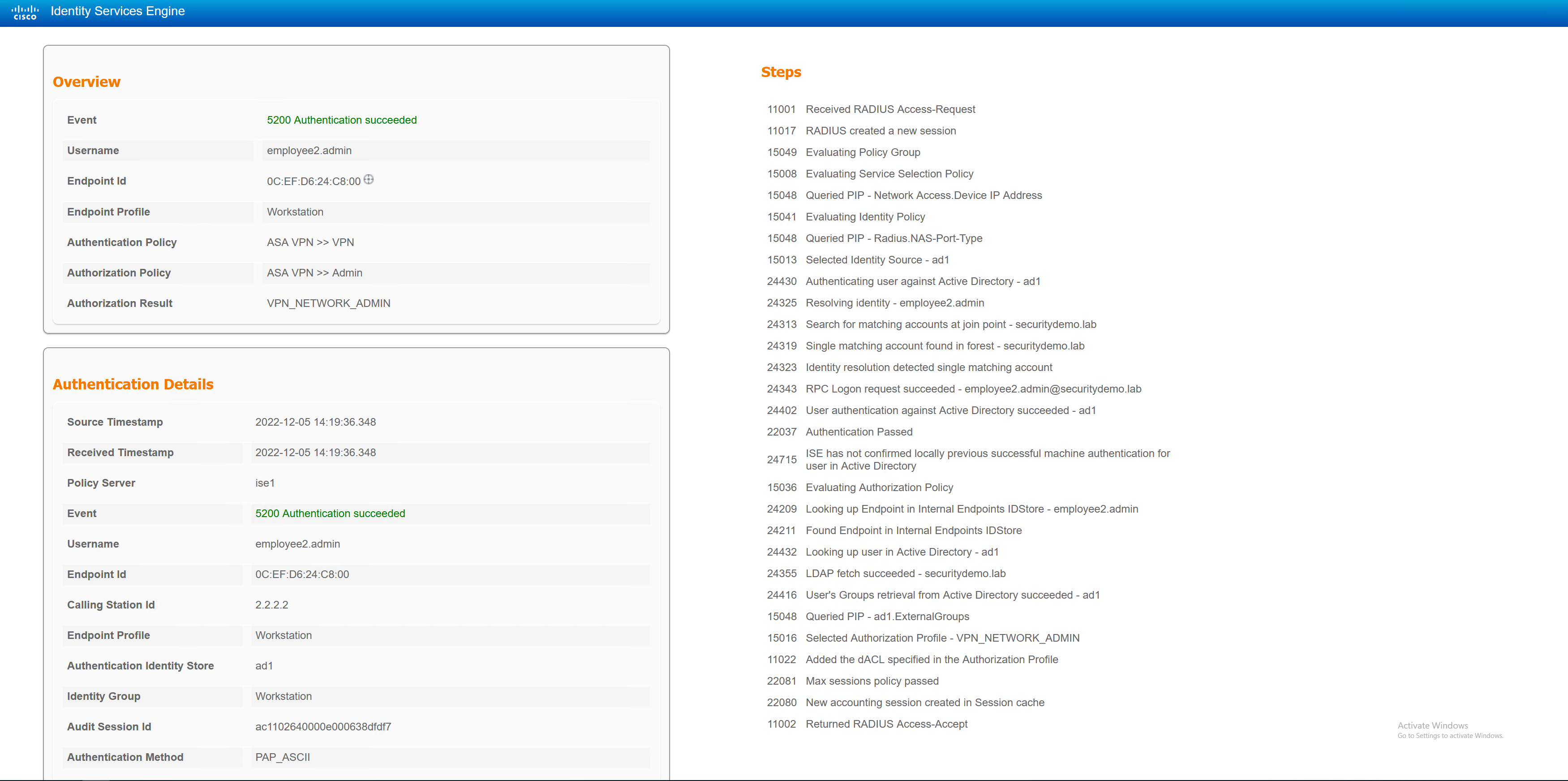
The employee2.admin user will be given NETWORK_ADMIN
ASA1# sh vpn-sessiondb detail anyconnect filter name employee2.admin

Session Type: AnyConnect Detailed

Username     : employee2.admin        Index        : 14
Assigned IP  : 172.20.171.1           Public IP    : 2.2.2.2
Protocol     : AnyConnect-Parent SSL-Tunnel DTLS-Tunnel
License      : AnyConnect Premium
Encryption   : AnyConnect-Parent: (1)none  SSL-Tunnel: (1)AES-GCM-256  DTLS-Tunnel: (1)AES256
Hashing      : AnyConnect-Parent: (1)none  SSL-Tunnel: (1)SHA384  DTLS-Tunnel: (1)SHA1
Bytes Tx     : 44998                  Bytes Rx     : 29139
Pkts Tx      : 130                    Pkts Rx      : 140
Pkts Tx Drop : 0                      Pkts Rx Drop : 0
Group Policy : NETWORK_ADMIN          Tunnel Group : DefaultWEBVPNGroup
Login Time   : 14:19:35 UTC Mon Dec 5 2022
Duration     : 0h:00m:26s
Inactivity   : 0h:00m:00s
VLAN Mapping : N/A                    VLAN         : none
Audt Sess ID : ac1102640000e000638dfdf7
Security Grp : none

AnyConnect-Parent Tunnels: 1
SSL-Tunnel Tunnels: 1
DTLS-Tunnel Tunnels: 1

AnyConnect-Parent:
  Tunnel ID    : 14.1
  Public IP    : 2.2.2.2
  Encryption   : none                   Hashing      : none
  TCP Src Port : 37577                  TCP Dst Port : 443
  Auth Mode    : userPassword
  Idle Time Out: 30 Minutes             Idle TO Left : 29 Minutes
  Client OS    : win
  Client OS Ver: 10.0.19045
  Client Type  : AnyConnect
  Client Ver   : Cisco AnyConnect VPN Agent for Windows 4.7.01076
  Bytes Tx     : 7993                   Bytes Rx     : 0
  Pkts Tx      : 6                      Pkts Rx      : 0
  Pkts Tx Drop : 0                      Pkts Rx Drop : 0

SSL-Tunnel:
  Tunnel ID    : 14.2
  Assigned IP  : 172.20.171.1           Public IP    : 2.2.2.2
  Encryption   : AES-GCM-256            Hashing      : SHA384
  Ciphersuite  : ECDHE-ECDSA-AES256-GCM-SHA384
  Encapsulation: TLSv1.2                TCP Src Port : 37578
  TCP Dst Port : 443                    Auth Mode    : userPassword
  Idle Time Out: 30 Minutes             Idle TO Left : 29 Minutes
  Client OS    : Windows
  Client Type  : SSL VPN Client
  Client Ver   : Cisco AnyConnect VPN Agent for Windows 4.7.01076
  Bytes Tx     : 7993                   Bytes Rx     : 112
  Pkts Tx      : 6                      Pkts Rx      : 2
  Pkts Tx Drop : 0                      Pkts Rx Drop : 0
  Filter Name  : #ACSACL#-IP-PERMIT_ALL_IPV4_TRAFFIC-57f6b0d3

DTLS-Tunnel:
  Tunnel ID    : 14.3
  Assigned IP  : 172.20.171.1           Public IP    : 2.2.2.2
  Encryption   : AES256                 Hashing      : SHA1
  Ciphersuite  : DHE-RSA-AES256-SHA
  Encapsulation: DTLSv1.0               UDP Src Port : 10009
  UDP Dst Port : 443                    Auth Mode    : userPassword
  Idle Time Out: 30 Minutes             Idle TO Left : 30 Minutes
  Client OS    : Windows
  Client Type  : DTLS VPN Client
  Client Ver   : Cisco AnyConnect VPN Agent for Windows 4.7.01076
  Bytes Tx     : 29146                  Bytes Rx     : 29095
  Pkts Tx      : 119                    Pkts Rx      : 139
  Pkts Tx Drop : 0                      Pkts Rx Drop : 0
  Filter Name  : #ACSACL#-IP-PERMIT_ALL_IPV4_TRAFFIC-57f6b0d3
Vendor1 – 3rd Party User
The vendor1 user will be given VPN_3rd_PARTY_GRP
ASA1# sh vpn-sessiondb detail anyconnect filter name vendor1

Session Type: AnyConnect Detailed

Username     : vendor1                Index        : 15
Assigned IP  : 172.20.169.1           Public IP    : 2.2.2.2
Protocol     : AnyConnect-Parent SSL-Tunnel DTLS-Tunnel
License      : AnyConnect Premium
Encryption   : AnyConnect-Parent: (1)none  SSL-Tunnel: (1)AES-GCM-256  DTLS-Tunnel: (1)AES256
Hashing      : AnyConnect-Parent: (1)none  SSL-Tunnel: (1)SHA384  DTLS-Tunnel: (1)SHA1
Bytes Tx     : 19999                  Bytes Rx     : 4606
Pkts Tx      : 54                     Pkts Rx      : 42
Pkts Tx Drop : 0                      Pkts Rx Drop : 0
Group Policy : VPN_3rd_PARTY_GRP      Tunnel Group : DefaultWEBVPNGroup
Login Time   : 14:23:39 UTC Mon Dec 5 2022
Duration     : 0h:00m:17s
Inactivity   : 0h:00m:00s
VLAN Mapping : N/A                    VLAN         : none
Audt Sess ID : ac1102640000f000638dfeeb
Security Grp : none

AnyConnect-Parent Tunnels: 1
SSL-Tunnel Tunnels: 1
DTLS-Tunnel Tunnels: 1

AnyConnect-Parent:
  Tunnel ID    : 15.1
  Public IP    : 2.2.2.2
  Encryption   : none                   Hashing      : none
  TCP Src Port : 12808                  TCP Dst Port : 443
  Auth Mode    : userPassword
  Idle Time Out: 30 Minutes             Idle TO Left : 29 Minutes
  Client OS    : win
  Client OS Ver: 10.0.19045
  Client Type  : AnyConnect
  Client Ver   : Cisco AnyConnect VPN Agent for Windows 4.7.01076
  Bytes Tx     : 7853                   Bytes Rx     : 0
  Pkts Tx      : 6                      Pkts Rx      : 0
  Pkts Tx Drop : 0                      Pkts Rx Drop : 0

SSL-Tunnel:
  Tunnel ID    : 15.2
  Assigned IP  : 172.20.169.1           Public IP    : 2.2.2.2
  Encryption   : AES-GCM-256            Hashing      : SHA384
  Ciphersuite  : ECDHE-ECDSA-AES256-GCM-SHA384
  Encapsulation: TLSv1.2                TCP Src Port : 12812
  TCP Dst Port : 443                    Auth Mode    : userPassword
  Idle Time Out: 30 Minutes             Idle TO Left : 29 Minutes
  Client OS    : Windows
  Client Type  : SSL VPN Client
  Client Ver   : Cisco AnyConnect VPN Agent for Windows 4.7.01076
  Bytes Tx     : 7853                   Bytes Rx     : 134
  Pkts Tx      : 6                      Pkts Rx      : 2
  Pkts Tx Drop : 0                      Pkts Rx Drop : 0
  Filter Name  : #ACSACL#-IP-PERMIT_ALL_IPV4_TRAFFIC-57f6b0d3

DTLS-Tunnel:
  Tunnel ID    : 15.3
  Assigned IP  : 172.20.169.1           Public IP    : 2.2.2.2
  Encryption   : AES256                 Hashing      : SHA1
  Ciphersuite  : DHE-RSA-AES256-SHA
  Encapsulation: DTLSv1.0               UDP Src Port : 35009
  UDP Dst Port : 443                    Auth Mode    : userPassword
  Idle Time Out: 30 Minutes             Idle TO Left : 29 Minutes
  Client OS    : Windows
  Client Type  : DTLS VPN Client
  Client Ver   : Cisco AnyConnect VPN Agent for Windows 4.7.01076
  Bytes Tx     : 4293                   Bytes Rx     : 4472
  Pkts Tx      : 42                     Pkts Rx      : 40
  Pkts Tx Drop : 0                      Pkts Rx Drop : 0
  Filter Name  : #ACSACL#-IP-PERMIT_ALL_IPV4_TRAFFIC-57f6b0d3