
I have been over the automatic creation of the VXLAN topology in the previous post. However, this stopped at the creation of the topology only. If in the future I wanted to add a new spine or leaf switch, this could be done, but the other switches wouldn’t be aware as they would also need to be rebuilt.
So in this post, I will address a method to boot up new switches and have the existing fabric become aware that there is an additional leaf or spine.
The scripts used for this post can be found here on my GitHub.
The process is quite simple and does require some manual intervention. It is not like the boot up and forget automation as the topology creation is.
– Process to boot up new switch is the same, ZTP and python scripts running from AEM to create VXLAN config.
– I have added XMPP configuration and all switches in the fabric will join a switch group (chat group)
– Before any boot up, the device username is added to the XMPP server
– Once boot up has finished, all switches will get issued with the command to run a python script that will recreate their VXLAN configuration and save it.
– All new spine and leaf switches are now known about over the fabric.
The base topology will be the switches as in the previous VXLAN posts.
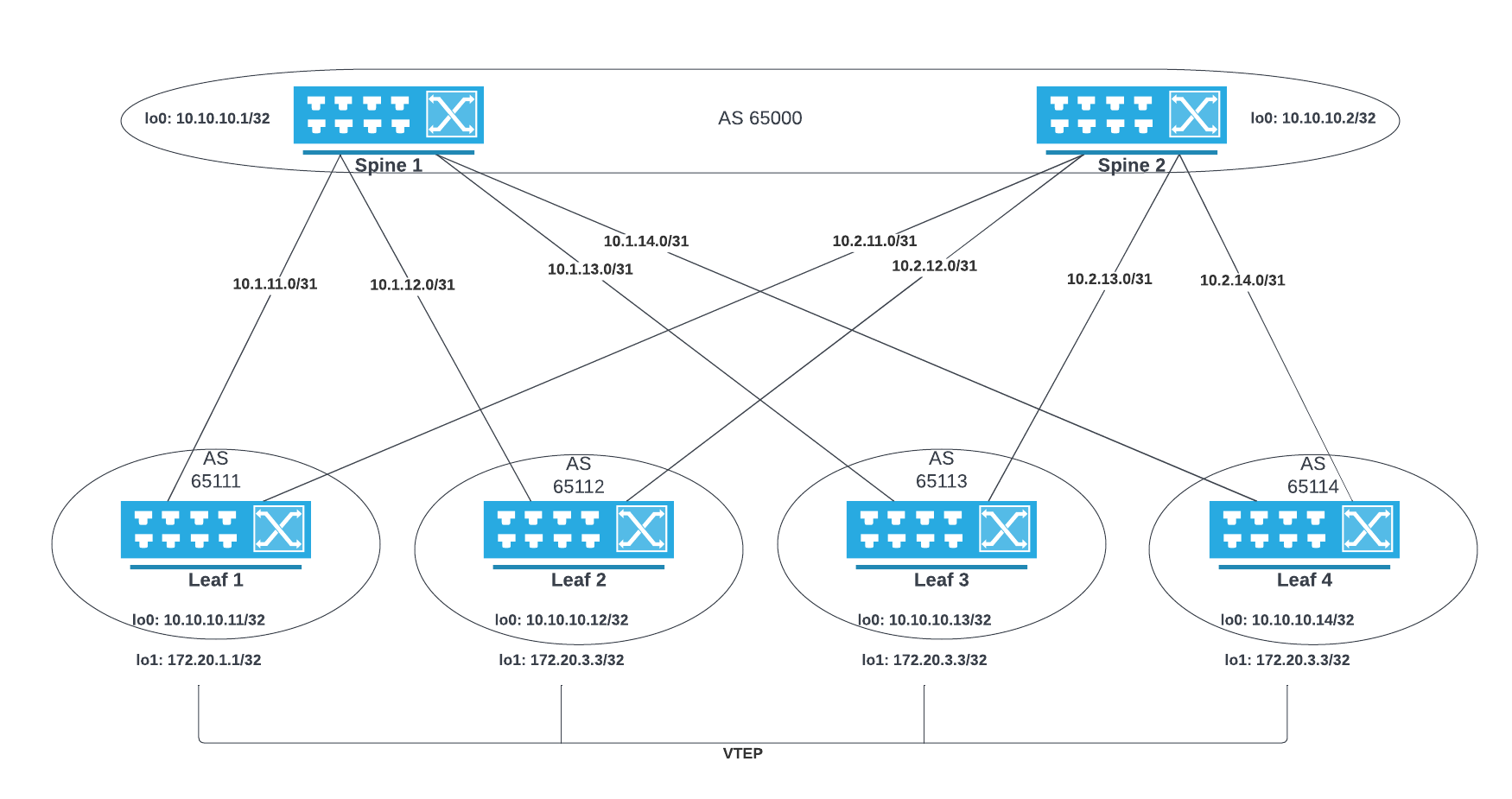
Lab Prep
Ubuntu Server running; DHCP, TFTP and XMPP Servers
Creating the DHCP Server
Install the DHCP Server
sudo apt update
sudo apt install isc-dhcp-server
Configure the DHCP server with option 66 and 67
subnet 172.16.1.0 netmask 255.255.255.0 {
 default-lease-time 43200;
 max-lease-time 86400;
 range 172.16.1.220 172.16.1.250;
 option routers 172.16.1.1;
 option domain-name-servers 1.1.1.1, 8.8.8.8;
#option domain-name "mydomain.example";
#option 66
 option tftp-server-name "172.16.1.69";
#option 67
 option bootfile-name "config-ztp-fix.cfg";
}
Bind the DHCP server to an interface. In my case, it will be ens3. Use the command ip a to locate the interface to be used.
ip a
! locate interface to be used

sudo nano /etc/default/isc-dhcp-server
INTERFACESv4="ens3"
Restart the DHCP Server and confirm it is running.
sudo systemctl restart isc-dhcp-server.service
sudo systemctl status isc-dhcp-server.service
Creating TFTP Server
Install the server
sudo apt update
sudo apt install tftpd-hpa
Check the server is running
sudo systemctl status tftpd-hpaConfigure the TFTP Server. The options important to me are;
– Add in a user specified directory /tftp
– Setting the user to connect to the /tftp server when connecting, using the --secure option
– Adding the option to create files/directories on the TFTP server. --create option
sudo nano /etc/default/tftpd-hpa# /etc/default/tftpd-hpa
TFTP_USERNAME="tftp"
TFTP_DIRECTORY="/tftp"
TFTP_ADDRESS=":69"
TFTP_OPTIONS="--secure --create"Change the TFTP directory owner and group to the tftp user
sudo chown tftp:tftp /tftp
Restart and check the server status
sudo systemctl restart tftpd-hpa
sudo systemctl status tftpd-hpa
Installing and configuring XMPP
This is a repeat of when I configure XMPP on Ubuntu in a previous post. All switches have been added to the XMPP server.
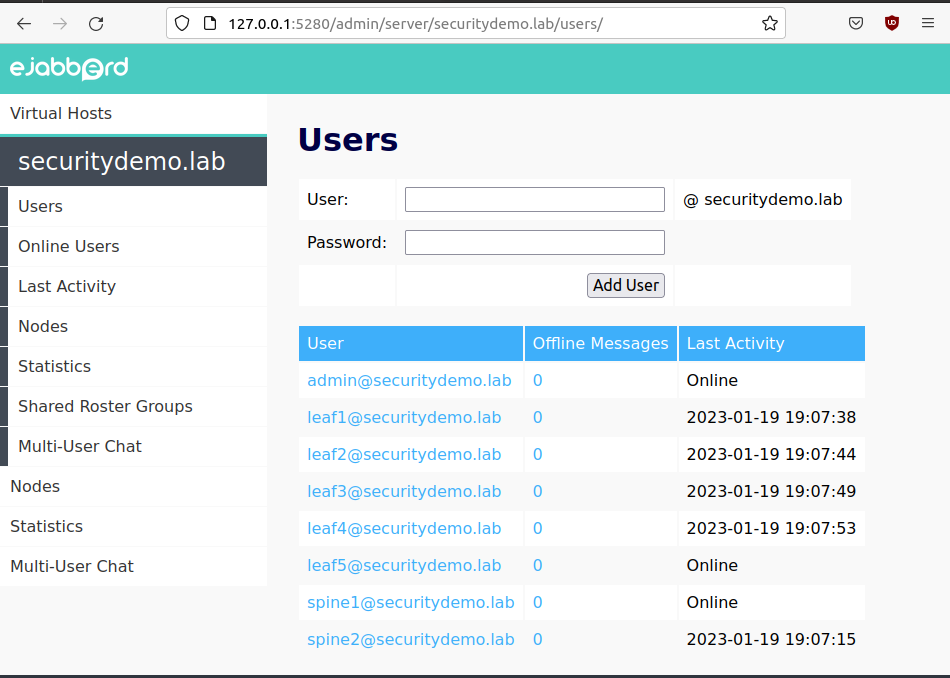
I have also used the same GAJIM client. The installation and configuration for the has been described in a previous post.
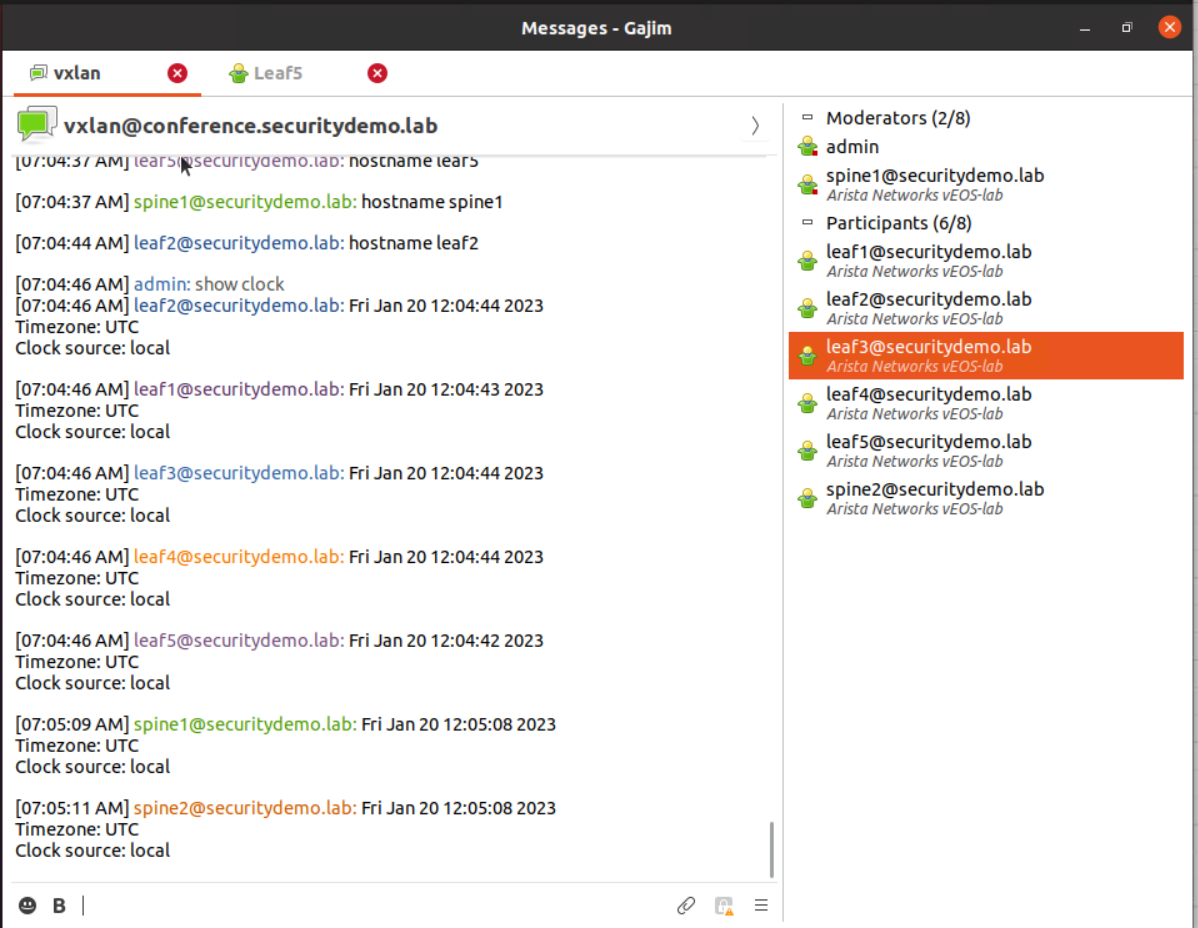
Not all switches are contacts in GAJIM client. This is because all switches are automatically joining the VXLAN switch-group (chat group) and so do not need to be individual contacts. I can reach them through the chat group without manually adding new switch contacts.
Automation Scripts
There are four files in total to get this running. Three are similar to the previous VXLAN 2 automation post. The new file is a python script that is very similar to the VXLAN config creation script. All the files can be found on GitHub.
In these scripts there is additional configuration for XMPP, this is pretty much lifted from the XMPP post
spine1(config-mgmt-xmpp)#sh run sec xmpp
management xmpp
   no shutdown
   server 172.16.1.69
   username spine1@securitydemo.lab password 7 03374F0E000E2F1E1E5B49
   session privilege 15
   switch-group vxlan@conference.securitydemo.lab
   domain securitydemo.lab
- config-ztp-fix.cfg
!
hostname provision-me
!
!
interface Management1
 description Provisioning-in-progress
 ip address dhcp

ip route 0.0.0.0/0 172.16.1.1
!
ip routing
event-handler ZTP1
 trigger on-startup-config
 action bash `FastCli -p 15 -c 'copy tftp:172.16.1.69/ZTP1.py flash:'`; `FastCli -p 15 -c 'copy tftp:172.16.1.69/AEM_VXLAN_DeviceReady.py flash:'`; `FastCli -p 15 -c 'copy tftp:172.16.1.69/newSpineLeaf.py flash:'`; python3 /mnt/flash/ZTP1.py; `FastCli -p 15 -c 'reload in 1 force reason ZTP1 provisioning'`
2. ZTP1.py
#!/usr/bin/python

from collections import Counter
import subprocess
import sys
import time

# Delay for a 60 seconds
time.sleep(60)
output = subprocess.Popen(["/usr/bin/FastCli", "-c", "show lldp neigh"], stdout=subprocess.PIPE).communicate()[0]
out2 = list(iter(output.decode().split()))

# Count interfaces for spine
lookup = ["Ethernet1", "Ethernet2", "Ethernet3", "Ethernet4"]
all_counts = Counter(out2)
counts = {k: all_counts[k] for k in lookup}
print(f"all counts {all_counts}")
print(f"counts {counts}")
print(f"counts {counts.values()}")

# Determine if spine or leaf
for value in counts.values():
    print(value)
    if value >= 4:
        switch = "spine"
        break
    else:
        switch = "leaf"

# Determine spine number
for key, value in counts.items():
    if value >= 4:
        spine_num = key[8:]
        break

# Assing spine number hostname and IP
if switch == "spine":
    hostname = "spine{}".format(spine_num)
    ip_addr = "172.16.1.1{}".format(spine_num)

# Determine and assign leaf hostname and IP
if switch == "leaf":
    out3 = list(iter(output.decode().splitlines()))
    intnum = out3[8].split()[2][8:]
    hostname = "leaf{}".format(intnum)
    ip_addr = "172.16.1.1{}".format(intnum)


# Add AEM for vxlan python script
# download python script from tftp
# create AEM


# Create startup-config file
f = open("/mnt/flash/startup-config", "w")
f.write("\nhostname {}".format(hostname))
f.write("\ninterface Management1\nip address {}/24".format(ip_addr))
f.write("\nip routing")
f.write("\nip route 0.0.0.0/0 172.16.1.1")
# XMPP
f.write("\nmanagement xmpp")
f.write("\ndomain securitydemo.lab")
f.write("\nusername {} password Stefan2020".format(hostname))
f.write("\nsession privilege 15")
f.write("\nserver 172.16.1.69")
f.write("\nswitch-group vxlan")
f.write("\nno shutdown")
# Remove AEM ZTP1
f.write("\nno event-handler ZTP1")
# Add AEM for VXLAN
f.write("\nevent-handler VXLAN_CONFIG")
f.write("\ntrigger on-startup-config")
# Reload switch to run VXLAN AEM
f.write("\n action bash python3 /mnt/flash/AEM_VXLAN_DeviceReady.py; `FastCli -p 15 -c 'reload in 1 force reason VXLAN Configuration'`")

f.close()
sys.exit( 0 )
3. AEM_VXLAN_DeviceReady.py
import os
import subprocess
from collections import Counter
import time


def get_hostname():

    with open('/mnt/flash/startup-config') as f:
    # with open('startup-config') as f:
        startup = f.readlines()

    # Get Hostname
    for line in startup:
        if "hostname" in line:
            hostname = line.split("\n")[0][9:]
    return hostname


def get_lldp_interfaces():
    # run lldp bash command from python
    output = subprocess.Popen(["/usr/bin/FastCli", "-c", "show lldp neigh | i Ethernet"], stdout=subprocess.PIPE).communicate()[0]
    out2 = list(iter(output.split()))

    leaf_count = 0
    spine_count = 0
    switch_list = []
    for switch in out2:
        # print(switch.decode())
        if "leaf" in switch.decode():
            leaf_count + 1
            switch_list.append(switch.decode())
        elif "spine" in switch.decode():
            spine_count + 1
            switch_list.append(switch.decode())

    return switch_list


# Configure IP Addresses
def interface_config(hostname, switch_list):
    interface = []

    if "spine" in hostname:
        for switch in switch_list:
            eth = f"\
interface ethernet{switch[-1]}\n\
description LINK to {switch.upper()}.LAB\n\
mtu 9200\n\
logging event link-status\n\
no switchport\n\
ip address 10.{hostname[-1]}.1{switch[-1]}.0/31\n\
arp aging timeout 1200\n\
"
            interface.append(eth)

        lo0 = f"\
interface loopback 0\n\
description MANAGEMENT\n\
ip address 10.10.10.{hostname[-1]}/32\n\
"
        interface.extend([lo0])

    elif "leaf" in hostname:
        print(f"{hostname} Interface IP Addresses will be...")
        eth1 = f"10.{hostname[-1]}.1{hostname[-1]}.1/31"
        eth2 = f"10.{hostname[-1]}.1{hostname[-1]}.1/31"

        for switch in switch_list:
            eth = f"\
interface ethernet{switch[-1]}\n\
description LINK to {switch.upper()}.LAB\n\
mtu 9200\n\
logging event link-status\n\
no switchport\n\
ip address 10.{switch[-1]}.1{hostname[-1]}.1/31\n\
arp aging timeout 1200\n\
"
            interface.append(eth)

        lo0 = f"\
interface loopback 0\n\
description MANAGEMENT\n\
ip address 10.10.10.1{hostname[-1]}/32\n\
"

        lo1 = f"\
interface loopback 1\n\
description LOGICAL VTEP\n\
ip address 172.20.{hostname[-1]}.{hostname[-1]}/32\n\
"
        interface.extend([eth1, eth2, lo0, lo1])

    interface_text = "\n".join(interface)
    print(interface_text)

    return interface


# BGP Underlay Config
def underlay_config(hostname, switch_list):

# ['leaf1', 'leaf2', 'leaf3', 'leaf4']

    if "spine" in hostname:
        # Create BGP Config
        bgp_config = []
        asn = 'router bgp 65000'
        router_id = f" router-id 10.10.10.{hostname[-1]}"
        ecmp = ' maximum-paths 4 ecmp 64'
        distance = ' distance bgp 20 200 200'

        bgp_config.insert(0,asn)
        bgp_config.insert(1,router_id)
        bgp_config.insert(2,distance)
        bgp_config.insert(3,ecmp)

        for switch in switch_list:
            neighbour = f"\
 neighbor LEAFS6511{switch[-1]} peer group\n\
 neighbor LEAFS6511{switch[-1]} remote-as 6511{switch[-1]}\n\
 neighbor 10.{hostname[-1]}.1{switch[-1]}.1 peer group LEAFS6511{switch[-1]}\n\
 neighbor 10.{hostname[-1]}.1{switch[-1]}.1 description LEAF{switch[-1]}.LAB\n\
"
            bgp_config.append(neighbour)

    elif "leaf" in hostname:
        # Create BGP Config
        bgp_config = []
        asn = f'router bgp 6511{hostname[-1]}'
        router_id = f" router-id 10.10.10.1{hostname[-1]}"
        distance = ' distance bgp 20 200 200'
        ecmp = ' maximum-paths 4 ecmp 64'
        bgp_group = ' neighbor SPINE peer group'
        bgp_group_asn = ' neighbor SPINE remote-as 65000'
        redistribute = ' redistribute connected\n'

        bgp_config.insert(0,asn)
        bgp_config.insert(1,router_id)
        bgp_config.insert(2,distance)
        bgp_config.insert(3,bgp_group)
        bgp_config.insert(4,bgp_group_asn)
        bgp_config.insert(5,ecmp)

        # ['spine1', 'spine2', 'spine3', 'spine4']
        for switch in switch_list:
            neighbour = f"\
 neighbor 10.{switch[-1]}.1{hostname[-1]}.0 peer group SPINE\n\
 neighbor 10.{switch[-1]}.1{hostname[-1]}.0 description SPINE{switch[-1]}.LAB\n\
"
            bgp_config.append(neighbour)
        bgp_config.append(redistribute)

    return bgp_config


# VTEP Config
def vtep_config(hostname):
    vtep_config = []
    asn = f'router bgp 6511{hostname[-1]}'
    router_id = f" router-id 10.10.10.1{hostname[-1]}"
    vtep_net = f" network 172.20.{hostname[-1]}.{hostname[-1]}/32\n"

    vtep_config.insert(0,asn)
    vtep_config.insert(1,router_id)
    vtep_config.insert(2,vtep_net)

    return vtep_config


# VXLAN EVPN
def vxlan_config(hostname, switch_list):

    if "spine" in hostname:
        vtep_bgp = [
                    "router bgp 65000",
                    " neighbor EVPN peer group",
                    " neighbor EVPN next-hop-unchanged",
                    " neighbor EVPN update-source Loopback0",
                    " neighbor EVPN ebgp-multihop 3",
                    " neighbor EVPN send-community extended",
                    " !"
                    ]

        for switch in switch_list:
            neighbour1 = f" neighbor 10.10.10.1{switch[-1]} peer group EVPN"
            neighbour2 = f" neighbor 10.10.10.1{switch[-1]} remote-as 6511{switch[-1]}"
            neighbour3 = f" neighbor 10.10.10.1{switch[-1]} description LEAF{switch[-1]}"

            vtep_bgp.extend([neighbour1, neighbour2, neighbour3])

    elif "leaf" in hostname:
        vtep_bgp = [
                    "interface Vxlan1",
                    " vxlan source-interface Loopback1",
                    " vxlan udp-port 4789\n!",
                    f"router bgp 6511{hostname[-1]}",
                    " neighbor EVPN peer group",
                    " neighbor EVPN remote-as 65000",
                    " neighbor EVPN update-source Loopback0",
                    " neighbor EVPN ebgp-multihop 3",
                    " neighbor EVPN send-community extended",
                    "!"
                    ]

        for switch in switch_list:
            neighbour1 = f" neighbor 10.10.10.{switch[-1]} peer group EVPN"
            neighbour2 = f" neighbor 10.10.10.{switch[-1]} description SPINE{switch[-1]}.LAB"

            vtep_bgp.extend([neighbour1, neighbour2])

    redistribute = ' redistribute connected'
    evpn_family = '!\n address-family evpn'
    evpn_active = '  neighbor EVPN activate\n'
    service = f'service routing protocols model multi-agent'

    vtep_bgp.extend([redistribute, evpn_family, evpn_active])
    vtep_bgp.insert(0,service)

    return vtep_bgp


# VXLAN EVPN VRF
def vxlan_vrf_config(hostname):

    vrf_config = [
                "vrf instance CUSTOMER1",
                "ip routing vrf CUSTOMER1",
                "vlan 20",
                "vlan 30",
                "interface Vlan20",
                "no autostate",
                "vrf CUSTOMER1",
                "ip address virtual 192.168.20.1/24",
                "interface Vlan30",
                "no autostate",
                "vrf CUSTOMER1",
                "ip address virtual 192.168.30.1/24",
                "interface Vxlan1",
                "vxlan vlan 20 vni 10020",
                "vxlan vlan 30 vni 10030",
                "vxlan vrf CUSTOMER1 vni 20120",
                f"router bgp 6511{hostname[-1]}",
                " vlan 20",
                f"rd 10.10.10.1{hostname[-1]}:20",
                "route-target both 20:20",
                "redistribute learned",
                "vlan 30",
                f"rd 10.10.10.1{hostname[-1]}:30",
                "route-target both 30:30",
                "redistribute learned",
                "vrf CUSTOMER1",
                f"rd 10.10.10.1{hostname[-1]}:20120",
                "route-target import evpn 20:120",
                "route-target export evpn 20:120",
                "route-target import evpn 30:130",
                "route-target export evpn 30:130",
                "redistribute connected",
                ]

    return vrf_config


# Save to the special location, see AEM post


if __name__ == '__main__':
    # introduce a wait period of 1 minute before executing so all switches are up and have basic hostnames
    time.sleep(60)
    hostname = get_hostname()
    switch_list = get_lldp_interfaces()

    # Standard config for all switches
    interfaces = interface_config(hostname, switch_list)
    underlay = underlay_config(hostname, switch_list)

    # Leaf specific config
    if "leaf" in hostname:
        vtep = vtep_config(hostname)

    # VXLAN config spine and leaf
    vxlan = vxlan_config(hostname, switch_list)

    if "leaf" in hostname:
        vrf = vxlan_vrf_config(hostname)


    # Save config to file
    with open('/mnt/flash/vxlan_config.cfg', 'w') as f:
        f.write('\n'.join(interfaces))
        f.write('\n'.join(underlay))
        if "leaf" in hostname:
            f.write('\n'.join(vtep))
        f.write('\n'.join(vxlan))
        if "leaf" in hostname:
            f.write('\n'.join(vrf))
        # Remove VXLAN AEM
        f.write("\nno event-handler VXLAN_CONFIG")


    subprocess.Popen(["/usr/bin/FastCli", "-p 15", "-c", "copy flash:vxlan_config.cfg running-config"], stdout=subprocess.PIPE).communicate()[0]
    subprocess.Popen(["/usr/bin/FastCli", "-p 15", "-c", "wr mem"], stdout=subprocess.PIPE).communicate()[0]
    # Reload for multi-agent service
    subprocess.Popen(["/usr/bin/FastCli", "-p 15", "-c", "reload in 1 force reason VXLAN service multi-agent"], stdout=subprocess.PIPE).communicate()[0]
4. newSpineLeaf.py
import os
import subprocess
from collections import Counter
import time


def get_hostname():

    with open('/mnt/flash/startup-config') as f:
    # with open('startup-config') as f:
        startup = f.readlines()

    # Get Hostname
    for line in startup:
        if "hostname" in line:
            hostname = line.split("\n")[0][9:]
    return hostname


def get_lldp_interfaces():
    # run lldp bash command from python
    output = subprocess.Popen(["/usr/bin/FastCli", "-c", "show lldp neigh | i Ethernet"], stdout=subprocess.PIPE).communicate()[0]
    out2 = list(iter(output.split()))

    leaf_count = 0
    spine_count = 0
    switch_list = []
    for switch in out2:
        # print(switch.decode())
        if "leaf" in switch.decode():
            leaf_count + 1
            switch_list.append(switch.decode())
        elif "spine" in switch.decode():
            spine_count + 1
            switch_list.append(switch.decode())

    return switch_list


# Configure IP Addresses
def interface_config(hostname, switch_list):
    interface = []

    if "spine" in hostname:
        for switch in switch_list:
            eth = f"\
interface ethernet{switch[-1]}\n\
description LINK to {switch.upper()}.LAB\n\
mtu 9200\n\
logging event link-status\n\
no switchport\n\
ip address 10.{hostname[-1]}.1{switch[-1]}.0/31\n\
arp aging timeout 1200\n\
"
            interface.append(eth)

        lo0 = f"\
interface loopback 0\n\
description MANAGEMENT\n\
ip address 10.10.10.{hostname[-1]}/32\n\
"
        interface.extend([lo0])

    elif "leaf" in hostname:
        print(f"{hostname} Interface IP Addresses will be...")
        eth1 = f"10.{hostname[-1]}.1{hostname[-1]}.1/31"
        eth2 = f"10.{hostname[-1]}.1{hostname[-1]}.1/31"

        for switch in switch_list:
            eth = f"\
interface ethernet{switch[-1]}\n\
description LINK to {switch.upper()}.LAB\n\
mtu 9200\n\
logging event link-status\n\
no switchport\n\
ip address 10.{switch[-1]}.1{hostname[-1]}.1/31\n\
arp aging timeout 1200\n\
"
            interface.append(eth)

        lo0 = f"\
interface loopback 0\n\
description MANAGEMENT\n\
ip address 10.10.10.1{hostname[-1]}/32\n\
"

        lo1 = f"\
interface loopback 1\n\
description LOGICAL VTEP\n\
ip address 172.20.{hostname[-1]}.{hostname[-1]}/32\n\
"
        interface.extend([eth1, eth2, lo0, lo1])

    interface_text = "\n".join(interface)
    print(interface_text)

    return interface


# BGP Underlay Config
def underlay_config(hostname, switch_list):

# ['leaf1', 'leaf2', 'leaf3', 'leaf4']

    if "spine" in hostname:
        # Create BGP Config
        bgp_config = []
        asn = 'router bgp 65000'
        router_id = f" router-id 10.10.10.{hostname[-1]}"
        distance = ' distance bgp 20 200 200'

        bgp_config.insert(0,asn)
        bgp_config.insert(1,router_id)
        bgp_config.insert(2,distance)

        for switch in switch_list:
            neighbour = f"\
 neighbor LEAFS6511{switch[-1]} peer group\n\
 neighbor LEAFS6511{switch[-1]} remote-as 6511{switch[-1]}\n\
 neighbor 10.{hostname[-1]}.1{switch[-1]}.1 peer group LEAFS6511{switch[-1]}\n\
 neighbor 10.{hostname[-1]}.1{switch[-1]}.1 description LEAF{switch[-1]}.LAB\n\
"
            bgp_config.append(neighbour)

    elif "leaf" in hostname:
        # Create BGP Config
        bgp_config = []
        asn = f'router bgp 6511{hostname[-1]}'
        router_id = f" router-id 10.10.10.1{hostname[-1]}"
        distance = ' distance bgp 20 200 200'
        bgp_group = ' neighbor SPINE peer group'
        bgp_group_asn = ' neighbor SPINE remote-as 65000'
        redistribute = ' redistribute connected\n'

        bgp_config.insert(0,asn)
        bgp_config.insert(1,router_id)
        bgp_config.insert(2,distance)
        bgp_config.insert(3,bgp_group)
        bgp_config.insert(4,bgp_group_asn)

        # ['spine1', 'spine2', 'spine3', 'spine4']
        for switch in switch_list:
            neighbour = f"\
 neighbor 10.{switch[-1]}.1{hostname[-1]}.0 peer group SPINE\n\
 neighbor 10.{switch[-1]}.1{hostname[-1]}.0 description SPINE{switch[-1]}.LAB\n\
"
            bgp_config.append(neighbour)
        bgp_config.append(redistribute)

    return bgp_config


# VTEP Config
def vtep_config(hostname):
    vtep_config = []
    asn = f'router bgp 6511{hostname[-1]}'
    router_id = f" router-id 10.10.10.1{hostname[-1]}"
    vtep_net = f" network 172.20.{hostname[-1]}.{hostname[-1]}/32\n"

    vtep_config.insert(0,asn)
    vtep_config.insert(1,router_id)
    vtep_config.insert(2,vtep_net)

    return vtep_config


# VXLAN EVPN
def vxlan_config(hostname, switch_list):

    if "spine" in hostname:
        vtep_bgp = [
                    "router bgp 65000",
                    " neighbor EVPN peer group",
                    " neighbor EVPN next-hop-unchanged",
                    " neighbor EVPN update-source Loopback0",
                    " neighbor EVPN ebgp-multihop 3",
                    " neighbor EVPN send-community extended",
                    " !"
                    ]

        for switch in switch_list:
            neighbour1 = f" neighbor 10.10.10.1{switch[-1]} peer group EVPN"
            neighbour2 = f" neighbor 10.10.10.1{switch[-1]} remote-as 6511{switch[-1]}"
            neighbour3 = f" neighbor 10.10.10.1{switch[-1]} description LEAF{switch[-1]}"

            vtep_bgp.extend([neighbour1, neighbour2, neighbour3])

    elif "leaf" in hostname:
        vtep_bgp = [
                    "interface Vxlan1",
                    " vxlan source-interface Loopback1",
                    " vxlan udp-port 4789\n!",
                    f"router bgp 6511{hostname[-1]}",
                    " neighbor EVPN peer group",
                    " neighbor EVPN remote-as 65000",
                    " neighbor EVPN update-source Loopback0",
                    " neighbor EVPN ebgp-multihop 3",
                    " neighbor EVPN send-community extended",
                    "!"
                    ]

        for switch in switch_list:
            neighbour1 = f" neighbor 10.10.10.{switch[-1]} peer group EVPN"
            neighbour2 = f" neighbor 10.10.10.{switch[-1]} description SPINE{switch[-1]}.LAB"

            vtep_bgp.extend([neighbour1, neighbour2])

    redistribute = ' redistribute connected'
    evpn_family = '!\n address-family evpn'
    evpn_active = '  neighbor EVPN activate\n'

    vtep_bgp.extend([redistribute, evpn_family, evpn_active])

    return vtep_bgp


# VXLAN EVPN VRF
def vxlan_vrf_config(hostname):

    vrf_config = [
                "vrf instance CUSTOMER1",
                "ip routing vrf CUSTOMER1",
                "vlan 20",
                "vlan 30",
                "interface Vlan20",
                "no autostate",
                "vrf CUSTOMER1",
                "ip address virtual 192.168.20.1/24",
                "interface Vlan30",
                "no autostate",
                "vrf CUSTOMER1",
                "ip address virtual 192.168.30.1/24",
                "interface Vxlan1",
                "vxlan vlan 20 vni 10020",
                "vxlan vlan 30 vni 10030",
                "vxlan vrf CUSTOMER1 vni 20120",
                f"router bgp 6511{hostname[-1]}",
                " vlan 20",
                f"rd 10.10.10.1{hostname[-1]}:20",
                "route-target both 20:20",
                "redistribute learned",
                "vlan 30",
                f"rd 10.10.10.1{hostname[-1]}:30",
                "route-target both 30:30",
                "redistribute learned",
                "vrf CUSTOMER1",
                f"rd 10.10.10.1{hostname[-1]}:20120",
                "route-target import evpn 20:120",
                "route-target export evpn 20:120",
                "route-target import evpn 30:130",
                "route-target export evpn 30:130",
                "redistribute connected",
                ]

    return vrf_config


if __name__ == '__main__':
    # introduce a wait period of 1 minute before executing so all switches are up and have basic hostnames
    hostname = get_hostname()
    switch_list = get_lldp_interfaces()

    # Standard config for all switches
    interfaces = interface_config(hostname, switch_list)
    underlay = underlay_config(hostname, switch_list)

    # Leaf specific config
    if "leaf" in hostname:
        vtep = vtep_config(hostname)

    # VXLAN config spine and leaf
    vxlan = vxlan_config(hostname, switch_list)

    if "leaf" in hostname:
        vrf = vxlan_vrf_config(hostname)


    # Save config to file
    with open('/mnt/flash/vxlan_config.cfg', 'w') as f:
        f.write('\n'.join(interfaces))
        f.write('\n'.join(underlay))
        if "leaf" in hostname:
            f.write('\n'.join(vtep))
        f.write('\n'.join(vxlan))
        if "leaf" in hostname:
            f.write('\n'.join(vrf))

    subprocess.Popen(["/usr/bin/FastCli", "-p 15", "-c", "copy flash:vxlan_config.cfg running-config"], stdout=subprocess.PIPE).communicate()[0]
    subprocess.Popen(["/usr/bin/FastCli", "-p 15", "-c", "wr mem"], stdout=subprocess.PIPE).communicate()[0]
Adding Leaf5
Before adding a new switch, the switch XMPP user must be added to the XMPP server. I have explained this in my XMPP configuration post, so a quick summary is that the commands are to be run as the root or ejabberd users.
osboxes@osboxes:~$ ejabberdctl register admin securitydemo.lab Stefan2020
ERROR: This command can only be run by root or the user ejabberd
root@osboxes:~# ejabberdctl register admin securitydemo.lab Stefan2020
User admin@securitydemo.lab successfully registered
root@osboxes:~# ejabberdctl register spine1 securitydemo.lab Stefan2020
User spine1@securitydemo.lab successfully registered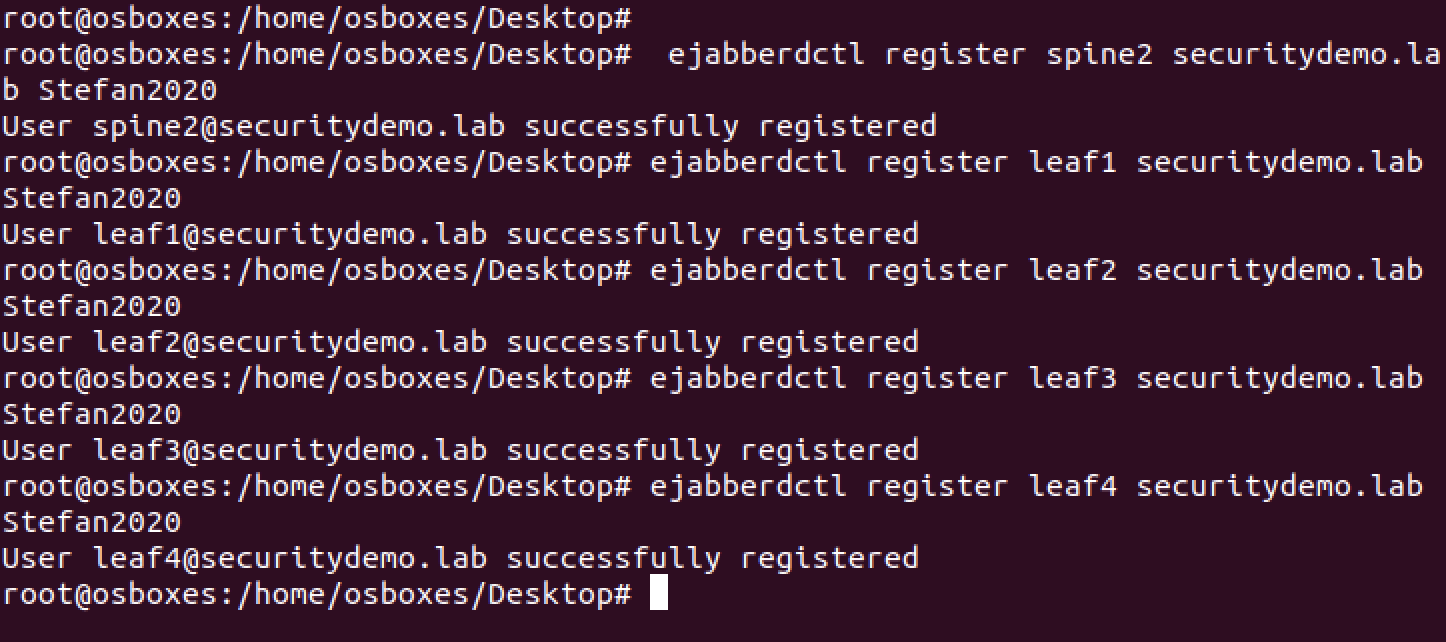
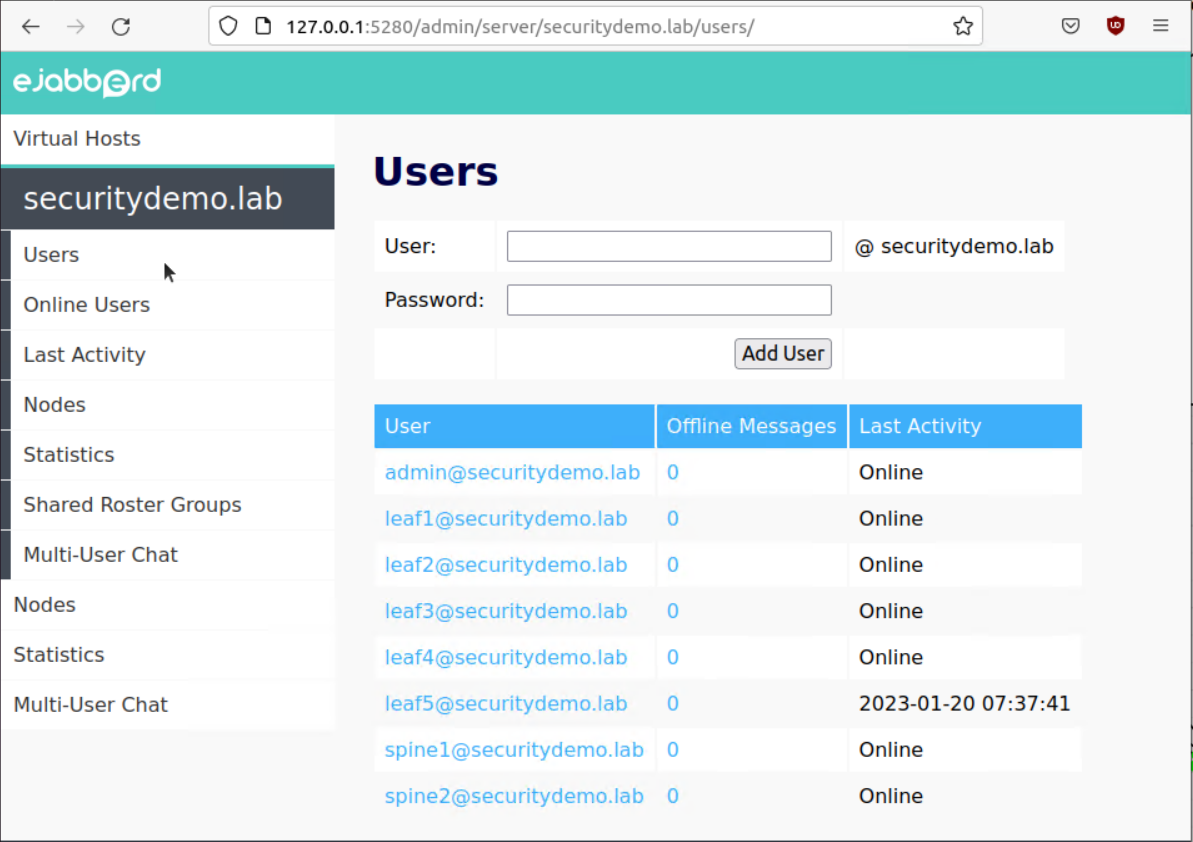
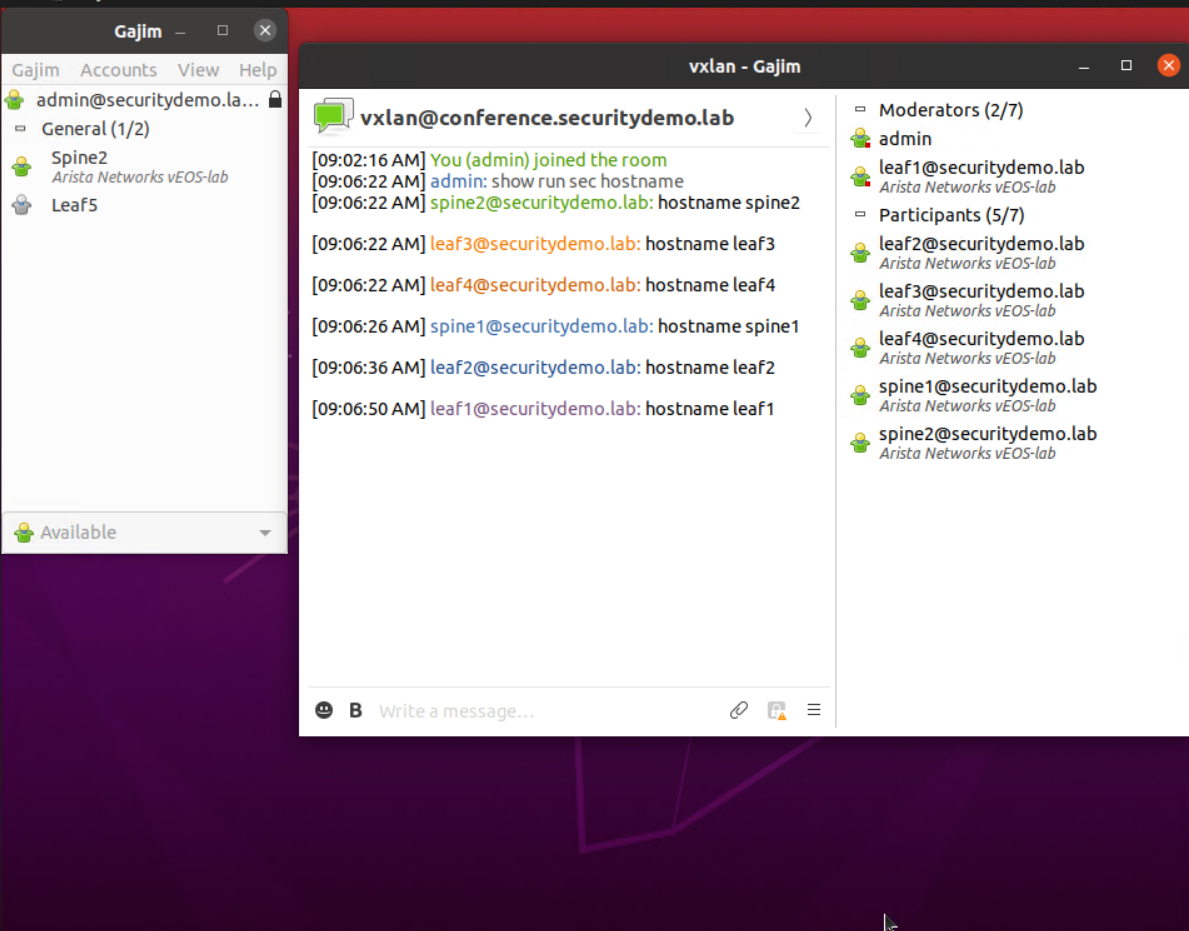
The current state of the VXLAN network is correct. BGP is working, and the switches have learnt about each other’s VTEP. Below is an example output from Spine1 and Leaf3 to demonstrate.
spine1#sh ip bgp summary
BGP summary information for VRF default
Router identifier 10.10.10.1, local AS number 65000
Neighbor Status Codes: m - Under maintenance
  Description              Neighbor         V AS           MsgRcvd   MsgSent  InQ OutQ  Up/Down State   PfxRcd PfxAcc
  LEAF1.LAB                10.1.11.1        4 65111             24        21    0    0 00:07:17 Estab   5      5
  LEAF2.LAB                10.1.12.1        4 65112             25        18    0    0 00:07:29 Estab   5      5
  LEAF3.LAB                10.1.13.1        4 65113             26        20    0    0 00:07:22 Estab   5      5
  LEAF4.LAB                10.1.14.1        4 65114             22        21    0    0 00:07:17 Estab   5      5
  LEAF1                    10.10.10.11      4 65111             34        30    0    0 00:06:56 Estab   5      5
  LEAF2                    10.10.10.12      4 65112             43        27    0    0 00:07:25 Estab   5      5
  LEAF3                    10.10.10.13      4 65113             38        27    0    0 00:07:20 Estab   5      5
  LEAF4                    10.10.10.14      4 65114             30        29    0    0 00:07:07 Estab   5      5
leaf3#show ip bgp summary
BGP summary information for VRF default
Router identifier 10.10.10.13, local AS number 65113
Neighbor Status Codes: m - Under maintenance
  Description              Neighbor         V AS           MsgRcvd   MsgSent  InQ OutQ  Up/Down State   PfxRcd PfxAcc
  SPINE1.LAB               10.1.13.0        4 65000             39        46    0    0 00:07:48 Estab   15     15
  SPINE2.LAB               10.2.13.0        4 65000             38        59    0    0 00:07:47 Estab   15     15
  SPINE1.LAB               10.10.10.1       4 65000             55        90    0    0 00:07:45 Estab   15     15
  SPINE2.LAB               10.10.10.2       4 65000             57        89    0    0 00:07:40 Estab   15     15
leaf3#show vxlan vtep
Remote VTEPS for Vxlan1:

VTEP             Tunnel Type(s)
---------------- --------------
172.20.1.1       flood, unicast
172.20.2.2       flood, unicast
172.20.4.4       flood, unicast

Total number of remote VTEPS:  3
Now that the users are added to the server, the new leaf switch can be turned on. This will go through the process of discovering what its hostname is and LLDP neighbours are From the hostname and LLDP neighbour details, the correct VXLAN configuration will be applied. At this point the new switch won’t have any BGP neighbours and be cut off from the rest of the fabric.
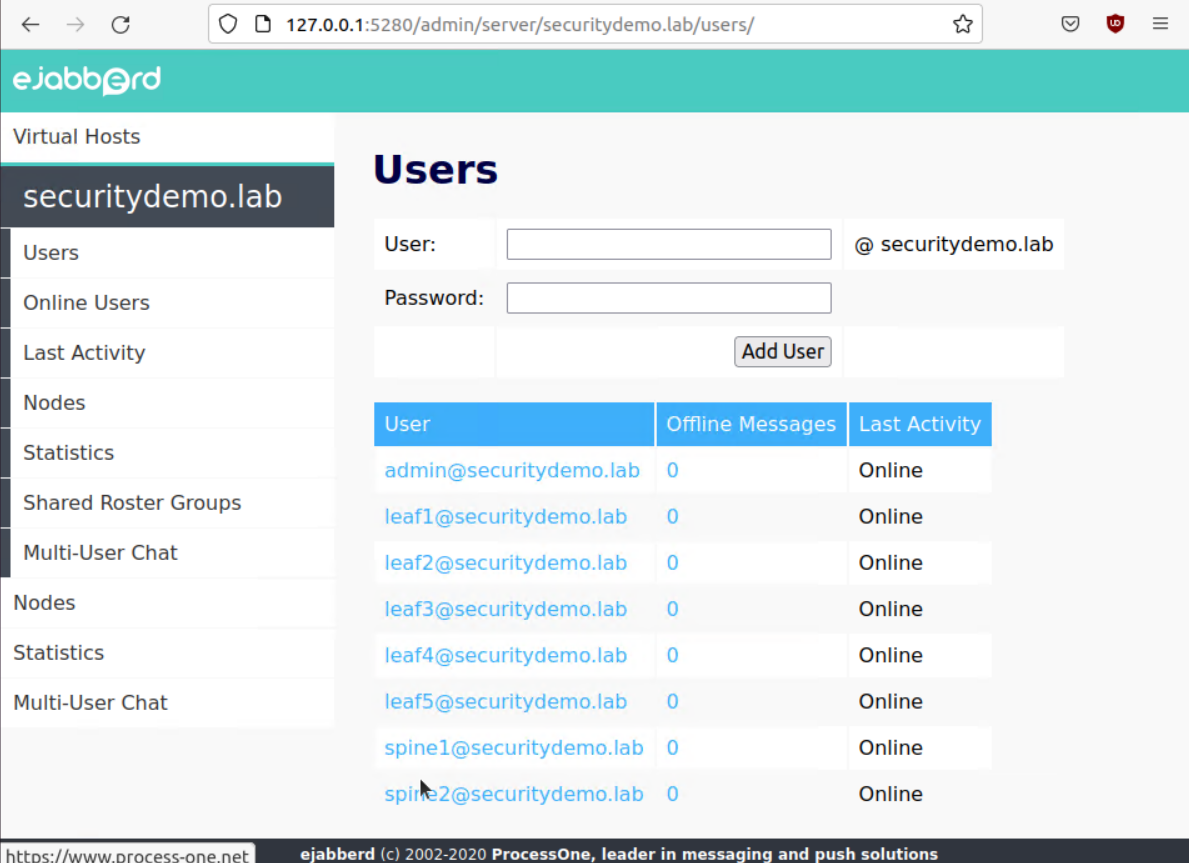
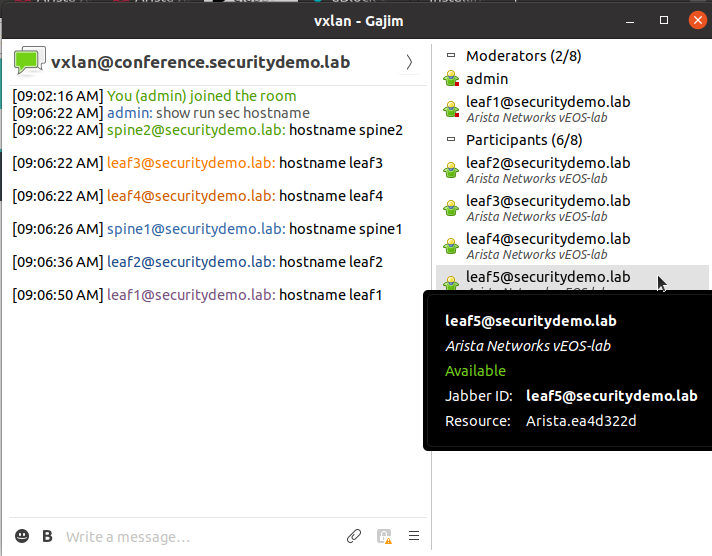
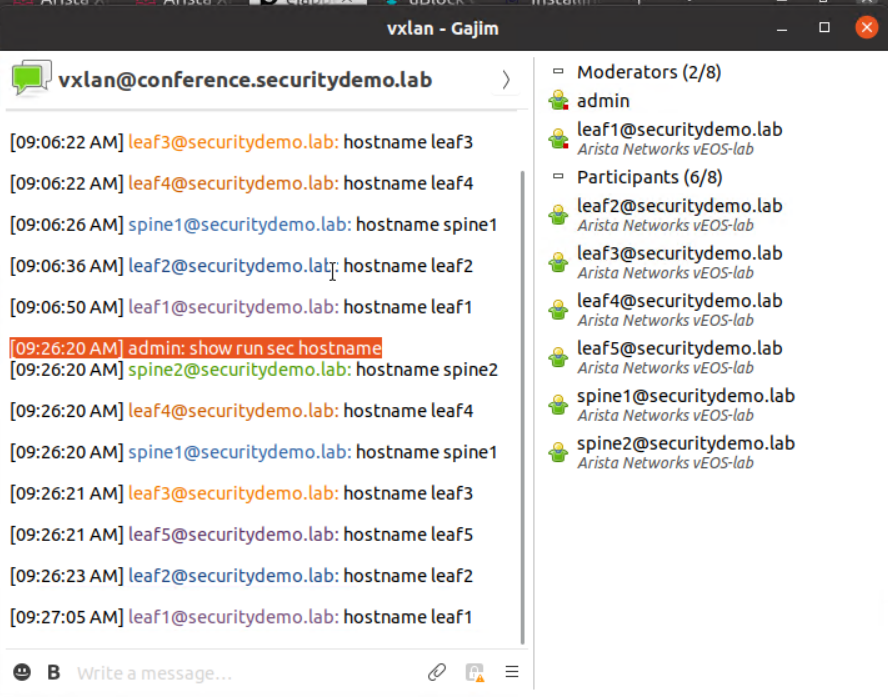
Leaf5 is cut off from the rest of the VXLAN fabric. The only functioning interface is the management.
leaf5#show ip bgp summary
BGP summary information for VRF default
Router identifier 10.10.10.15, local AS number 65115
Neighbor Status Codes: m - Under maintenance
  Description              Neighbor         V AS           MsgRcvd   MsgSent  InQ OutQ  Up/Down State   PfxRcd PfxAcc
  SPINE1.LAB               10.1.15.0        4 65000              0         0    0    0 00:04:03 Active
  SPINE2.LAB               10.2.15.0        4 65000              0         0    0    0 00:04:03 Active
  SPINE1.LAB               10.10.10.1       4 65000              0         0    0    0 00:04:03 Active
  SPINE2.LAB               10.10.10.2       4 65000              0         0    0    0 00:04:03 Active

leaf5#show vxlan vtep
Remote VTEPS for Vxlan1:

VTEP       Tunnel Type(s)
---------- --------------

Total number of remote VTEPS:  0
To fix the fact that the new switch is not yet part of the fabric, a manual command will be run from XMPP to all switches in the VXLAN chat group, even the new leaf. This command is to run the python script newSpineLeaf.py This will take seconds to execute and each switch in the fabric will have the correct config, allowing the new leaf5 to function correctly.
bash python3 /mnt/flash/newSpineLeaf.py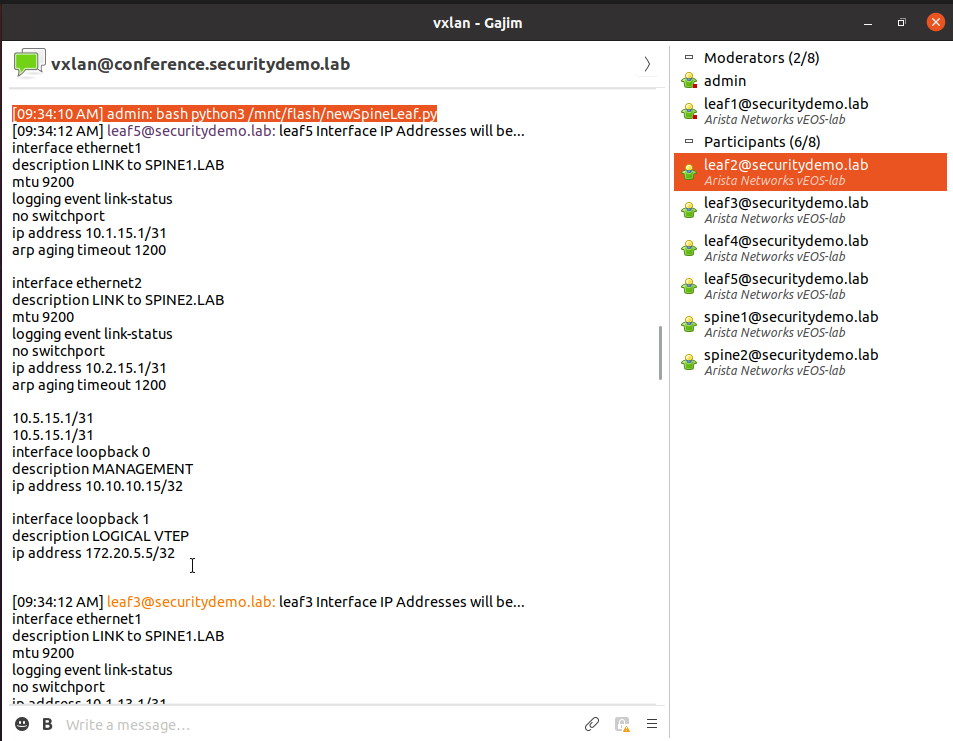
Now that the switches have reconfigured themselves, Leaf5 now has BGP neighbours, prefixes and knows about the remote VTEPs
leaf5#show ip bgp summary
BGP summary information for VRF default
Router identifier 10.10.10.15, local AS number 65115
Neighbor Status Codes: m - Under maintenance
  Description              Neighbor         V AS           MsgRcvd   MsgSent  InQ OutQ  Up/Down State   PfxRcd PfxAcc
  SPINE1.LAB               10.1.15.0        4 65000             10         7    0    0 00:01:07 Estab   19     19
  SPINE2.LAB               10.2.15.0        4 65000             10        12    0    0 00:01:07 Estab   19     19
  SPINE1.LAB               10.10.10.1       4 65000             24        16    0    0 00:01:06 Estab   19     19
  SPINE2.LAB               10.10.10.2       4 65000             24        28    0    0 00:00:59 Estab   19     19


leaf5#show vxlan vtep
Remote VTEPS for Vxlan1:

VTEP             Tunnel Type(s)
---------------- --------------
172.20.1.1       flood, unicast
172.20.2.2       flood, unicast
172.20.3.3       flood, unicast
172.20.4.4       flood, unicast

Total number of remote VTEPS:  4
Adding Spine3
Adding a new spine switch will behave in the same way as adding a Leaf5 did.
Add the new switch user to the XMPP server

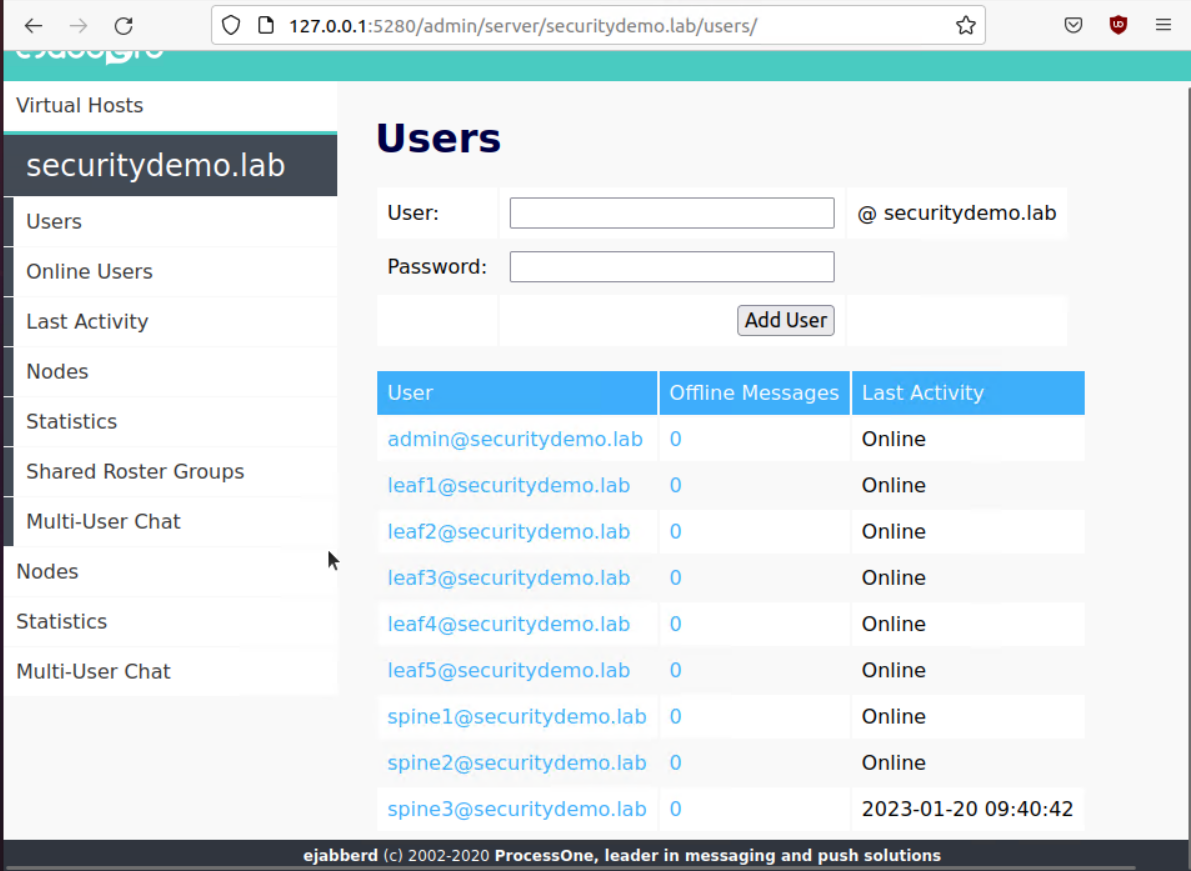
Cable and start the switch Spine3
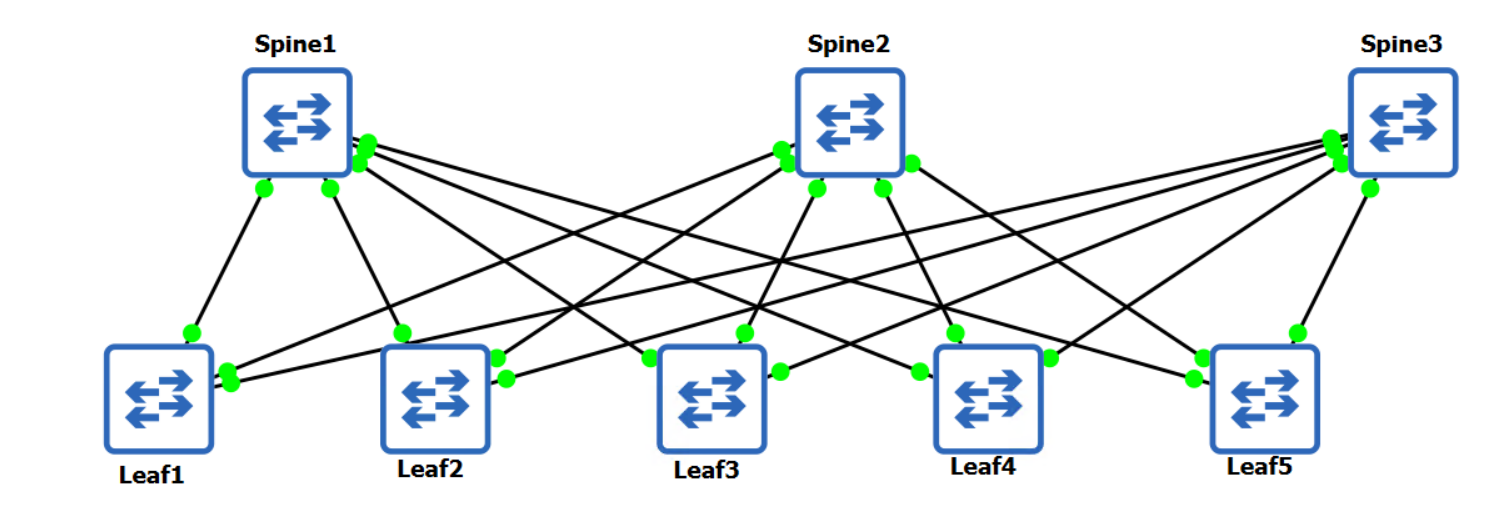
Once that has booted up and is responding to commands sent via XMPP chat, all that is left is top run the newSpineLeaf.py script to add it to the fabric correctly.
spine3#show ip bgp summary
BGP summary information for VRF default
Router identifier 10.10.10.3, local AS number 65000
Neighbor Status Codes: m - Under maintenance
  Description              Neighbor         V AS           MsgRcvd   MsgSent  InQ OutQ  Up/Down State   PfxRcd PfxAcc
  LEAF1.LAB                10.3.11.1        4 65111              0         0    0    0 00:02:20 Active
  LEAF2.LAB                10.3.12.1        4 65112              0         0    0    0 00:02:20 Active
  LEAF3.LAB                10.3.13.1        4 65113              0         0    0    0 00:02:20 Active
  LEAF4.LAB                10.3.14.1        4 65114              0         0    0    0 00:02:20 Active
  LEAF5.LAB                10.3.15.1        4 65115              0         0    0    0 00:02:20 Active
  LEAF1                    10.10.10.11      4 65111              0         0    0    0 00:02:20 Active
  LEAF2                    10.10.10.12      4 65112              0         0    0    0 00:02:20 Active
  LEAF3                    10.10.10.13      4 65113              0         0    0    0 00:02:20 Active
  LEAF4                    10.10.10.14      4 65114              0         0    0    0 00:02:20 Active
  LEAF5                    10.10.10.15      4 65115              0         0    0    0 00:02:20 Active
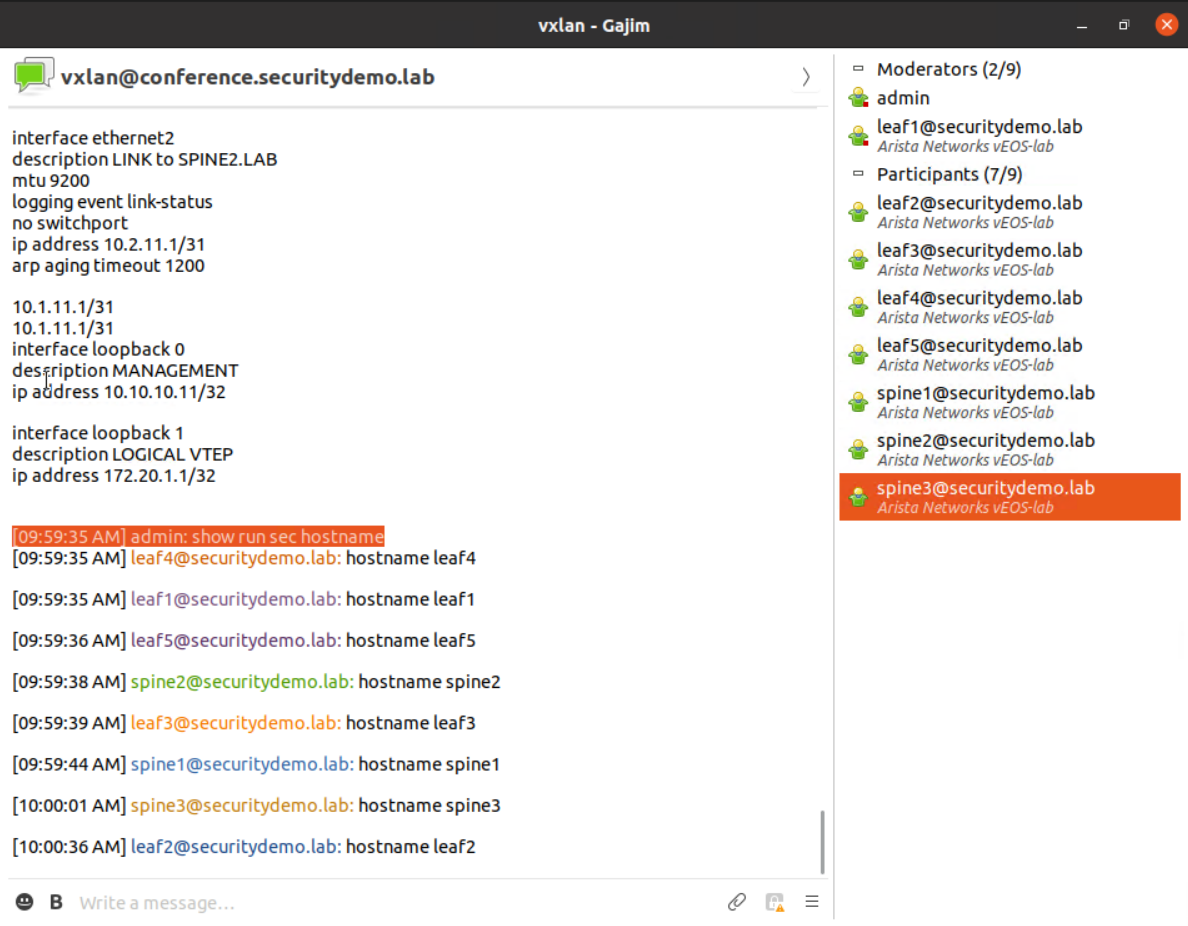
Now that all switches are responding, time to run the newSpineLeaf.py script.
spine3#show ip bgp summary
BGP summary information for VRF default
Router identifier 10.10.10.3, local AS number 65000
Neighbor Status Codes: m - Under maintenance
  Description              Neighbor         V AS           MsgRcvd   MsgSent  InQ OutQ  Up/Down State   PfxRcd PfxAcc
  LEAF1.LAB                10.3.11.1        4 65111             15        10    0    0 00:01:51 Estab   6      6
  LEAF2.LAB                10.3.12.1        4 65112             13         9    0    0 00:00:15 Estab   6      6
  LEAF3.LAB                10.3.13.1        4 65113             15        10    0    0 00:01:51 Estab   6      6
  LEAF4.LAB                10.3.14.1        4 65114             13        10    0    0 00:01:51 Estab   6      6
  LEAF5.LAB                10.3.15.1        4 65115             14        11    0    0 00:01:51 Estab   6      6
  LEAF1                    10.10.10.11      4 65111             30        24    0    0 00:01:43 Estab   6      6
  LEAF2                    10.10.10.12      4 65112             28        23    0    0 00:00:10 Estab   6      6
  LEAF3                    10.10.10.13      4 65113             30        24    0    0 00:01:43 Estab   6      6
  LEAF4                    10.10.10.14      4 65114             30        24    0    0 00:01:50 Estab   6      6
  LEAF5                    10.10.10.15      4 65115             29        24    0    0 00:01:44 Estab   6      6
Below is BGP config taken from Leaf4 to show that ECMP is running and is going via the three spine switches for connectivity to the VTEPs.
leaf4#show ip route
! some output omitted

 B E      172.20.1.1/32 [20/0] via 10.1.14.0, Ethernet1
                               via 10.2.14.0, Ethernet2
                               via 10.3.14.0, Ethernet3
 B E      172.20.2.2/32 [20/0] via 10.1.14.0, Ethernet1
                               via 10.2.14.0, Ethernet2
                               via 10.3.14.0, Ethernet3
 B E      172.20.3.3/32 [20/0] via 10.1.14.0, Ethernet1
                               via 10.2.14.0, Ethernet2
                               via 10.3.14.0, Ethernet3
 C        172.20.4.4/32 is directly connected, Loopback1
 B E      172.20.5.5/32 [20/0] via 10.1.14.0, Ethernet1
                               via 10.2.14.0, Ethernet2
                               via 10.3.14.0, Ethernet3