
In my previous post, I have talked about deploying a CloudFormation nested stack. Here I will discuss how I made that nested stack work and the differences between a nested stack and cross-stack references.
Multi-Stack Architecture
Most simple projects will use a single CloudFormation stack. This has all the resources together in the same stack. All of the resources are isolated from other stacks and are created, updated and deleted together. None of the resources are shared between any other stacks.
There is nothing wrong with this single template approach for smaller projects. There is the potential to hit the 500 resource limit per stack, and if creating multiple similar stacks, each one would need to have the same resource duplicated per stack. Such as creating a VPC for each stack. That VPC resource would need to be copied into each stack, duplicating code.
The multi-stack architecture enables resources to be split up per stack, it also allows for resources to be shared between stacks. Multi-stack architecture can even allow for base resources to be created in one stack and shared with other stacks. Such as a VPC where other stacks will share the same VPC and build their resources onto that VPC.
The main differences between a nested stack a cross reference stack is a parent stack. The parent stack will call the individual stacks resulting in a nested stack. There are no outputs or imports required on the nested stack as there are in cross stack reference.
# Parent Stack
Resources:
  NetworkStack:
    Type: AWS::CloudFormation::Stack
    Properties:
      TemplateURL: https://s3.amazonaws.com/bucket-name/network.yaml

  ApplicationStack:
    Type: AWS::CloudFormation::Stack
    Properties:
      TemplateURL: https://s3.amazonaws.com/bucket-name/application.yaml
      Parameters:
        VPCId: !GetAtt NetworkStack.Outputs.VPCId

# network.yaml (Child Stack)
Resources:
  MyVPC:
    Type: AWS::EC2::VPC
    Properties:
      CidrBlock: 10.0.0.0/16

Outputs:
  VPCId:
    Description: VPC ID
    Value: !Ref MyVPC

# application.yaml (Child Stack)
Parameters:
  VPCId:
    Type: String
    Description: VPC ID from network stack

Resources:
  MySubnet:
    Type: AWS::EC2::Subnet
    Properties:
      VpcId: !Ref VPCId
      CidrBlock: 10.0.1.0/24
Multi-Stack Architecture – Nested Stacks
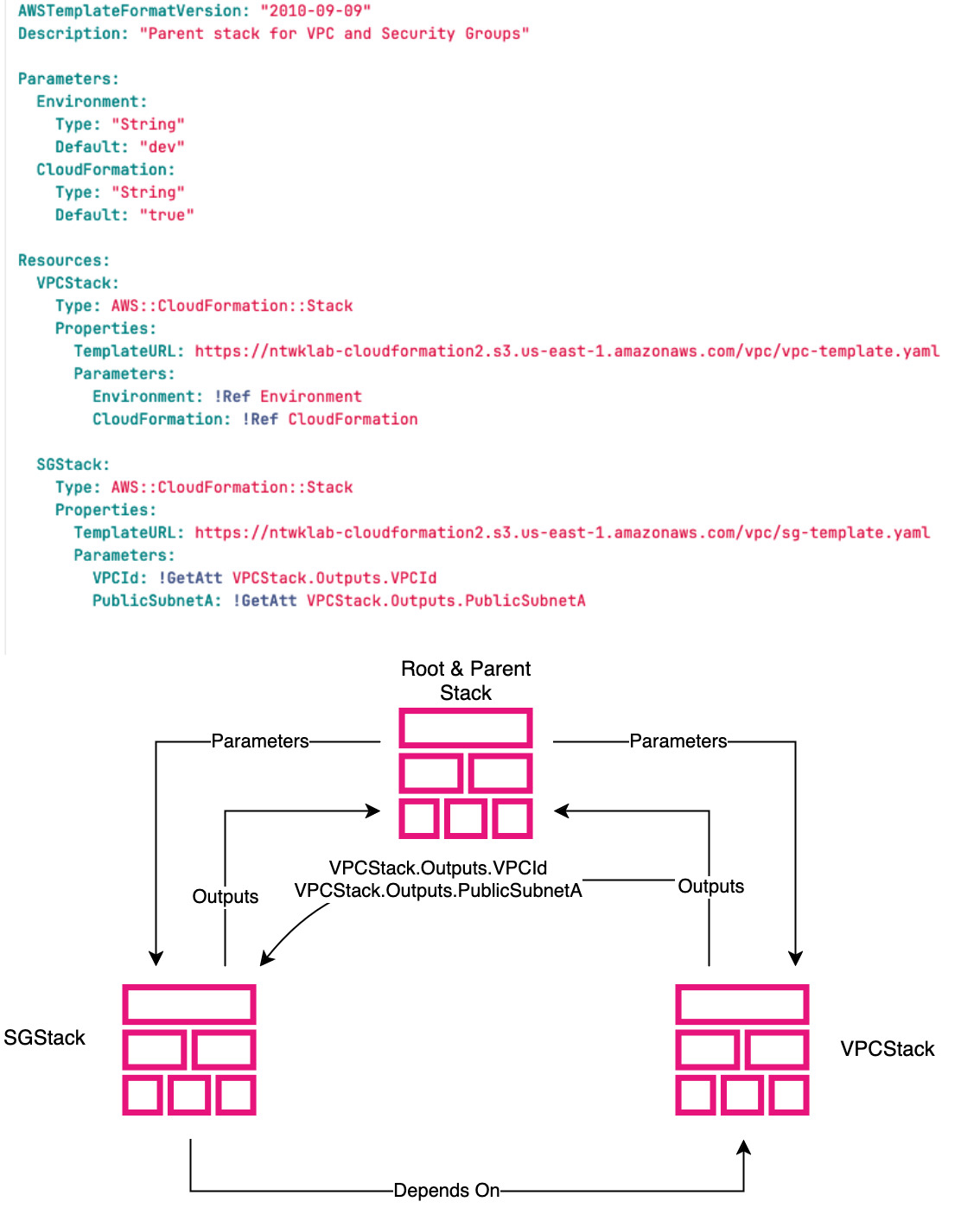
Each nested stack will have a root and parent stack. The root and parent stack shown in the diagram as the top stack. The root stack is created manually, by either a human or software process. This stack spawns the VPC and SG stacks. It is important to be aware that the child stacks such as VPCStack or SGStack can also be parent stacks and spawn other child stacks. This will give a hierarchy with the root stack sat at the top.
Inside the VPCStack there are two resources, one for each child stack for the VPC and SG. These templates are stored in S3 and can be reused many times by other nested stacks. The nested stacks will create brand-new resources each time they are used. The VPC or SG will not be shared between stacks. Only the code to create the resource is shared, meaning less duplication in writing, but not in actual resources created in the AWS account.
There are two parameters referenced by the SGStack. These are outputs from the VPCStack, one for VPCId and the other for PublicSubnetA. Those output parameters are then imported into the SGStack. Outputs between child stacks are passed via the root or parent stack.
The stack forms a single solution and is lifecycle linked, meaning that all the resources are created, updated and deleted together. To share resources between stacks that are not lifecycle linked this would be cross-stack references.
Multi-Stack Architecture – Cross-Stack References
Cross-stack references are used when there is a requirement for resources to be shared between stacks. For example, creating a single shared VPC for multiple environments.
Stacks are isolated by default, however there is a way to reference parameters between stacks, although there are limitations to be aware of.
Values are exported to an exports list in the region the stack has been created in. The exports list is isolated per region and per account. Each value must be uniquely named and may then be imported into other stacks using Fn::ImportValaue
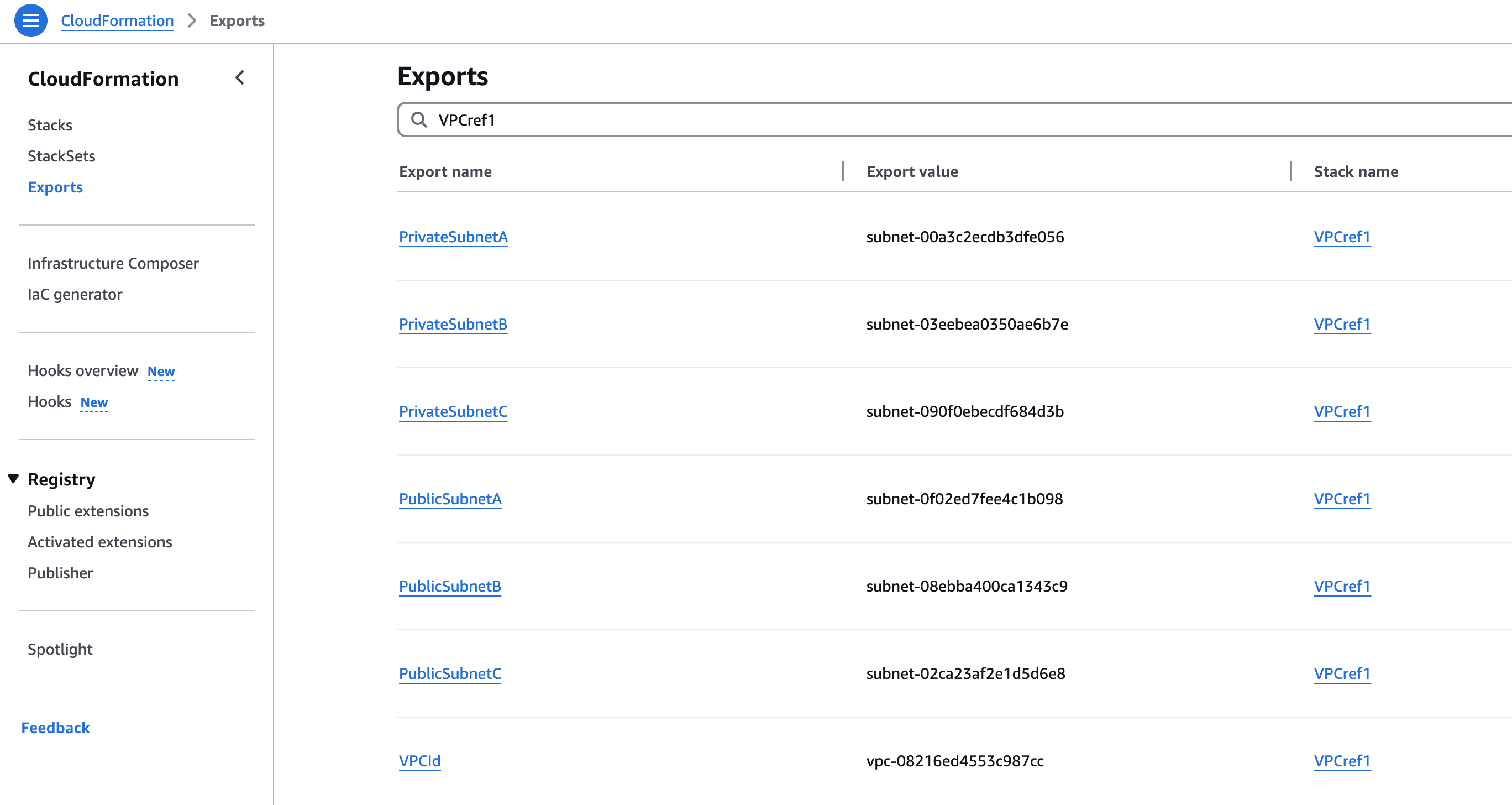
Below is an example of a cross-stack reference. This is the same as the nested stack, where there is a VPC created in one stack and a security group created in another stack. The VPC and a public subnet is passed from the VPC stack to the security group stack.
The VPC is being shared out to any other stacks that import the VPC ID parameter and use it.
The important part of the VPC Stack is the outputs, the Export key
AWSTemplateFormatVersion: "2010-09-09"
Description: "VPC and related resources"

Parameters:
  Environment:
    Type: "String"
    Default: "dev"
  CloudFormation:
    Type: "String"
    Default: "true"


Resources:
  EC2VPC:
    Type: "AWS::EC2::VPC"
    Properties:
      CidrBlock: "10.0.0.0/16"
      EnableDnsSupport: true
      EnableDnsHostnames: true
      InstanceTenancy: "default"
      Tags:
        - Key: "Environment"
          Value: !Ref Environment
        - Key: "Name"
          Value: "Pipeline"
        - Key: "CloudFormation"
          Value: !Ref CloudFormation

  EC2Subnet:
    Type: "AWS::EC2::Subnet"
    Properties:
      AvailabilityZone: !GetAtt EC2Subnet4.AvailabilityZone
      CidrBlock: "10.0.50.0/24"
      VpcId: !Ref EC2VPC
      MapPublicIpOnLaunch: false
      Tags:
        - Key: "CloudFormation"
          Value: !Ref CloudFormation
        - Key: "Environment"
          Value: !Ref Environment
        - Key: "Name"
          Value: "public_subnet"

  EC2Subnet2:
    Type: "AWS::EC2::Subnet"
    Properties:
      AvailabilityZone: !GetAtt EC2Subnet6.AvailabilityZone
      CidrBlock: "10.0.16.0/20"
      VpcId: !Ref EC2VPC
      MapPublicIpOnLaunch: false
      Tags:
        - Key: "CloudFormation"
          Value: !Ref CloudFormation
        - Key: "Environment"
          Value: !Ref Environment
        - Key: "Name"
          Value: !Sub "Pipeline-private-${EC2Subnet6.AvailabilityZone}"

  EC2Subnet3:
    Type: "AWS::EC2::Subnet"
    Properties:
      AvailabilityZone: !GetAtt EC2Subnet5.AvailabilityZone
      CidrBlock: "10.0.48.0/24"
      VpcId: !Ref EC2VPC
      MapPublicIpOnLaunch: false
      Tags:
        - Key: "CloudFormation"
          Value: !Ref CloudFormation
        - Key: "Environment"
          Value: !Ref Environment
        - Key: "Name"
          Value: "public_subnet"

  EC2Subnet4:
    Type: "AWS::EC2::Subnet"
    Properties:
      AvailabilityZone: !Sub "${AWS::Region}c"
      CidrBlock: "10.0.32.0/20"
      VpcId: !Ref EC2VPC
      MapPublicIpOnLaunch: false
      Tags:
        - Key: "CloudFormation"
          Value: !Ref CloudFormation
        - Key: "Environment"
          Value: !Ref Environment
        - Key: "Name"
          Value: !Sub "Pipeline-private-${AWS::Region}c"

  EC2Subnet5:
    Type: "AWS::EC2::Subnet"
    Properties:
      AvailabilityZone: !Sub "${AWS::Region}a"
      CidrBlock: "10.0.0.0/20"
      VpcId: !Ref EC2VPC
      MapPublicIpOnLaunch: false
      Tags:
        - Key: "CloudFormation"
          Value: !Ref CloudFormation
        - Key: "Environment"
          Value: !Ref Environment
        - Key: "Name"
          Value: !Sub "Pipeline-private-${AWS::Region}a"

  EC2Subnet6:
    Type: "AWS::EC2::Subnet"
    Properties:
      AvailabilityZone: !Sub "${AWS::Region}b"
      CidrBlock: "10.0.49.0/24"
      VpcId: !Ref EC2VPC
      MapPublicIpOnLaunch: false
      Tags:
        - Key: "CloudFormation"
          Value: !Ref CloudFormation
        - Key: "Environment"
          Value: !Ref Environment
        - Key: "Name"
          Value: "public_subnet"

  EC2InternetGateway:
    Type: "AWS::EC2::InternetGateway"
    Properties:
      Tags:
        - Key: "Environment"
          Value: !Ref Environment
        - Key: "Name"
          Value: "Pipeline"
        - Key: "CloudFormation"
          Value: !Ref CloudFormation

  EC2VPCGatewayAttachment:
    Type: "AWS::EC2::VPCGatewayAttachment"
    Properties:
      InternetGatewayId: !Ref EC2InternetGateway
      VpcId: !Ref EC2VPC

  EC2EIP:
    Type: "AWS::EC2::EIP"
    Properties:
      Domain: "vpc"
      Tags:
        - Key: "CloudFormation"
          Value: !Ref CloudFormation
        - Key: "Name"
          Value: !Sub "Pipeline-${EC2Subnet3.AvailabilityZone}"
        - Key: "Environment"
          Value: !Ref Environment

  EC2NatGateway:
    Type: "AWS::EC2::NatGateway"
    Properties:
      SubnetId: !Ref EC2Subnet3
      Tags:
        - Key: "CloudFormation"
          Value: !Ref CloudFormation
        - Key: "Environment"
          Value: !Ref Environment
        - Key: "Name"
          Value: !Sub "Pipeline-${EC2Subnet3.AvailabilityZone}"
      AllocationId: !GetAtt EC2EIP.AllocationId

  EC2RouteTable:
    Type: "AWS::EC2::RouteTable"
    Properties:
      VpcId: !Ref EC2VPC
      Tags:
        - Key: "Name"
          Value: "Pipeline-private"
        - Key: "Environment"
          Value: !Ref Environment
        - Key: "CloudFormation"
          Value: !Ref CloudFormation

  EC2RouteTable3:
    Type: "AWS::EC2::RouteTable"
    Properties:
      VpcId: !Ref EC2VPC
      Tags:
        - Key: "CloudFormation"
          Value: !Ref CloudFormation
        - Key: "Name"
          Value: "Pipeline-public"
        - Key: "Environment"
          Value: !Ref Environment

  EC2Route:
    Type: "AWS::EC2::Route"
    Properties:
      DestinationCidrBlock: "0.0.0.0/0"
      NatGatewayId: !Ref EC2NatGateway
      RouteTableId: !Ref EC2RouteTable

  EC2Route2:
    Type: "AWS::EC2::Route"
    Properties:
      DestinationCidrBlock: "0.0.0.0/0"
      GatewayId: !Ref EC2InternetGateway
      RouteTableId: !Ref EC2RouteTable3

  EC2SubnetRouteTableAssociation:
    Type: "AWS::EC2::SubnetRouteTableAssociation"
    Properties:
      RouteTableId: !Ref EC2RouteTable
      SubnetId: !Ref EC2Subnet4

  EC2SubnetRouteTableAssociation2:
    Type: "AWS::EC2::SubnetRouteTableAssociation"
    Properties:
      RouteTableId: !Ref EC2RouteTable
      SubnetId: !Ref EC2Subnet5

  EC2SubnetRouteTableAssociation3:
    Type: "AWS::EC2::SubnetRouteTableAssociation"
    Properties:
      RouteTableId: !Ref EC2RouteTable
      SubnetId: !Ref EC2Subnet2

  EC2SubnetRouteTableAssociation4:
    Type: "AWS::EC2::SubnetRouteTableAssociation"
    Properties:
      RouteTableId: !Ref EC2RouteTable3
      SubnetId: !Ref EC2Subnet3

  EC2SubnetRouteTableAssociation5:
    Type: "AWS::EC2::SubnetRouteTableAssociation"
    Properties:
      RouteTableId: !Ref EC2RouteTable3
      SubnetId: !Ref EC2Subnet6

  EC2SubnetRouteTableAssociation6:
    Type: "AWS::EC2::SubnetRouteTableAssociation"
    Properties:
      RouteTableId: !Ref EC2RouteTable3
      SubnetId: !Ref EC2Subnet

Outputs:
  VPCId:
    Value: !Ref EC2VPC
    Export:
      Name: VPCId

  PrivateSubnetA:
    Value: !Ref EC2Subnet5
    Export:
      Name: PrivateSubnetA

  PrivateSubnetB:
    Value: !Ref EC2Subnet2
    Export:
      Name: PrivateSubnetB

  PrivateSubnetC:
    Value: !Ref EC2Subnet4
    Export:
      Name: PrivateSubnetC

  PublicSubnetA:
    Value: !Ref EC2Subnet3
    Export:
      Name: PublicSubnetA

  PublicSubnetB:
    Value: !Ref EC2Subnet6
    Export:
      Name: PublicSubnetB

  PublicSubnetC:
    Value: !Ref EC2Subnet
    Export:
      Name: PublicSubnetC
AWSTemplateFormatVersion: "2010-09-09"
Description: "Security Groups"
Parameters:
Environment:
Type: "String"
Default: "dev"
CloudFormation:
Type: "String"
Default: "true"
VPCId: # Add this parameter
Type: "String"
Description: "The VPC ID for the Security Groups"
PublicSubnetA: # Add this parameter
Type: "String"
Description: "The Public Subnet A for InstanceConnectEndpoint"
Resources:
EC2SecurityGroup:
Type: "AWS::EC2::SecurityGroup"
Properties:
GroupDescription: "Security Group to allow SSH ports to instances"
GroupName: !Sub "SSH Ingress-${VPCId}"
Tags:
- Key: "Environment"
Value: !Ref Environment
- Key: "CloudFormation"
Value: !Ref CloudFormation
- Key: "Name"
Value: "SSH Ingress"
VpcId: !ImportValue VPCId
SecurityGroupIngress:
- CidrIp: "2.120.215.110/32"
Description: "SSH"
FromPort: 22
IpProtocol: "tcp"
ToPort: 22
- CidrIp: "3.16.146.0/29"
Description: "SSH"
FromPort: 22
IpProtocol: "tcp"
ToPort: 22
- CidrIp: "10.0.0.0/8"
IpProtocol: "-1"
EC2SecurityGroup3:
Type: "AWS::EC2::SecurityGroup"
Properties:
GroupDescription: "Security Group to allow web ports to instances"
GroupName: !Sub "Web Ingress-${VPCId}"
Tags:
- Key: "CloudFormation"
Value: !Ref CloudFormation
- Key: "Name"
Value: "Web Ingress"
- Key: "Environment"
Value: !Ref Environment
VpcId: !ImportValue VPCId
SecurityGroupEgress:
- CidrIp: "0.0.0.0/0"
Description: "All protocols"
IpProtocol: "-1"
- CidrIpv6: "::/0"
Description: "All protocols"
IpProtocol: "-1"
EC2SecurityGroup2:
Type: "AWS::EC2::SecurityGroup"
Properties:
GroupDescription: "Security group to allow port 80 from ALB"
GroupName: !Sub "Web Ingress ALB-${VPCId}"
Tags:
- Key: "CloudFormation"
Value: !Ref CloudFormation
- Key: "Name"
Value: "alb-allow-port-80"
- Key: "Environment"
Value: !Ref Environment
VpcId: !ImportValue VPCId
SecurityGroupIngress:
- SourceSecurityGroupId: !Ref EC2SecurityGroup3
Description: "Allow port 80 from ALB"
FromPort: 80
IpProtocol: "tcp"
ToPort: 80
SecurityGroupEgress:
- CidrIp: "0.0.0.0/0"
Description: "All protocols"
IpProtocol: "-1"
- CidrIpv6: "::/0"
Description: "All protocols"
IpProtocol: "-1"
EC2SecurityGroupIC:
Type: "AWS::EC2::SecurityGroup"
Properties:
GroupDescription: "VPC"
GroupName: "VPC"
VpcId: !ImportValue VPCId
SecurityGroupIngress:
- CidrIp: "52.94.36.0/25"
Description: "pl-fca24795 - com.amazonaws.firewall.regional-corp-only-eu-west-2"
IpProtocol: "-1"
- CidrIp: "10.0.0.0/8"
IpProtocol: "-1"
SecurityGroupEgress:
- CidrIp: "0.0.0.0/0"
IpProtocol: "-1"
VPCendpointICA:
Type: AWS::EC2::InstanceConnectEndpoint
Properties:
PreserveClientIp: false
SecurityGroupIds:
- !Ref EC2SecurityGroupIC
SubnetId: !ImportValue PublicSubnetA