Continuing on from the work in the previous post for setting up GitSync and a GitLab pipeline with CloudFormation. This will detail how to use a Nested Stack that is stored in a GitLab repo and then deploy it with CloudFormation.
In my previous example, CloudFormation would use the CloudFormation template file from the GitLab repo and create the infrastructure as defined. Using a Nested Stack this is a little more complex. The Nested Stack parent template seems to only be able to use templates stored in S3.
To work around this, I have updated my gitlab.ci file so that when there is a merge request, all the files in the repo are sync’d to a specified S3 bucket. This allows CloudFormation to use the parent template from GitLab, but still be able to use the files for the Nested Stack.
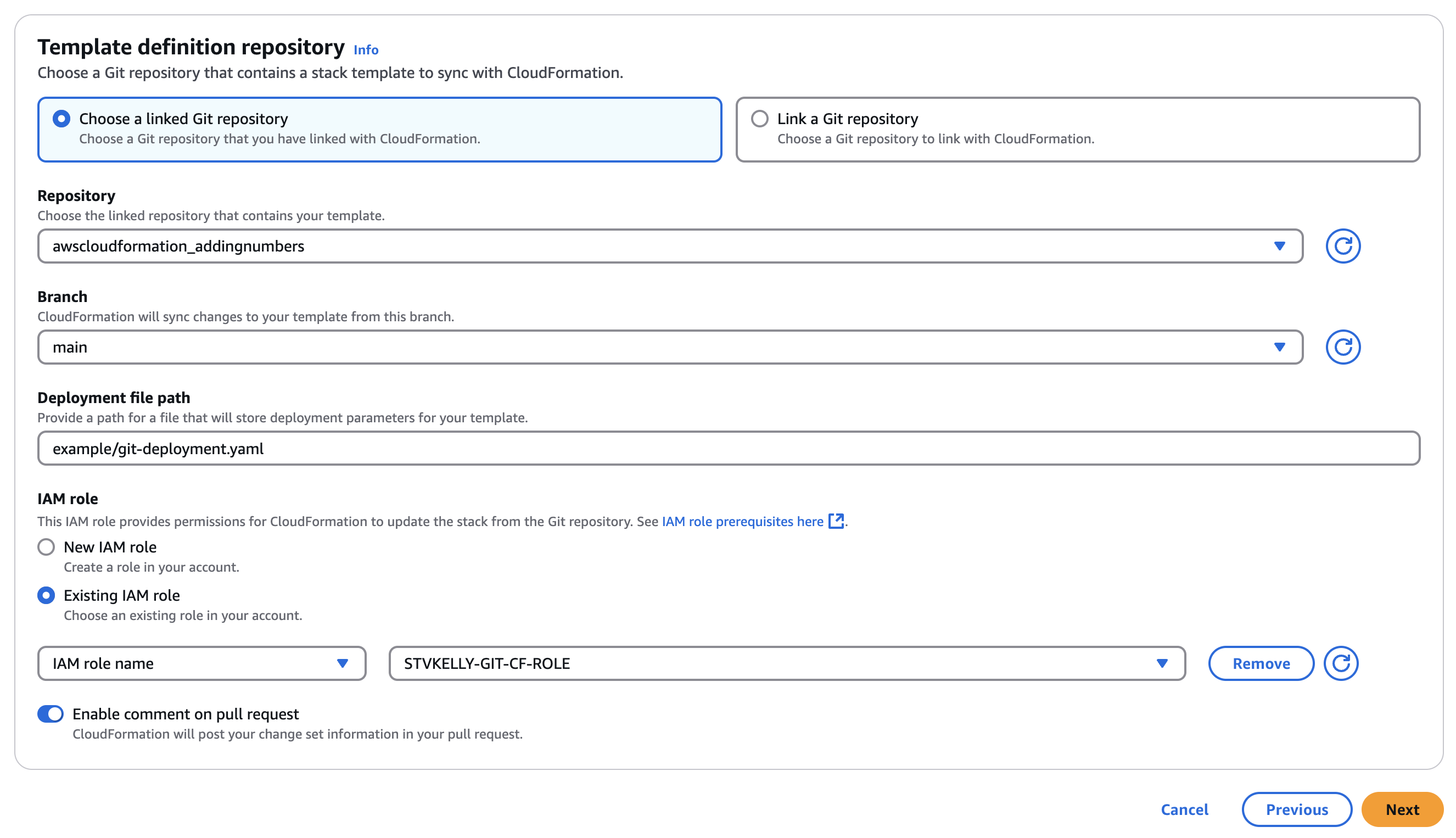
There is also an additional file required for the GitSync aspect to this. CloudFormaiton requires the parent template to build the nested stack. However, when using GitSync, that parent template cannot be used, and will fail. There needs to be a parameter deployment file that in its most basic form will merely point to the Nested Stack parent template in the GitLab directory structure.
git-deployment.yaml
template-file-path: example/deployment.yamldeployment.yaml
AWSTemplateFormatVersion: '2010-09-09'
Resources:
  VPCStack:
    Type: AWS::CloudFormation::Stack
    Properties:
      TemplateURL: https://ntwklab-cloudformation2.s3.us-east-1.amazonaws.com/example/vpc.yaml

  Subnet1Stack:
    Type: AWS::CloudFormation::Stack
    Properties:
      TemplateURL: https://ntwklab-cloudformation2.s3.us-east-1.amazonaws.com/example/subnet1.yaml
      Parameters:
        VpcId: !GetAtt VPCStack.Outputs.VpcId

  Subnet2Stack:
    Type: AWS::CloudFormation::Stack
    Properties:
      TemplateURL: https://ntwklab-cloudformation2.s3.us-east-1.amazonaws.com/example/subnet2.yaml
      Parameters:
        VpcId: !GetAtt VPCStack.Outputs.VpcId
Creating an Example VPC
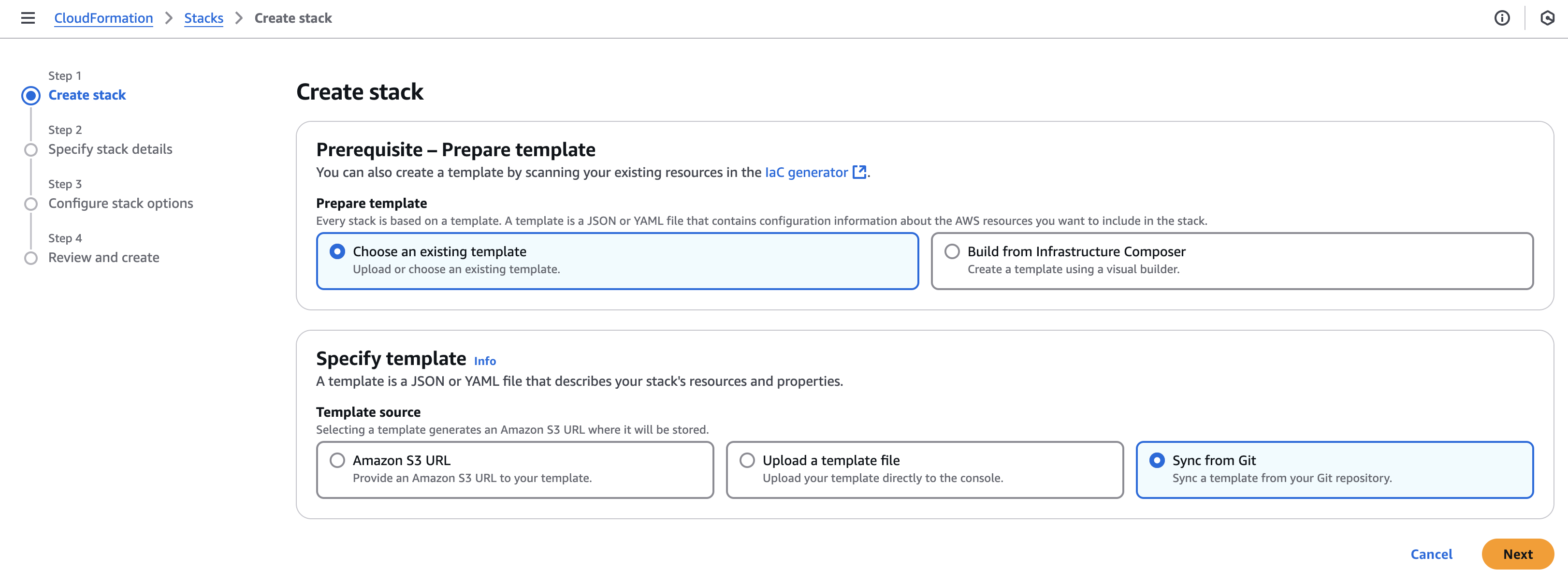
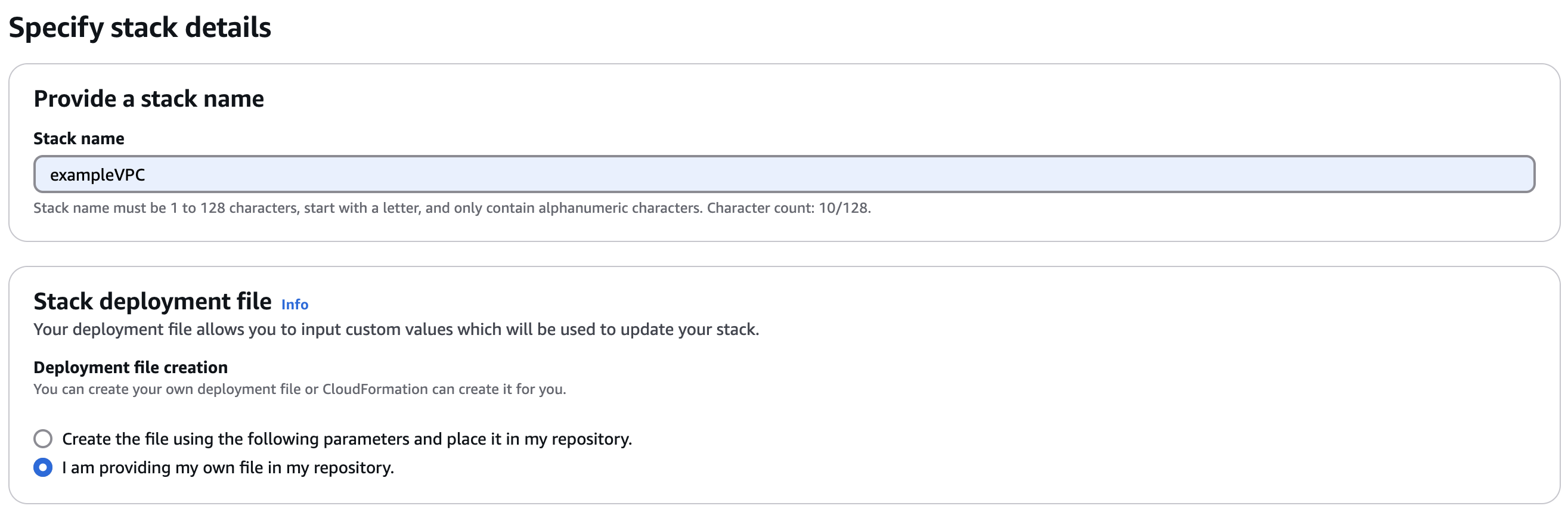
This is a a small example to create a VPC with 2 subnets. See the repo for all of the files.
GitLab Pipeline
The GitLab pipeline for this template is following a similar one to the previous post. There are some differences that I will note.
The current way I am running this pipeline is to only use the main branch for all changes. CloudFormation will create a new branch beginning with aws-sync- automatically. This will then be auto merged with main branch. If the merge request is on a branch that does not begin with aws-sync-, then there will be a manual action in the pipeline to merge the branch.
The next step, which is only used if the branch does not begin with aws-sync-, is to sync the GitLab repo to the AWS S3 bucket named ntwklab-cloudformation2. This is how the CloudFormation parent template can be used when pointing all the child templates to S3 URLs.
This is my current gitlab.ci file. It is full of debugging output and a work in progress.
stages:
  - validate
  - merge
  - deploy

validate_changes:
  stage: validate
  script:
    - echo "Validating changes..."
    # Add any validation steps here, such as linting or testing
  rules:
    - if: $CI_MERGE_REQUEST_SOURCE_BRANCH_NAME =~ /^aws-sync-/
      when: always

merge_to_main:
  stage: merge
  image: alpine:latest
  before_script:
    - apk add --no-cache curl jq
  script:
    - |
      echo "Debugging environment variables:"
      echo "CI_MERGE_REQUEST_SOURCE_BRANCH_NAME: $CI_MERGE_REQUEST_SOURCE_BRANCH_NAME"
      echo "CI_COMMIT_REF_NAME: $CI_COMMIT_REF_NAME"
      echo "CI_PROJECT_ID: $CI_PROJECT_ID"
      echo "CI_API_V4_URL: $CI_API_V4_URL"
      echo "GITLAB_API_TOKEN is set: $([[ -n $GITLAB_API_TOKEN ]] && echo 'Yes' || echo 'No')"
      echo "GITLAB_API_TOKEN length: ${#GITLAB_API_TOKEN}"

    - |
      if [ "$CI_MERGE_REQUEST_SOURCE_BRANCH_NAME" != "" ] && [[ "$CI_MERGE_REQUEST_SOURCE_BRANCH_NAME" =~ ^aws-sync- ]]; then
        echo "Attempting to merge the AWS-generated changes..."

        # Check if MR already exists
        existing_mr=$(curl -s --header "PRIVATE-TOKEN: $GITLAB_API_TOKEN" \
          "$CI_API_V4_URL/projects/$CI_PROJECT_ID/merge_requests?state=opened&source_branch=$CI_COMMIT_REF_NAME" | jq '.[0].iid')

        if [ "$existing_mr" != "null" ]; then
          echo "Existing merge request found: !$existing_mr"
          MR_ID=$existing_mr
        else
          # Create new MR if it doesn't exist
          response=$(curl -s --request POST --header "PRIVATE-TOKEN: $GITLAB_API_TOKEN" \
            --data "source_branch=$CI_COMMIT_REF_NAME&target_branch=main&title=Merge AWS sync changes&remove_source_branch=true" \
            "$CI_API_V4_URL/projects/$CI_PROJECT_ID/merge_requests")
          echo "Create MR Response: $response"

          MR_ID=$(echo "$response" | jq -r '.iid')
          if [ "$MR_ID" == "null" ]; then
            echo "Failed to create merge request. Response:"
            echo "$response" | jq '.'
            exit 1
          fi
          echo "Created Merge Request ID: $MR_ID"
        fi

        # Attempt to merge
        merge_response=$(curl -s --request PUT --header "PRIVATE-TOKEN: $GITLAB_API_TOKEN" \
          --data "should_remove_source_branch=true" \
          "$CI_API_V4_URL/projects/$CI_PROJECT_ID/merge_requests/$MR_ID/merge")
        echo "Merge Response: $merge_response"

        if echo "$merge_response" | jq -e '.state == "merged"' > /dev/null; then
          echo "Merge request successfully merged"

          # Explicitly delete the branch
          delete_response=$(curl -s --request DELETE --header "PRIVATE-TOKEN: $GITLAB_API_TOKEN" \
            "$CI_API_V4_URL/projects/$CI_PROJECT_ID/repository/branches/$CI_COMMIT_REF_NAME")
          echo "Branch deletion response: $delete_response"

          if echo "$delete_response" | jq -e '.message' > /dev/null; then
            echo "Branch successfully deleted"
          else
            echo "Failed to delete branch. Response:"
            echo "$delete_response" | jq '.'
          fi
        else
          echo "Failed to merge. Full response:"
          echo "$merge_response" | jq '.'
          exit 1
        fi
      else
        echo "Not an AWS-generated merge request. Skipping auto-merge."
      fi

  rules:
    - if: $CI_MERGE_REQUEST_SOURCE_BRANCH_NAME =~ /^aws-sync-/
      when: always
    - if: $CI_MERGE_REQUEST_SOURCE_BRANCH_NAME !~ /^aws-sync-/
      when: manual

upload_to_s3:
  stage: deploy
  image: registry.gitlab.com/gitlab-org/cloud-deploy/aws-base:latest
  script:
    - aws s3 sync . s3://ntwklab-cloudformation2 --exclude ".git/*" --delete
  environment: production
  rules:
    - if: $CI_COMMIT_REF_NAME !~ /^aws-sync-/
      when: always


# s3_sync:
#   stage: deploy
#   image: amazon/aws-cli:2.13.0
#   script:
#     # Enable AWS CLI debugging
#     - echo "Starting debug for AWS CLI"
#     - export AWS_ACCESS_KEY_ID=$AWS_ACCESS_KEY_ID
#     - export AWS_SECRET_ACCESS_KEY=$AWS_SECRET_ACCESS_KEY
#     - export AWS_DEFAULT_REGION=$AWS_DEFAULT_REGION

#     # Output debug environment variables (only for debugging purposes, avoid sensitive data in real pipelines)
#     - echo "AWS_ACCESS_KEY_ID is set"
#     - echo "AWS_DEFAULT_REGION: $AWS_DEFAULT_REGION"

#     # Run AWS CLI command with debug flag
#     - echo "Running aws s3 sync command with debug mode enabled"
#     - aws s3 sync . s3://ntwklab-cloudformation --region $AWS_DEFAULT_REGION --debug

#   variables:
#     AWS_ACCESS_KEY_ID: $AWS_ACCESS_KEY_ID
#     AWS_SECRET_ACCESS_KEY: $AWS_SECRET_ACCESS_KEY
#     AWS_DEFAULT_REGION: $AWS_DEFAULT_REGION

#   # only:
#   #   - main

#   rules:
#     - if: $CI_COMMIT_REF_NAME !~ /^aws-sync-/
#       when: always
Using the GitLab AWS CLI Image
My gitlab.ci file uses an AWS CLI image to run the S3 sync commands. GitLab provides detailed instructions on how this can be used.
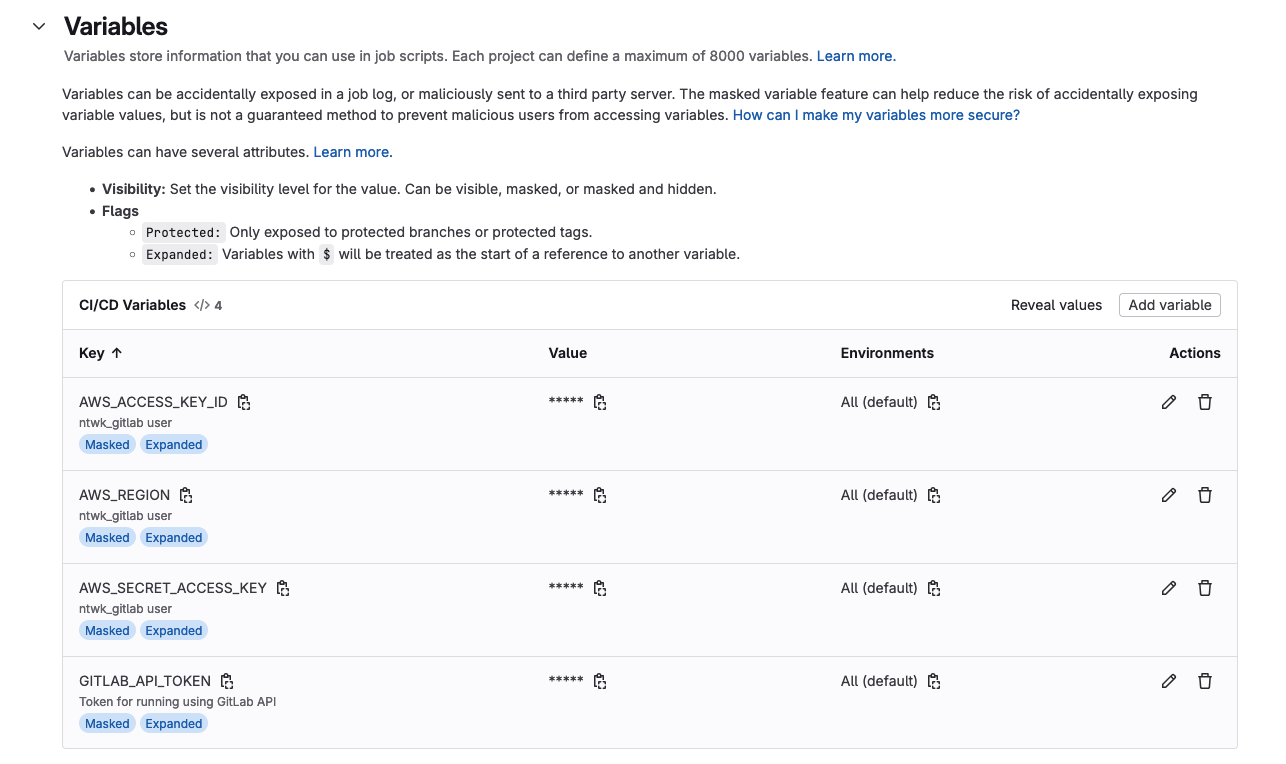
To simply sum it up, use the AWS IAM user AWS_ACCESS_KEY_ID, AWS_SECRET_ACCESS_KEY and AWS_DEFAULT_REGION variables in the GitLab CI/CD settings.
The image will be registry.gitlab.com/gitlab-org/cloud-deploy/aws-base:latest