Revision1 Lab
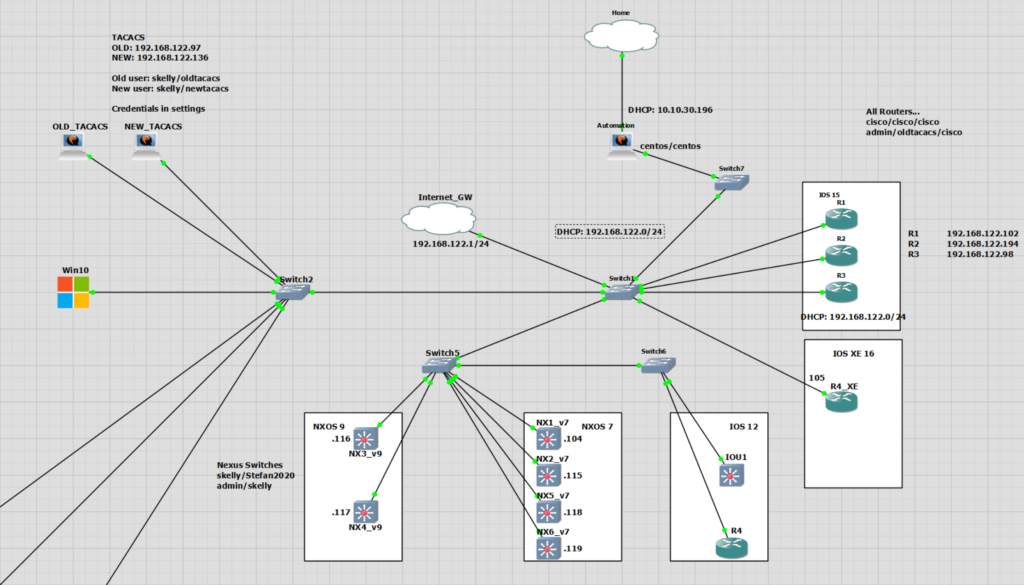
Revision1 Scripts
A link to the Revision1 scripts in this example may be found on my GitHub.
The overall changes to the function of the script has not changed. TACACS is still checked and reconfigured.
Main Changes are;
- Split script into different files for readability and re-usability
- The Check and Config scripts are now performed from a single script
- No more user input passwords required
- Base directory is defined
- Error files have different names for different sections (Check and Configure)
- The Configure section no longer relies on the file created from the Check section. A dictionary is created with all the info that is now used
- The Configure section uses the same connection list as the Check section
- The Configure section checks to see if any IPs are in the check error IPs list before applying configuration
The scripts are no longer monolithic. I have split them into three different scripts and tried to make each function of a class as reusable as possible. If you compare this part to the original. The original two scripts were essentially duplicates.
A major change I have made is to remove the need to enter the passwords. They are now stored in the same directory in the .env file.
This has been made possible with the library python-dotenv. I have explained this more in a post.
There are still more changes that are required, this first revision has foundations that I will be able to build on to include different operating systems.
Device List CSV
(.venv) -bash-4.2$ cat cisco_check_ssh_usernames_output.csvIP Address,Hostname,Username192.168.122.102,R1,admin192.168.122.194,R2,skelly192.168.122.98,R3,admin.env Password File
DEVICE_USERNAME=user
ENABLE_DEVICE_PASSWORD=cisco
TACACS_DEVICE_PASSWORD=oldtacacs
ADMIN_DEVICE_PASSWORD=oldtacacs
CISCO_DEVICE_PASSWORD=cisco
Notable Changes
Setting a Base Directory
import os
basedir = os.path.abspath(os.path.dirname(__file__))
# Open CSV
open_file = f'{basedir}/cisco_check_ssh_usernames_output.csv'
csv_data = check_tacacs_csv.open_csv(open_file)
# Write Output
write_file = f"{basedir}/iosxe_tacacs_check.csv"
check_tacacs_csv.write_csv(write_file,checked_list)
Check if IP is in Error Log
There is an error log from the checking of TACACS or AAA config. This is handled by a try/except statement. This is not perfect as if there is any error then the IP will be added to the error log. However for this first revision it is enough.
# Check Device
    try:
        # 1. Create the connection
        # 2. Send commands
        # 3. Close Connection
    except:
        error = cisco_device["host"]
        print(f"There is an error connecting to {error}" )
        print("Continuing...n")
        check_error_ips.append(cisco_device["host"])
# Configure Device
    try:
        if cisco_device["host"] not in check_error_ips:
            # 1. Create connection
            # 2. Send removal commands
            # 3. Send config file for newtacacs.cfg
            # 4. Send show commands to check
            # 3. Close Connection
    except:
        # More Python etc
Getting the Removal Config – Dictionary
I wanted a way to get the removal config without opening the Check section output file and recreating the connection list. This was too much duplication for me.
I decided to add the all the output to a list containing dictionaries. In the original I have individual lists that I then zipped up. The dictionary approach means I can just ask for what value I want based on the key.
checked_dict = {"IP Address":host_ip, "Hostname":hostname, "Username":host_username, "Current Config":show_tacacs, "Removal Config":removal_conf}
checked_list.append(checked_dict)
I have used the dictionary in two working ways in the Configure section. I have no preference, they both seem to work.
The first is to call the list and element and then key for “Removal Config”
config_remove = checked_list[i]["Removal Config"]The second is to add the “Removal Config” value to the cisco_device dictionary. This needs to be performed after the initial connection otherwise Netmiko doesn’t expect it and does not like it.
config_remove = cisco_device["Removal_Config"]=checked_list[i]["Removal Config"]Running Script 1
This is essentially the same output as in the Original, only performed from a single script with the changes above mentioned.
(.venv) -bash-4.2$ python ios_xe_a1_run.pySSH connection established to 192.168.122.102:22Interactive SSH session establishedHostname: R1IP Address: 192.168.122.102Getting AAA & TACACSClosing connection##############################SSH connection established to 192.168.122.194:22Interactive SSH session establishedHostname: R2IP Address: 192.168.122.194Getting AAA & TACACSClosing connection##############################SSH connection established to 192.168.122.98:22Interactive SSH session establishedHostname: R3IP Address: 192.168.122.98Getting AAA & TACACSClosing connection##############################CSV written outPlease enter the file name of the config file to apply to devices: newtacacs.cfgSSH connection established to 192.168.122.102:22Interactive SSH session establishedHostname: R1IP Address: 192.168.122.102Entering the config mode ...Applying config...Config Complete...Config file to be appliedaaa new-modelaaa session-id commonaaa authentication login IPCISCOAUTH group tacacs+ localtacacs server NEWTACACSaddress ipv4 192.168.122.136key 123abcline vty 0 15login authentication IPCISCOAUTHaaa authorization exec default group tacacs+aaa accounting exec default start-stop group tacacs+Entering the config mode ...Applying config...Config Complete...Getting AAA & TACACSClosing connection##############################SSH connection established to 192.168.122.194:22Interactive SSH session establishedHostname: R2IP Address: 192.168.122.194Entering the config mode ...Applying config...Config Complete...Config file to be appliedaaa new-modelaaa session-id commonaaa authentication login IPCISCOAUTH group tacacs+ localtacacs server NEWTACACSaddress ipv4 192.168.122.136key 123abcline vty 0 15login authentication IPCISCOAUTHaaa authorization exec default group tacacs+aaa accounting exec default start-stop group tacacs+Entering the config mode ...Applying config...Config Complete...Getting AAA & TACACSClosing connection##############################SSH connection established to 192.168.122.98:22Interactive SSH session establishedHostname: R3IP Address: 192.168.122.98Entering the config mode ...Applying config...Config Complete...Config file to be appliedaaa new-modelaaa session-id commonaaa authentication login IPCISCOAUTH group tacacs+ localtacacs server NEWTACACSaddress ipv4 192.168.122.136key 123abcline vty 0 15login authentication IPCISCOAUTHaaa authorization exec default group tacacs+aaa accounting exec default start-stop group tacacs+Entering the config mode ...Applying config...Config Complete...Getting AAA & TACACSClosing connection##############################CSV written outScript Check TACACS Output
| IP Address | Hostname | Username | Current Config | Removal Config |
| 192.168.122.102 | R1 | admin | aaa new-model
aaa session-id common |
no aaa session-id common |
| 192.168.122.194 | R2 | skelly | aaa new-model
aaa authentication login IPCISCOAUTH group tacacs+ local aaa authorization exec default group tacacs+ aaa accounting exec default start-stop group tacacs+ aaa session-id common tacacs-server host 192.168.122.97 key 123abc |
no aaa authentication login IPCISCOAUTH group tacacs+ local
no aaa authorization exec default group tacacs+ no aaa accounting exec default start-stop group tacacs+ no aaa session-id common no tacacs-server host 192.168.122.97 key 123abc |
| 192.168.122.98 | R3 | admin | aaa new-model
aaa session-id common |
no aaa session-id common |
Script Configure TACACS Output
| IP Address | Hostname | Username | Current Config |
| 192.168.122.102 | R1 | admin | aaa new-model
aaa authentication login IPCISCOAUTH group tacacs+ local aaa authorization exec default group tacacs+ aaa accounting exec default start-stop group tacacs+ aaa session-id common tacacs server NEWTACACS |
| 192.168.122.194 | R2 | skelly | aaa new-model
aaa authentication login IPCISCOAUTH group tacacs+ local aaa authorization exec default group tacacs+ aaa accounting exec default start-stop group tacacs+ aaa session-id common tacacs-server host 192.168.122.97 key 123abc tacacs server NEWTACACS |
| 192.168.122.98 | R3 | admin | aaa new-model
aaa authentication login IPCISCOAUTH group tacacs+ local aaa authorization exec default group tacacs+ aaa accounting exec default start-stop group tacacs+ aaa session-id common tacacs server NEWTACACS |