Revision2 Lab
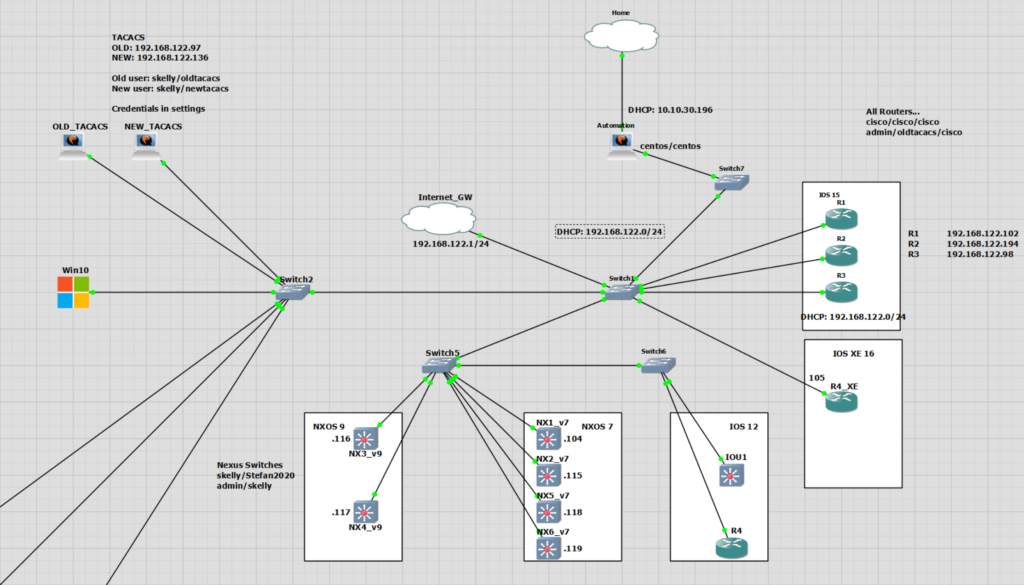
Revision2 Scripts
A link to the Revision2 scripts in this example may be found on my GitHub.
The overall changes to the function of the script has not changed. TACACS is still checked and reconfigured.
Main Changes are;
- Ability to get OS type
- Added IOS12, 15 and NXOS v7 devices
- Takes in different config files per OS type
- Config is applied based off device version
As the script is basically the same functionality as in revision1 performed in the same manner I will talk about the specifics of the changes.There is more I would like to do for a revision3. This would be the inclusion of NXOS v9 and the ability for some parallelism. Currently each device is logged into and configured one at a time. It’s quite slow.
How to Get OS Type
This is run as soon as the device has an initial connection made. The OS type is then stored in a new dictionary that is referenced when deciding what config to apply.
        # 2. Get Version commands
        print("Getting Version")
        device_version = check_tacacs_cmds_iosxe.get_version(connection)
        print(device_version)
        dev_ver_dict = {"IP Address":host_ip,
                        "Hostname":hostname,
                        "Username":host_username,
                        "Device Version":device_version}
        dev_ver_list.append(dev_ver_dict)
This next part is the heavy lifting. This is what is sending the commands to the devices and then using textfsm to parse the output and determine the output to determine what it is.
I have used two commands “show version” and “show inventory”. I needed to use two as the textfsm default Cisco Nexus template was not picking up it was a Nexus from the show version command. I’m not sure if this is because they are NXOSv images. But it works for NXOS7.
def get_version(self, connection):
        show_version = BaseConn.send_commands(self, connection, "show version", True)
        show_inventory = BaseConn.send_commands(self, connection,"show inventory", True)
        version = show_version[0]["version"].split(".")[0]
        inventory = show_inventory[0]["descr"].split(" ")[0]
        if version == "12":
            device_version = "ios12"
        elif version == "15":
            device_version = "ios15"
        elif  " 16" in version:
            device_version = "iosxe"
        elif "NX-OS" in inventory:
            device_version = "nxos"
        else:
            device_version = "unknown"
        return device_version
How to Match up Files to OS Types
The script will ask for a file per OS type. In this case the IOS variants are all the same config. Only the NXOS TACACS config is different.
Please enter the file name of the IOS 12 config file to apply to devices: iosnewtacacs.cfg
Please enter the file name of the IOS 15 config file to apply to devices: iosnewtacacs.cfg
Please enter the file name of the IOS XE config file to apply to devices: iosnewtacacs.cfg
Please enter the file name of the NXOS config file to apply to devices: nxosnewtacacs.cfg
The script will then continue and apply the config to each device type. This is achieved by adding the device version to the cisco_device dictionary after the connection has been opened with Netmiko.
error_ips = []
configured_list = []
i = 0
for cisco_device in device_list:
    try:
        if cisco_device["host"] not in check_error_ips:
            # 1. Create connection
            connection, hostname, host_ip, host_username = check_tacacs_cmds_iosxe.open_connection(cisco_device)
            # 2. Create and if based on the device type
            # config_remove = show_tacacs_list[i]["Removal Config"]
            device_type = cisco_device["Device_Version"]=show_tacacs_list[i]["Device Version"]
        # 3. Send removal commands
        # config_remove = show_tacacs_list[i]["Removal Config"]
        config_remove = cisco_device["Removal_Config"]=show_tacacs_list[i]["Removal Config"]
        config_remove_list = []
        for line in config_remove:
            config_remove_list.append(line)
        check_tacacs_cmds_iosxe.send_config_file(connection,config_remove_list)
        # 4. Send config file for newtacacs.cfg
        show_cmds.conf_dev_type(connection, cisco_device, ios12config_file, ios15config_file, iosxeconfig_file, nxosconfig_file)
        # 5. Send show commands to check2
        print("nGetting AAA & TACACS")
        show_tacacs, removal_conf = show_cmds.get_tacacs(connection, dev_details)
        show_tacacs_dict = {"IP Address":host_ip,
                        "Hostname":hostname,
                        "Username":host_username,
                        "Current Config":show_tacacs}
        configured_list.append(show_tacacs_dict)
        # 6. Close Connection
        check_tacacs_cmds_iosxe.close_connection(connection)
        i += 1
    except:
        error = cisco_device["host"]
        print(f"There is an error connecting to {error}" )
        print("Continuing...n")
        error_ips.append(cisco_device["host"])
        i += 1
The check of the file type is performed in the deviceConnection.py file.
    def conf_dev_type(self, connection, cisco_device, ios12config_file, ios15config_file, iosxeconfig_file, nxosconfig_file):
        if cisco_device["Device_Version"] == "ios12":
            config_file = ios12config_file
            print("ios12")
        elif cisco_device["Device_Version"] == "ios15":
            config_file = ios15config_file
            print("ios15")
        elif cisco_device["Device_Version"] == "iosxe":
            config_file = iosxeconfig_file
            print("iosxe")
        elif cisco_device["Device_Version"] == "nxos":
            config_file = nxosconfig_file
            print("nxos")
        else:
            print("unknown")
        BaseConn.send_config_file(self, connection, config_file)
Script Check TACACS Output
$ python ios_xe_a1_run.py
SSH connection established to 192.168.122.102:22
Interactive SSH session established
Hostname: R1
IP Address: 192.168.122.102
Getting Version
ios15
Getting AAA & TACACS
Closing connection
##############################
SSH connection established to 192.168.122.194:22
Interactive SSH session established
Hostname: R2
IP Address: 192.168.122.194
Getting Version
ios15
Getting AAA & TACACS
Closing connection
##############################
SSH connection established to 192.168.122.98:22
Interactive SSH session established
Hostname: R3
IP Address: 192.168.122.98
Getting Version
ios15
Getting AAA & TACACS
Closing connection
##############################
SSH connection established to 192.168.122.105:22
Interactive SSH session established
Hostname: R4
IP Address: 192.168.122.105
Entering the enable mode ...
Getting Version
iosxe
Getting AAA & TACACS
Closing connection
##############################
SSH connection established to 192.168.122.107:22
Interactive SSH session established
Hostname: R5
IP Address: 192.168.122.107
Getting Version
ios12
Getting AAA & TACACS
Closing connection
##############################
SSH connection established to 192.168.122.104:22
Interactive SSH session established
Hostname: NX1_v7
IP Address: 192.168.122.104
Getting Version
nxos
Getting AAA & TACACS
Closing connection
##############################| IP Address | Hostname | Username | Current Config | Removal Config | Device Version |
| 192.168.122.102 | R1 | admin | aaa new-model aaa session-id common |
#Nothing to do | ios15 |
| 192.168.122.194 | R2 | skelly | aaa new-model aaa authentication login IPCISCOAUTH group tacacs+ local aaa authorization exec default group tacacs+ aaa accounting exec default start-stop group tacacs+ aaa session-id common tacacs-server host 192.168.122.97 key 123abc tacacs-server host 192.168.122.99 key 123abc |
no aaa authentication login IPCISCOAUTH group tacacs+ local no aaa authorization exec default group tacacs+ no aaa accounting exec default start-stop group tacacs+ no tacacs-server host 192.168.122.97 key 123abc no tacacs-server host 192.168.122.99 key 123abc |
ios15 |
| 192.168.122.98 | R3 | admin | aaa new-model
aaa session-id common |
#Nothing to do | ios15 |
| 192.168.122.105 | R4 | admin | aaa new-model
aaa session-id common |
#Nothing to do | iosxe |
| 192.168.122.107 | R5 | admin | aaa new-model
aaa session-id common |
#Nothing to do | ios12 |
| 192.168.122.104 | NX1_v7 | admin | feature tacacs+ | #Nothing to do | nxos |
Script Configure TACACS Output
Please enter the file name of the IOS 12 config file to apply to devices: iosnewtacacs.cfg
Please enter the file name of the IOS 15 config file to apply to devices: iosnewtacacs.cfg
Please enter the file name of the IOS XE config file to apply to devices: iosnewtacacs.cfg
Please enter the file name of the NXOS config file to apply to devices: nxosnewtacacs.cfg
SSH connection established to 192.168.122.102:22
Interactive SSH session established
Hostname: R1
IP Address: 192.168.122.102
Entering the config mode ...
Applying config...
Config Complete...
ios15
Config file to be applied
aaa new-model
aaa session-id common
aaa authentication login IPCISCOAUTH group tacacs+ local
tacacs server NEWTACACS
address ipv4 192.168.122.136
key 123abc
address ipv4 192.168.122.137
key 123abc
line vty 0 15
login authentication IPCISCOAUTH
aaa authorization exec default group tacacs+
aaa accounting exec default start-stop group tacacs+
Entering the config mode ...
Applying config...
Config Complete...
Getting AAA & TACACS
Getting AAA & TACACS
Closing connection
##############################| IP Address | Hostname | Username | Current Config |
| 192.168.122.102 | R1 | admin | aaa new-model aaa authentication login IPCISCOAUTH group tacacs+ local aaa authorization exec default group tacacs+ aaa accounting exec default start-stop group tacacs+ aaa session-id common tacacs server NEWTACACS |
| 192.168.122.194 | R2 | skelly | aaa new-model aaa authentication login IPCISCOAUTH group tacacs+ local aaa authorization exec default group tacacs+ aaa accounting exec default start-stop group tacacs+ aaa session-id common tacacs-server host 192.168.122.97 key 123abc tacacs-server host 192.168.122.99 key 123abc tacacs server NEWTACACS |
| 192.168.122.98 | R3 | admin | aaa new-model aaa authentication login IPCISCOAUTH group tacacs+ local aaa authorization exec default group tacacs+ aaa accounting exec default start-stop group tacacs+ aaa session-id common tacacs server NEWTACACS |
| 192.168.122.105 | R4 | admin | aaa new-model aaa authentication login IPCISCOAUTH group tacacs+ local aaa authorization exec default group tacacs+ aaa accounting exec default start-stop group tacacs+ aaa session-id common tacacs server NEWTACACS |
| 192.168.122.107 | R5 | admin | aaa new-model aaa authentication login IPCISCOAUTH group tacacs+ local aaa authorization exec default group tacacs+ aaa accounting exec default start-stop group tacacs+ aaa session-id common |
| 192.168.122.104 | NX1_v7 | admin | feature tacacs+ ip tacacs source-interface Ethernet2/1 tacacs-server host 192.168.122.137 key 7 “123ftc” aaa group server tacacs+ NEWTACACS aaa authentication login default group NEWTACACS tacacs-server directed-request |